Privia Security was chosen as one of Türkiye's fastest growing companies!

Privia Security was chosen as one of Türkiye's fastest growing companies!

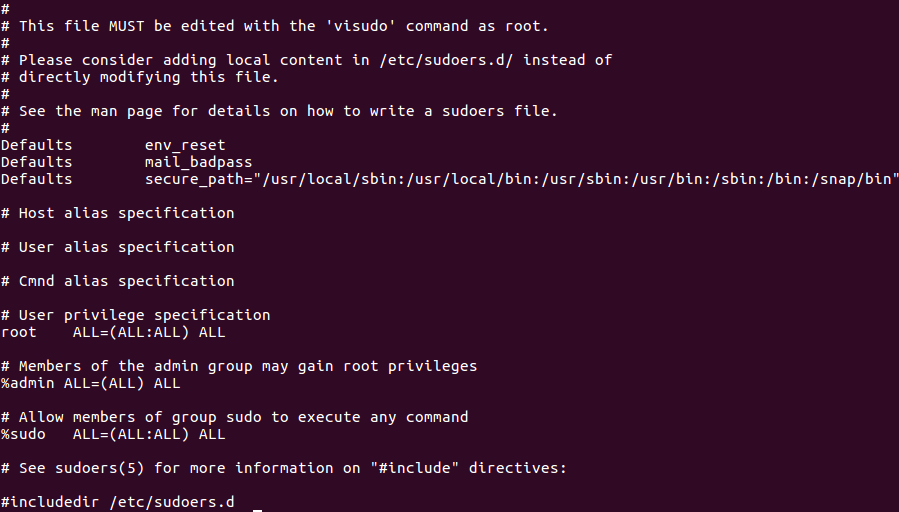
Sudo is a program on Linux and Unix systems that enables users to run commands with the rights of the superuser. On Linux and Unix systems, a file named sudoers exists under the /etc directory for sudo. This file is sudo’s configuration file. Through configurations made in the sudoers file, users with root rights can execute commands as root or as other users. Figure 1 shows the default sudoers file.
When a command is run with sudo, the system first checks the sudoers file. If that file contains the relevant permissions for the username and the groups the user belongs to, commands can be run with sudo within the granted permissions. Otherwise, the commands cannot be executed. Figure 1.1 shows the permissions assigned to the root user. Figure 1.2 explains the syntax of the permissions assigned to the root user.
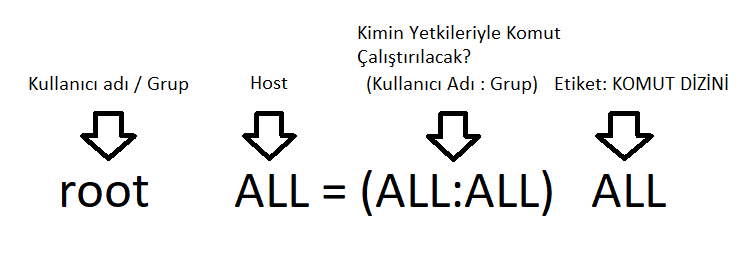
When permissions are defined in the sudoers file for a user or a group, the syntax shown in Figure 2 is used. The expressions within the syntax are explained below:
When additions are made to the sudoers file for low-privileged users and user groups, attackers can exploit this situation for privilege escalation. Below, a sample application is provided for privilege escalation via the sudo programme.
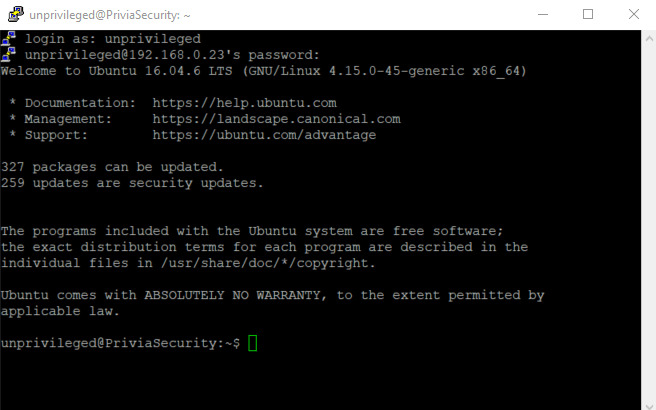
When the sudoers file is misconfigured for low-privileged users and groups, this situation may allow attackers to escalate their rights and privileges on Linux and Unix systems. In Figure 2.1, an SSH session was obtained via a user with low privileges.
A rule was also added to the sudoers file for a user named unprivileged. Figure 2.2 shows the reconfigured sudoers file.
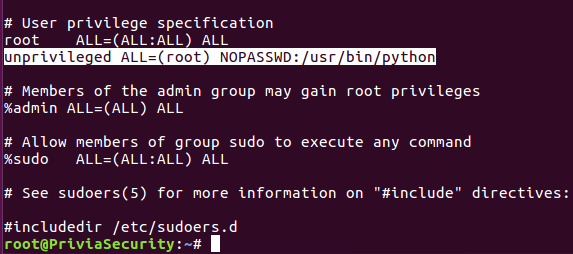
According to the rule added for the user named unprivileged: this user can use the sudo programme to run the python tool with root rights on all hosts without entering any password.
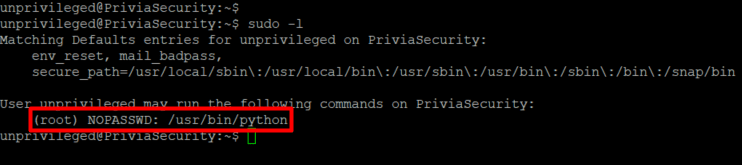
The command sudo -l was run on the obtained SSH session and used to identify what the low-privileged user can do via the sudo programme. Figure 2.3 shows the list of sudo permissions defined for the user named unprivileged.
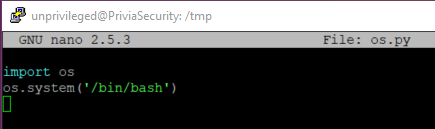
To leverage the functionality of the low-privileged user being able to run python commands with root rights, a Python code that runs the bash application on the operating system can be written. Figure 2.4 shows the code snippet that runs the bash application on the operating system.
In Figure 2.5, the written code snippet was executed using the sudo programme with the python tool, and root access was obtained.

You May Be Interested In These