Privia Security was chosen as one of Türkiye's fastest growing companies!

Privia Security was chosen as one of Türkiye's fastest growing companies!
Incorrect server-side and code-side configurations in dynamic websites can give rise to various types of vulnerabilities. Attackers can exploit these vulnerabilities to execute code on target systems, expose data, and carry out other attacks. One such security vulnerability is XSS (Cross-Site Scripting). An attacker who exploits an XSS vulnerability can steal the credentials of users who can log into a website, capture the cookies of authenticated users, and execute commands on the server hosting the website. This article covers the basics of JavaScript — the foundation of XSS vulnerabilities — and what an attacker who discovers an XSS vulnerability on a website can do by exploiting it.
JavaScript is a high-level programming language commonly used in web browsers. It is one of the most popular programming languages. JavaScript enables many actions to occur on a website. In dynamic websites, programming languages such as HTML and CSS are used to organise the general appearance of web pages. JavaScript, on the other hand, is used to add powerful features to websites such as alert boxes, rollover effects, and dropdown menus.
JavaScript is recognised as one of the most widely used programming languages. The reasons why JavaScript should be learned are listed below:
It is compatible with HTML and can work alongside HTML code.
JavaScript can be embedded within HTML and executed. In addition, HTML objects can be managed using the JavaScript language. For these operations, JavaScript has event handlers. For example, when a user clicks a button on a web page, event handlers can be used to open a pop-up. Actions on a page — such as clicking a button, pressing a key, closing a window, or resizing a window — are all events. These events can be managed using JavaScript event handlers. Some of the event handlers available in JavaScript are explained below.
Onload
Onload is an event used to execute a function after a web page has fully loaded. The onload event is generally used by developers to display user-friendly features such as welcome messages. This event is typically associated with the <body> tag.
The JavaScript onload event is also frequently used to automatically check the browsers of users visiting a page and to determine the path from which websites will load. Figure 2.1.1 below shows an example of the onload function in use.
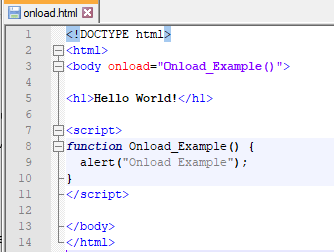
In this example, users who enter the website are greeted with an alert message reading “Onload Example”.
Onmouseover
Onmouseover causes a specified piece of JavaScript code to run when a user moves their mouse cursor over a specific area of the web page. Figure 2.1.2 shows an example related to onmouseover.
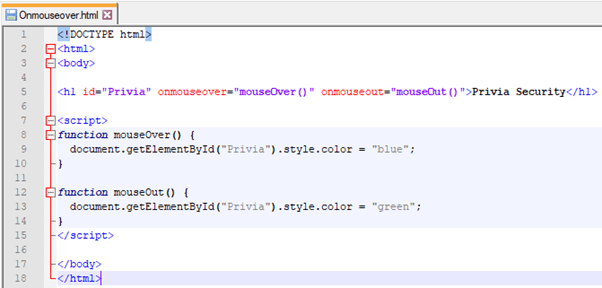
With the code in this example, when the user moves the mouse cursor over the <h1> tag, the text turns blue, and when the cursor is moved to another area, the text turns green. This is one of the features that onmouseover provides.
XSS (Cross-Site Scripting) is a security vulnerability that allows attackers to inject client-side code into web pages by exploiting client-based scripting languages such as HTML and JavaScript. Because XSS attacks are carried out on the client side, the actual targets of the attacks are not the web applications themselves but the users. Attackers who can exploit the XSS vulnerability can carry out attacks such as ad-jacking, click-jacking, keylogging, and session hijacking. Figure 3.1 shows an example in which the following code snippet is injected into a website containing an XSS vulnerability, causing an alert window to open:
<script>alert("PRIVIAHUB")</script>
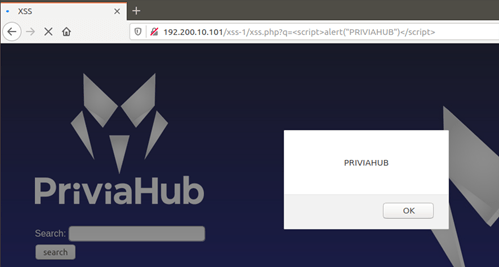
XSS vulnerabilities can be triggered by: placing malicious JavaScript code on the server side; websites containing vulnerabilities that allow JavaScript code to be executed in users’ browsers; running malicious JavaScript code in end users’ internet browsers; stealing users’ cookie information; or redirecting end users to malicious sites or links. Figure 3.2 shows a visual relating to triggering an XSS vulnerability.
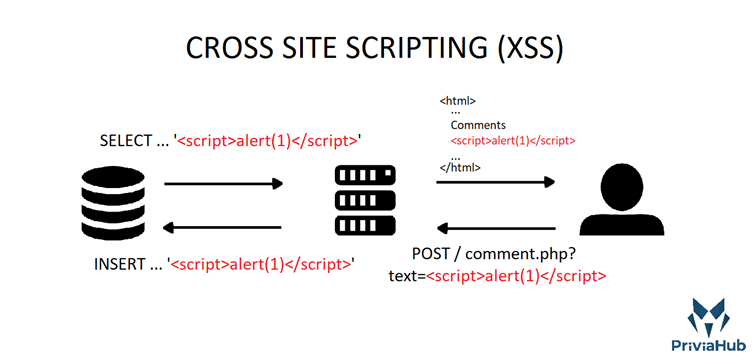
The XSS vulnerability was classified as “A3” in the 2013 OWASP Top 10 list and as “A7” in the 2017 OWASP Top 10 list. With this security vulnerability, attackers can do the following:
The previous sections covered the concepts of JavaScript and XSS. This section will discuss the types of XSS. The XSS types are as follows:
Stored XSS is a type of XSS that is triggered when, as a result of a malicious request to a web application, malicious JavaScript code is saved to the database and the code runs on the page every time the website is accessed. For this reason, the effects of a Stored XSS vulnerability are visible to other users as well. Stored XSS vulnerabilities are generally encountered on comment pages. Figure 3.2.1.1 shows a web page where users can leave comments and where user inputs are saved to the database and reflected on the page without being validated.
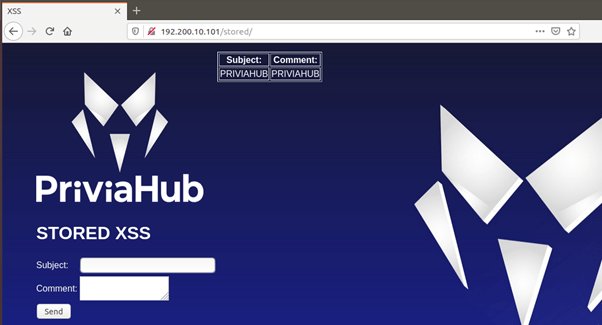
The code <script>alert("PRIVIAHUB")</script> was entered into the comment field and, as a result of the request, this code was saved to the database to be reflected on the web page. When the page was reopened, an alert window containing the text “PRIVIAHUB” was displayed. Figure 3.2.1.2 shows the alert window displayed on screen and the final state of the table listing the database records.
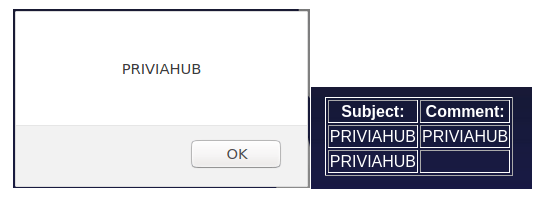
If a different user accesses the page from a different device, the JavaScript code will execute and the alert window will appear on screen.
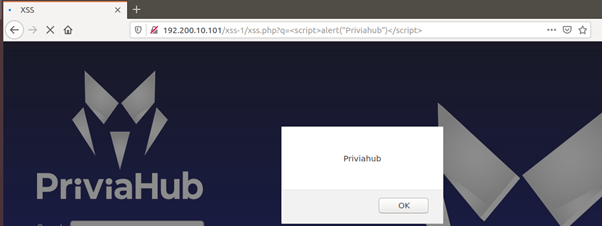
Reflected XSS is a type of XSS in which the vulnerability is triggered instantaneously on a web page and the effect of the attack disappears when the page is refreshed. An attacker who exploits this vulnerability may carry out phishing and similar attacks to gather instant information from users. Figure 3.2.2.1 shows a search page containing a Reflected XSS vulnerability.

As a result of a request made by entering text into the search box, the searched text is reflected on the page without being validated, alongside the results related to the search. If a JavaScript code is entered into the search box, the XSS vulnerability will be triggered instantaneously. The following code can be used to trigger the XSS vulnerability:
<script>alert("Priviahub")</script>
As a result of the request, the Reflected XSS vulnerability was exploited and JavaScript code was executed on the page.
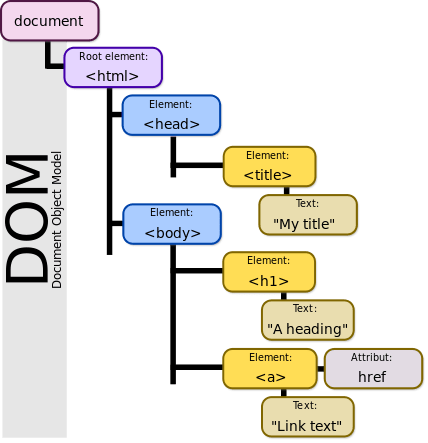
DOM-based XSS is a type of XSS vulnerability that originates not from HTML code but from the DOM (Document Object Model). In Stored and Reflected XSS attacks, it is possible to see the results of the XSS attack in the page returned after the attack; however, in DOM-based XSS attacks, the HTML source and the returned response will be entirely the same. The DOM (Document Object Model) defines many different sections of a web page. The figure below shows the DOM elements.
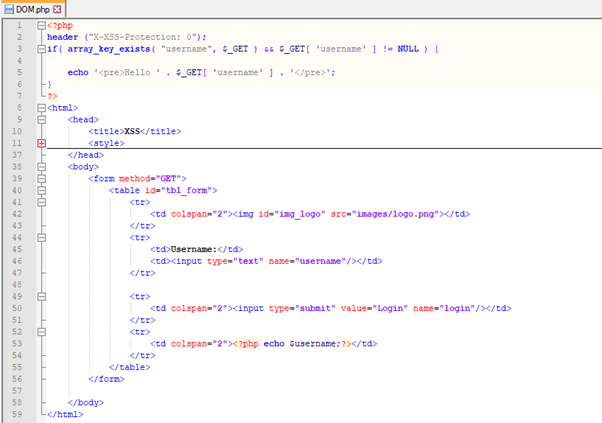
DOM-based XSS vulnerabilities are generally accessible to users. They are one of the most commonly seen XSS types on today’s websites. Figure 3.2.3.2 shows the source code of a page containing a DOM-based XSS vulnerability.
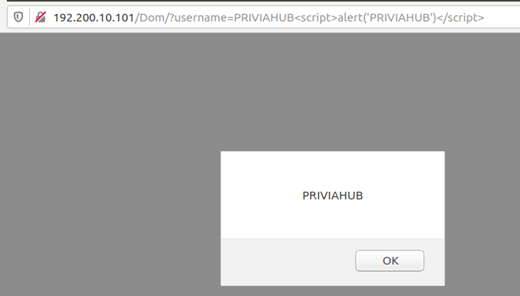
For a better understanding of the DOM-based XSS vulnerability, a payload such as the one below can be assigned to the URL section of the page in the example given in Figure 3.2.3.1:
PRIVIAHUB<script>alert('PRIVIAHUB')</script>
You May Be Interested In These