Privia Security was chosen as one of Türkiye's fastest growing companies!

Privia Security was chosen as one of Türkiye's fastest growing companies!
Today’s business world continues to evolve towards technologies that have become increasingly complex structures, and where we are forced to deal with big data. Naturally, in order to protect and safeguard our assets we are obliged to use much more effective methods and to spend much more money and time. Of course, this situation can be seen as a major advantage by cyber attackers.
Of course, cybersecurity experts also continue to make every effort to derive greater benefit from the advances and innovations of technology. At this point, with OSINT and many similar tools, the traces of cyber attackers have become traceable and it has been shown that, even though we may be one step behind cyber attackers in today’s world, we can still achieve effective results.
Cyber Threat Intelligence Analysts in particular are the security experts who specialise in this field. OSINT is defined as open source intelligence. Just as there are many OSINT tools, you can also make use of the OSINT Framework. Whether after cyber attacks, during attacks, or before attacks begin, meaningful data with intelligence value can be produced by combining small clues, and cyber intelligence can be provided.
Analysts, malware experts and many other people can obtain data that may also be useful to forensic analysis experts. This process is always one that is expensive and that requires a good infrastructure and trained human resources. Nevertheless, with approaches that work from small clues towards the bigger picture, we can make this situation a little easier.
The first stage in these processes, as always, begins with collecting data and making sense of it.
So, can this small clue that we extract from the HTTP header information we call E-TAG be accepted as a method that can be used by cyber threat intelligence analysts?
An E-TAG is a small piece of information provided on the server side in the HTTP response header. Web caching operations are performed thanks to this small piece of information. An E-TAG is an identifier assigned as a version to the resource of the URL address requested by a visitor, by a web server. At this point, these E-TAG values that have been assigned can be used by OSINT experts.
When you want to view a website, if it opens very slowly or you experience delays, you will most likely not visit that site and will close it. Or, consider that you have a server: if this server runs slowly and takes a very long time to deliver the data over the network, you will face cost burdens along with it. So, slowness is undesirable both from the visitor’s point of view and on the server side.
At this point, the caching feature (technology) for web servers has been introduced as a solution. The server responds to the first request, and on the second request, if there is no change on the server, you actually open the site from the caching mechanism. Naturally, on the second visit it opens much more quickly, and because it does not place too many requests or too much load on the server, costs on the server side are also reduced. You can also see something similar in browsers such as Chrome. Caching operations are performed not only on the server side but even at the browser level.
As a result, the ability to reuse previously fetched resources by caching them, and the resulting performance, are offered to the visitor.
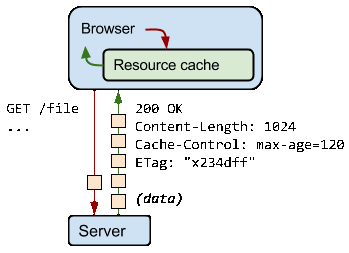
The server usually generates a hash code based on the file content. This code is in the form of a set of numbers, like a fingerprint (although strictly speaking we cannot say that it is exactly a fingerprint). The visitor’s browser reads this fingerprint and takes its time stamp. On the next visit, it reads this small piece of code, and if there is no change, the caching mechanism is used to display the page quickly without straining the server. The fact that the fingerprint has not changed means that the content has been the same since the last visit. Naturally, it opens faster in your browser, and many resources are not downloaded to the browser again.
We can answer this question with both yes and no. Thanks to this tag, we can verify the server, but if more than one website is hosted on the same server and the content does not change, the same ETAG value can be read from all of them.
The Etag HTTP header content actually also allows tracking of users across sessions, even if the websites change their IP address, disable JavaScript, cookies and/or local storage. This is achieved by the sending of Etag data in the HTTP header.
For example, on Amazon’s standard servers this ETAG is enabled, and because more than one site is hosted on a single server, they can receive the same E-TAG value.
Example HTTP header and E-TAG information
HTTP/1.1 200 OK
Transfer-Encoding: chunked
Cache-Control: max-age=0, private, must-revalidate
Content-Type: text/html; charset=utf-8
Date: Mon, 24 Jun 2020 01:18:15 GMT
Etag: W/”b2d8f2cd5dcc5013eed0cb477b39b67d”
Referrer-Policy: strict-origin-when-cross-origin
Server: nginx
The E-tag is the value enclosed in quotation marks. In the example above, the E-tag information we have obtained from the header information of the response given to the request we sent to the address PriviaSecurity.com is seen as b2d8f2cd5dcc50 13eed0cb477b39b67d.
Returning to our subject, we can succeed in following the traces left on the web server by a cyber attacker in a phishing or similar attack. We generally see that people who carry out attacks via phishing publish under fake names on overseas servers. Similarly, they do not keep a phishing site up for more than 5–10 days. However, by detecting and tracking the E-TAG, this method has become a usable way to identify another phishing site from a given one.
However, we cannot say that the E-TAG will always produce different values. For example, if you search for the value 122f-537eaccb76800 on Google, on Shodan or on FOFA, thousands of results will appear before you.
Etag: W/”122f-537eaccb76800”
In fact, this value is the E-TAG value of the default test page of Apache installed on a server with the Fedora operating system. Thousands of Apache servers on Fedora are brought up by default, and because the content is the same, the same etag value is read. Of course, considering that most of these sites are live, this E-tag value will have no meaning.
However, looking at another example, it is possible to follow the trail of a cyber attacker.
E-tag: W”122a68-7ab-59273bde5ba0c”
This E-tag belongs to a phishing site that was created by a cyber attacker and has been detected. Through this site, which was active a short while ago, credit card information was being collected under the pretext of a credit card annual fee refund. When we examine the HTTP header of the relevant site;
HTTP/1.1 200 OK
Server: Apache
Upgrade: h2,h2c
Connection: Upgrade, close
ETag: “122a68-7ab-59273bde5ba0c”
Accept-Ranges: bytes
Content-Length: 1963
Vary: Accept-Encoding,User-Agent
Content-Type: text/html
We reach this information. Then, when we searched for the E-tag data on FOFA or Shodan,
…and other phishing sites appear before us. The same etag value is used on all of these sites. Naturally, through one small clue left behind by an attacker, it becomes possible to identify all the other phishing sites (because they are hosted on the same server or because the same configuration is used) too.
Yes, we conclude this article by underlining that, according to the method and techniques used, E-tag can be used under certain conditions from an OSINT perspective. In the examples we have provided above, we have shown both that “no, it cannot be used as a fingerprint” / “yes, it can be used as a fingerprint”. In our next article we will be back with a follow-up on what kind of data can be obtained using this and similar clues.
You May Be Interested In These