Privia Security was chosen as one of Türkiye's fastest growing companies!

Privia Security was chosen as one of Türkiye's fastest growing companies!
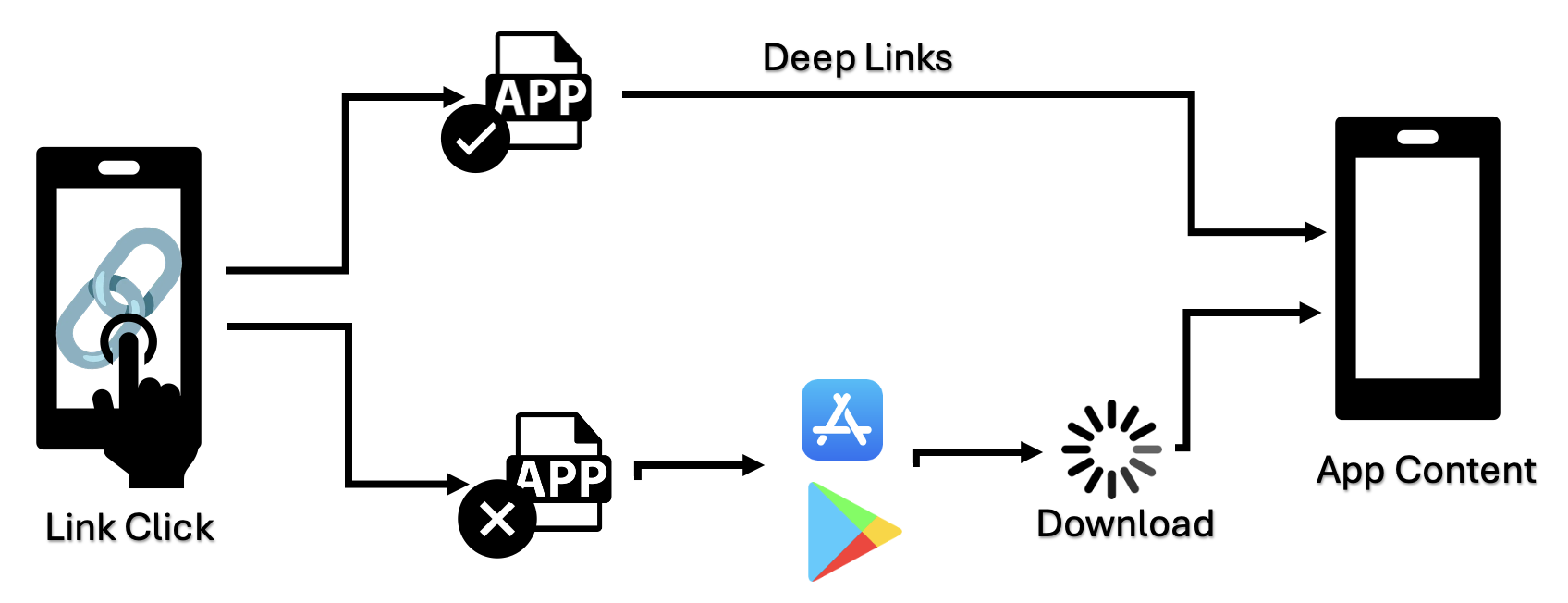
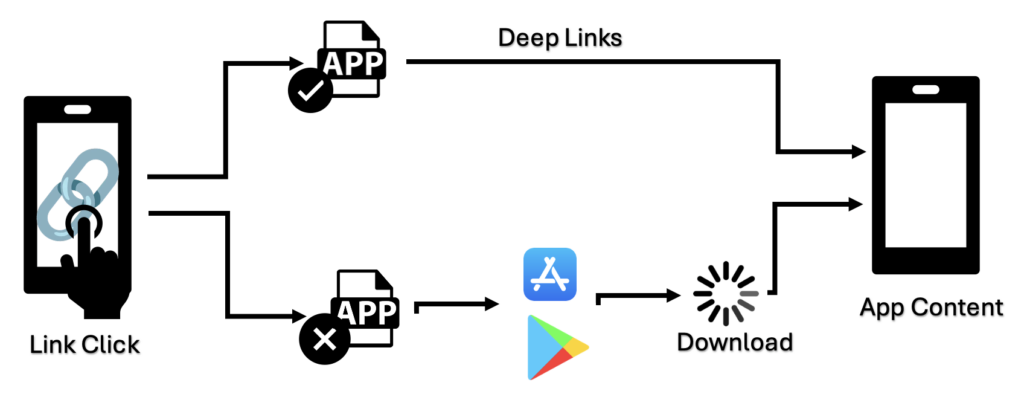
A deep link is a special URL address designed to directly open a specific page, content or event within a mobile application. Thanks to these links, when users click on a link they are automatically directed to the specified location within the application.
For example, when we click a link and see the warning “Do you want to open this page in the app?” on our screen, this actually indicates that a deep link redirection is active. Unlike web page openings, deep links aim to direct users straight to specific content or events within the application. For example, the deep link example://myapp could be used to launch MainActivity.
When a deep link URL is clicked, the system first checks whether the application is installed on the device:
There are two basic types of deep links in the Android ecosystem:
These are links that contain a specific URL scheme (URI scheme) but do not directly specify which activity to open. The application analyses the incoming URI data to determine the relevant screen internally.
Example Scenario: Consider an e-commerce application called Privia. An Implicit Deep Link like the following could be created to redirect to a specific product page in Privia:
Intent intent = new Intent(Intent.ACTION_VIEW);
intent.setData(Uri.parse("privia://product/14226"));
Working Principle: When the user clicks the privia://product/14226 URL, the system passes this URL to the Privia application as an Intent. The Privia application retrieves the product ID (14226) from within the URL and opens the relevant page. The activity to be opened is determined by the URL parameters.
These are links that directly redirect to a specific activity. The activity to be opened is predetermined and contains a direct class reference (Activity).
Example Scenario: An Explicit Deep Link to directly open a specific product page in the Privia application could be defined as follows:
Intent intent = new Intent(this, ProductActivity.class);
intent.setData(Uri.parse("privia://product/14226"));
startActivity(intent);
Working Principle: The privia://product/14226 URI redirects directly to the ProductActivity component. If the Privia application is not installed, the link does not work and the user can be redirected to the app store to install the application.
When not configured correctly, deep links can create various security risks for applications. Let us examine some common vulnerabilities and their effects:
In Link Hijacking, a malicious application can intercept and interfere with deep links belonging to another application. In this situation, users unknowingly come under the control of the malicious application.
Link Hijacking can pave the way for Phishing attacks. For example, it can present the user with a fake login screen that looks like a real application. When the user tries to log in on the fake screen, sensitive information falls into the hands of malicious parties.
Example Scenario: Suppose a bank application’s deep link is intercepted by a malicious application. When the user clicks the “Open bank in app” link, instead of the real banking application, a fake login screen is displayed. This fake screen is made to resemble the bank’s real design, and the user unwittingly hands over their login information to malicious parties.
Deep links can transmit sensitive data such as authentication tokens. If deep links are not properly secured, an attacker can intercept this data and gain unauthorised access to the user’s account.
Example Scenario: In an e-commerce application, suppose a payment token is sent via deep link for the user to complete the payment for items in their cart. If this token is sent unencrypted over the network, a malicious attacker could intercept the token and perform fraudulent transactions using the user’s account.
Misconfigured deep links can cause Traffic Hijacking attacks. In these attacks, some applications can register URL schemes belonging to popular applications and redirect users to their own applications.
Example Scenario: For example, if a social media application has links defined as socialapp://, a malicious developer could create a fake application using the same scheme. When the user clicks a share link, instead of the real social media application, the fake application opens.
By loading InsecureShop.apk, a vulnerable mobile application, we can better understand Deep Link vulnerabilities. You can use the following repository to download the relevant application:
https://github.com/optiv/InsecureShop
To detect deep link vulnerabilities, we must first conduct a static analysis of the application. In this analysis, we will use the Jadx tool to access the contents of the APK file.
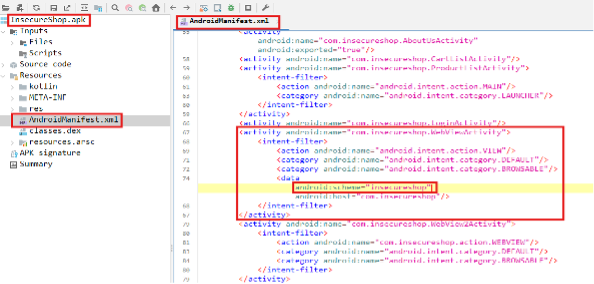
After opening the APK file with Jadx, let us examine the AndroidManifest.xml file where application permissions and components are defined. Intent Filter elements in this file where parameters such as scheme, host and path are defined are important for deep link vulnerabilities.
When the XML file is examined, we can see that scheme and host values are defined for WebViewActivity, but the path parameter is not specified. This deficiency can lead to open redirect or other Deep Link vulnerabilities if sufficient control is not exercised over the parameters sent when calling the activity.
The settings within WebViewActivity can directly affect the application’s security. When the code structure is examined, we can see that “setJavaScriptEnabled(true)” and “setAllowUniversalAccessFromFileURLs(true)” values are enabled.
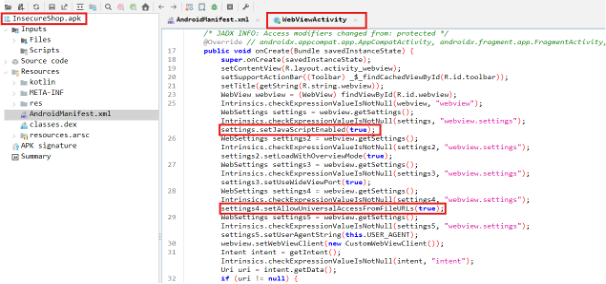
setJavaScriptEnabled(true): Tells WebView to enable JavaScript execution. However, if not properly configured, it can lead to attacks such as Cross-Site Scripting (XSS).
setAllowUniversalAccessFromFileURLs(true): This method has been deprecated in API level 30. Normally, a running JavaScript should only access resources related to the relevant file. However, with the “setAllowUniversalAccessFromFileURLs(true)” setting enabled, it gains access to files other than the relevant file and everything on the internet.
When the relevant code is examined, the application queries the URL obtained from the Intent object and performs different operations depending on the /web or /webview paths. For example, in the /webview path, the “url” parameter is retrieved using the getQueryParameter(“url”) method. The code then checks whether the obtained “url” value ends with “insecureshopapp.com”. If the “url” value ends with insecureshopapp.com, this value is assigned to the data variable and loaded within the WebView component via webView.loadUrl(data);.
The application’s weakness is that the endsWith-based domain name validation can easily be fooled by attackers. The superficial nature of a check like “endsWith$default(queryParameter, “insecureshopapp.com”)” allows an attacker to add “insecureshopapp.com” to the end of a URL to redirect to any desired page. Since the application only performs a suffix check, it accepts the link as trusted and loads it within the WebView.
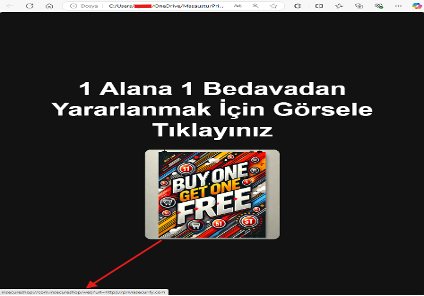
Let us exploit the deep link vulnerability identified through static analysis and examine how it can be abused. The goal here is to redirect the user, instead of to the campaign page within the insecureshop application, to a page determined by the attacker.
A user clicking on an image to take advantage of a campaign is redirected to the insecureshop application. However, within the application, the malicious page that the attacker wanted to redirect to is opened.
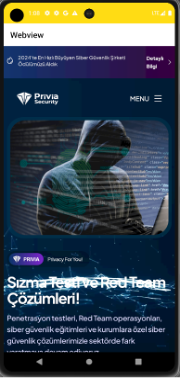
To simulate the attack more quickly and practically, we can trigger the deep link using ADB (Android Debug Bridge). This method causes the application to execute the vulnerable code fragment by manipulating the parameter sent via the Deep Link Vulnerability.
We can use the following ADB command to carry out our example attack:
adb shell am start -W -a android.intent.action.VIEW -d "insecureshop://com.insecureshop/web?url=https://priviasecurity.com"
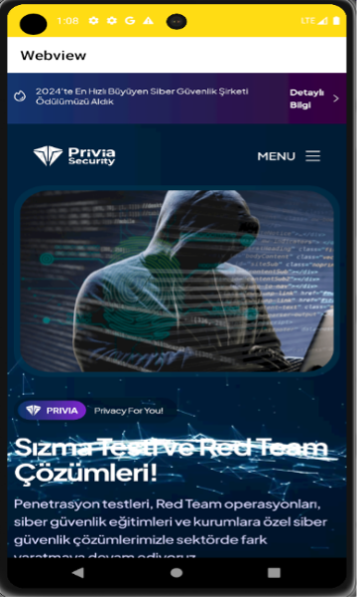
endsWith). Instead, the full domain should be validated to ensure only trusted domains are accepted.You May Be Interested In These