Privia Security was chosen as one of Türkiye's fastest growing companies!

Privia Security was chosen as one of Türkiye's fastest growing companies!
XSS (Cross-Site Scripting) is a security vulnerability that allows attackers to inject client-side code into web pages by exploiting client-based scripting languages such as HTML and JavaScript.
Because XSS attacks are carried out on the client side, the actual targets of the attacks are not the web applications themselves but the users. Attackers who can exploit the XSS security vulnerability can carry out attacks such as ad-jacking, click-jacking, keylogging, and session hijacking. Below is a simple example of triggering an XSS vulnerability.
Figure 1.1 shows a simple web page consisting of a text box and a button.
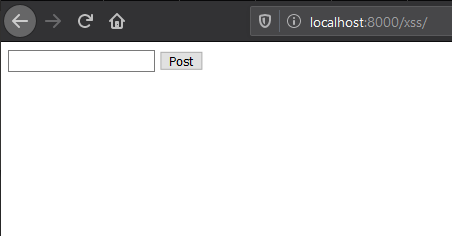
Figure 1.2 shows the source code of the web page.
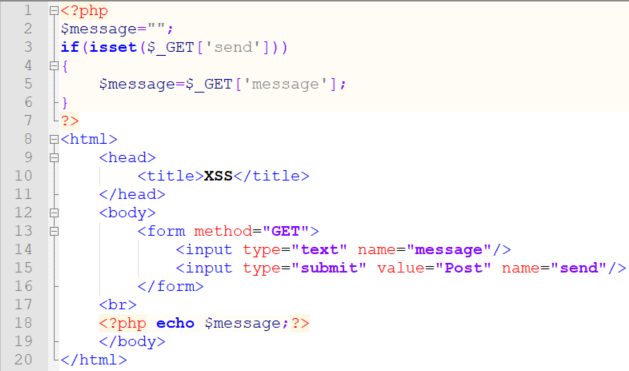
As can be understood from the code, when users click the button, the input entered in the text box will be written to the page. However, the entered text does not pass through any validation before being written to the page. Therefore, if HTML tags are written in the text box, these tags will not be written to the page as plain text — they will run as HTML code on the page.
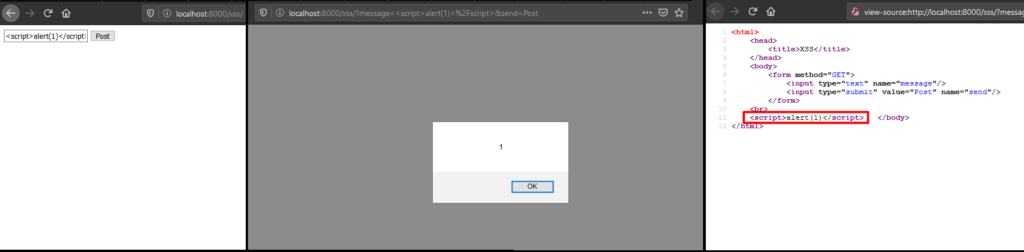
In Figure 1.3, a JavaScript command was executed on the page using the <script> tag and the XSS vulnerability was triggered.
Although the XSS attack was carried out very easily in this example, exploiting an XSS vulnerability is not always this straightforward. This article will explain techniques for bypassing some of the filtering methods applied to prevent XSS vulnerabilities from being triggered.
Various methods can be applied to filter inputs in order to prevent XSS vulnerabilities. Filtering can be done on the browser side or the server side. The core idea behind filtering is to validate data in user inputs that could cause XSS attacks. Common approaches to filtering include Regex and Blacklist controls. If inputs that could cause XSS attacks are detected as a result of these controls, the entire request or the malicious code within the request can be blocked.
Although the filtering methods applied by developers to prevent XSS attacks do provide some protection, some of these methods can be bypassed and XSS attacks can still be carried out. The techniques that can be used to bypass some filtering methods are described below.
Text scanning of user inputs can be carried out to prevent requests from causing XSS attacks. If an attacker’s request to a website passes through a text scan, they can encode certain characters in the XSS code to bypass this method and submit the request. For example, suppose incoming requests are scanned for the word “JavaScript” and a payload such as <a href="javascript:alert('PriviaSec')">XSS</a> is used to trigger the XSS vulnerability. In such a case, some characters of the word “JavaScript” can be ASCII-encoded. For example, the ASCII equivalent of the character j is 106. In the request, j can be used instead of the character j. In this case, j is interpreted as an HTML entity and represents the letter j. When the request is submitted in this way, the text scan will be bypassed and the XSS vulnerability will be triggered:
<a href="javascript:alert('PriviaSec')">XSS</a>
In addition to text scanning, if numbers following the &# characters in incoming requests are also checked, the request may be caught by the filter and the attack may fail. To address this, instead of using a decimal number after the &# characters, the hexadecimal equivalent of the number can be used together with the x character. In this case the payload becomes:
<a href="javascript:alert('PriviaSec')">XSS</a>
Base64 encoding can also be used to bypass text scans. To do this, the payload to be used to trigger the XSS vulnerability is first encoded using the Base64 algorithm. The encoded text is then submitted as a new request using the JavaScript atob() and eval() functions together. The atob() function will decode the encoded text, and the eval() function will cause the resulting text to be treated as a string. This will bypass the validation in place and trigger the XSS vulnerability. An example payload is shown below:
<body onload="eval(atob('YWxlcnQoJ1ByaXZpYVNlYycp'))">
As another filtering method, ASCII code scanning can be carried out alongside text scanning. In such a case, even if some characters in the XSS code are ASCII-encoded, the request may still be caught by the filter. However, ASCII encoding can still be leveraged to bypass the validation. Character entities produced by ASCII encoding can have numerical values between 1 and 7 digits. If there are zeros in the leftmost digits of this numerical value, those zeros are ignored. In addition, character entities may not have a semicolon (;) at the end. For example, a and a have the same meaning. Therefore, the characters of a text (e.g. alert) in the payload used to trigger the XSS vulnerability can be encoded in the manner described above, and the filter can be bypassed and the XSS vulnerability triggered. An example payload is shown below:
<a href="javascript:alert('PriviaSec')">XSS</a>
Some developers may convert all letters of malicious code in incoming requests to uppercase. For example, a code such as <script>alert(1)</script> passing through this filter would become <SCRIPT>ALERT(1)</SCRIPT>. In this case, the code would be useless, because JavaScript is a case-sensitive language and the alert() function with its characters converted to uppercase would not run. Therefore, all characters of the word alert can be run through ASCII encoding to bypass the filter. An example payload is shown below:
<SCRIPT> alert(1) </SCRIPT>
Unicode encoding can also be used to execute JavaScript commands. This enables XSS attacks to be carried out against web pages that apply filtering methods such as text scanning and ASCII code scanning. An example payload is shown below:
<script>\u0061\u006cert(1)</script>
Character control is another filtering method. Certain characters are checked because they can be used to trigger a vulnerability (e.g. ', "). HTML entities can be leveraged to bypass this check. An example payload is shown below:
<img src=javascript:alert("XSS")>
In addition, after user inputs have passed through validation, certain special characters may be encoded using URL Encoding (e.g. <, >, ', "). If specific characters in the payload are encoded using this method, the XSS vulnerability can be triggered as a result of the submitted request. An example payload is shown below:
%3Cscript%3Ealert(1)%3C%2Fscript%3E
Languages such as JavaScript and HTML are very flexible regarding whitespace. For example, the JavaScript alert() function can also be used as al ert().
In older browsers, if there was a TAB character between characters, the TAB was ignored. For this reason, a TAB character can be used to introduce spaces between texts in order to bypass filters. An example payload is shown below (this method does not work in modern browsers):
<img src="javascript:al ert('PriviaSec')">
The TAB character can also be ASCII-encoded. The resulting payload is as follows:
<img src="java	script: al	ert('PriviaSec')">Just as HTML is flexible with whitespace, it is also very flexible with new lines. An HTML tag opened on any line can be continued on the next line without being closed. This can be used to bypass XSS filters. An example payload is shown below:
<a href="jav
ascript:
ale
rt;('PriviaSec')">privia_security</a>
To prevent attackers from exploiting HTML tags to carry out XSS attacks, filtering can be applied based on the HTML tags and tag names present in requests made by users.
As a filtering method, requests can be scanned for the presence of the <script> tag, and if found, the detected tag can be removed from the request. To bypass this method, a second <script> tag can be placed between a split <script> tag (e.g. <scr and ipt>) and the request resubmitted. In this case, if the inserted tag is detected and deleted, the split tag will rejoin and the XSS vulnerability will be triggered. An example payload is shown below:
<scr<script>ipt>alert("privia_security")</scr<script>ipt>
As a second method, the whitespace characters between the tag name and attribute name can be checked to detect tags. To bypass this filter, the / character can be used. Just as a tag name and its attributes are separated by a space character, they can also be separated using a forward slash. An example payload is shown below:
<img/src="logo.jpg"onload=javascript:eval(alert('PriviaSec'))>
As a different approach, attackers can exploit XSS vulnerabilities by formatting tags differently. For example, suppose the href attribute of the <a> tag is being checked. This method can be bypassed using the following payload:
<a onmouseover=alert("PriviaSec")> priviasecurity.com</a>
Another bypass technique is to use a mixed case combination of tag names. HTML is not a case-sensitive language. Therefore, if case is not considered in text scans, attackers can write the letters of the tag name in a mixed case to trigger the vulnerability. An example payload is shown below:
<ScRipT>alert(1)</script>
In tag validation applied to user inputs, if a tag is detected it may be removed from the request, and the remainder of the input may be accepted without further validation. In such cases, attackers can trigger the XSS vulnerability by using more than one tag in their requests. An example payload is shown below:
<input type="text" name="textBox" value=""><script>alert(1)</script>
You May Be Interested In These