

Explore our new Cybersecurity Terms Glossary, explained by our experts.

Explore our new Cybersecurity Terms Glossary, explained by our experts.
Cybersecurity Terms Glossary
Part 3 of our Nmap guide covers the Nmap Scripting Engine (NSE), script categories, selection and arguments, and how Nmap maps firewall rules and evades firewalls and IDS.

What Is Nmap? Basic and Advanced Usage – Part 3
Nmap is an open-source tool for network scanning and vulnerability discovery. It can scan large numbers of systems and return results that are flexible, fast, and meaningful. It tells you whether hosts are up, the state of the ports on live hosts, which services are running, what operating system is in use, and a great deal more.
Nmap can also reveal whether the services it detects contain security vulnerabilities and gather information about those services. Its built-in scripts, when run against a target, produce detailed information about the system and report whether vulnerabilities are present. It is rightly regarded as one of the best tools in its field.
The Nmap Scripting Engine (NSE) is one of Nmap’s most powerful and flexible features. It automates the tasks users want to carry out on a network. Its scripts run in parallel with Nmap, adding speed and efficiency to a scan. NSE contains modules that gather information about a target during network discovery, perform advanced version detection on open ports, detect vulnerabilities on the target system, detect backdoors running on it, and even exploit discovered vulnerabilities, using scripts written in the Lua language.
NSE is enabled with the -sC option. To run a specific script, give the script name after the --script option. The results are included in Nmap’s normal and XML output.
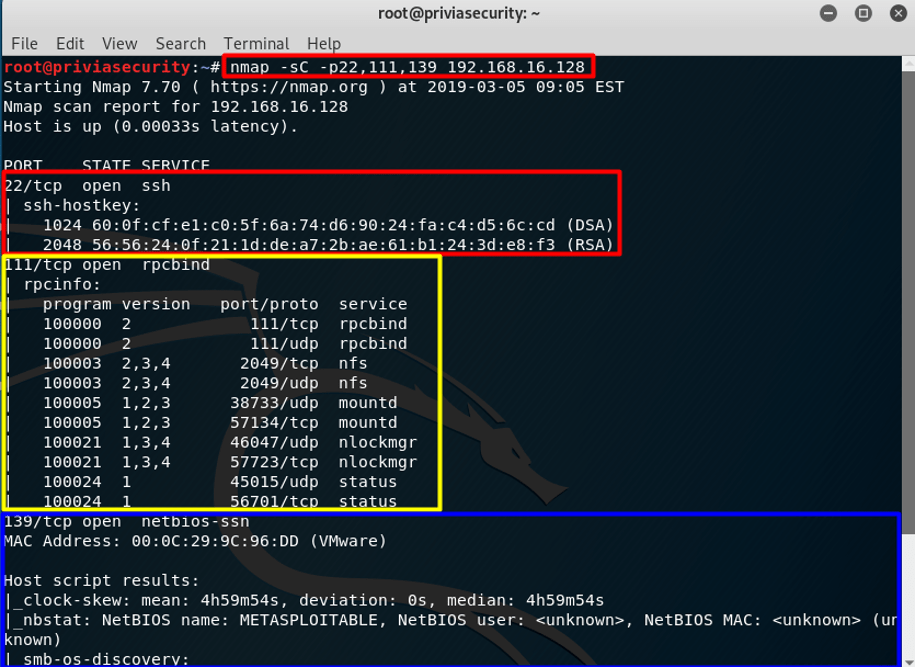
sC OptionIn Figure 7a, the service scripts that produced output are ssh-hostkey, which provides the system’s RSA and DSA SSH keys, and rpcinfo, which queries portmapper to enumerate available services. In this example, the only host script that produced output is smb-os-discovery, which collects various pieces of information from SMB servers.
--script <filename>|<category>|<directory>|<expression>[,...]: Runs a script scan using a comma-separated list of file names, script categories, and directories. Each element is interpreted first as an expression, then as a category, and finally as a file or directory name. A + character can be prepended to any element in the script expression list to force the given scripts to run regardless of the conditions in their portrule or hostrule functions. For example, rather than slowing the scan down by running intensive version detection (-sV --version-all) so that Nmap recognises an MSSQL service, you can force the ms-sql-config script to run against every targeted host and port with --script +ms-sql-config.
--script-args <args>, --script-args-file <filename>: Supplies arguments to scripts. The --script-args-file option is used when the arguments are stored in a file.
--script-help <filename>|<category>|<directory>|<expression>|all[,...]: Shows information about scripts. For each script that matches the given specification, Nmap prints the script name, its categories, and its description. The specifications are the same as those accepted by --script; for example, you can run nmap --script-help ssl-enum-ciphers.
--script-trace: This option is similar to --packet-trace, but works at the application level rather than packet by packet. When it is specified, all incoming and outgoing communication performed by scripts is printed. The information displayed includes the communication protocol, the source and destination addresses, and the data transmitted. If more than 5% of the transmitted data is not printable, hex dumps are shown instead. Specifying --packet-trace also enables script tracing. Figure 7b shows how it is used.
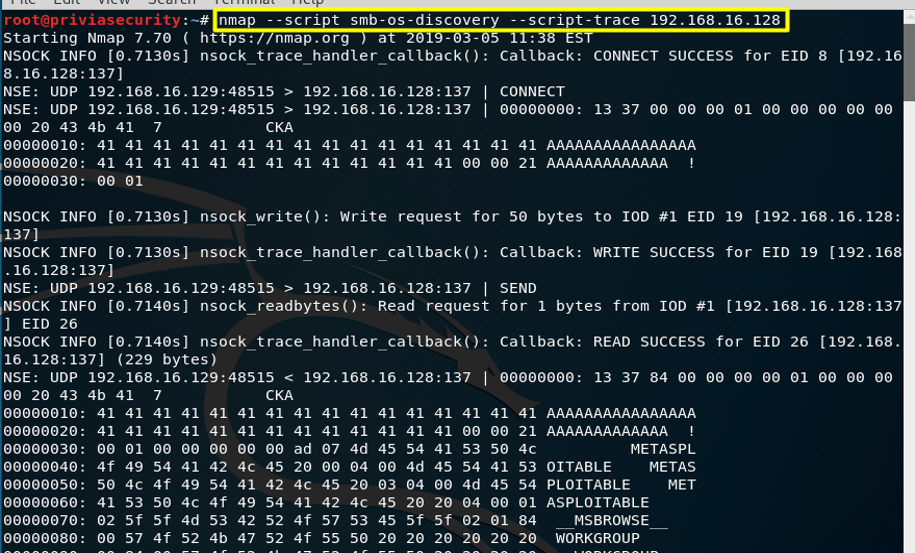
script trace Option--script-updatedb: This option updates the script database in scripts/script.db, which Nmap uses to determine the available default scripts and categories. Figure 7c shows how it is used.
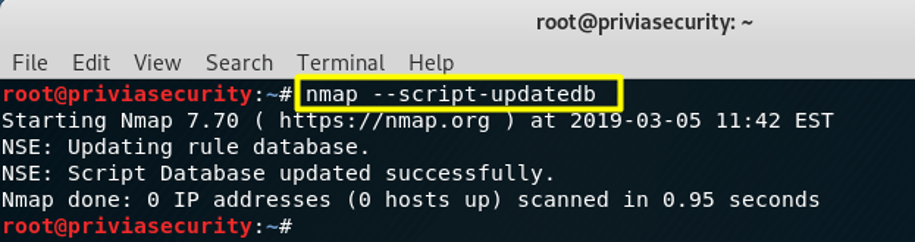
script updatedb OptionEach NSE script defines a list of the categories it belongs to. The categories currently defined are auth, broadcast, brute, default, discovery, dos, exploit, external, fuzzer, intrusive, malware, safe, version, and vuln. Category names are not case-sensitive.
-sC or -A option is used. This category can also be specified with --script=default. Whether a script belongs in the default category is decided by the following criteria:jdwp-exec and http-shellshock.whois-ip, which connects to whois servers to learn about the target’s address.dns-fuzz, which bombards a DNS server with slightly flawed DNS requests until the server crashes or a user-specified time limit expires.http-open-proxy, which tries to use the target server as an HTTP proxy, and snmp-brute, which tries to guess a device’s SNMP community string by sending common values such as public, private, and cisco.smtp-strangeport, which looks for SMTP servers running on ports other than 25, and auth-spoof, which detects identd spoofing daemons that answer as if they had received a query when none was made.ssh-hostkey, which retrieves an SSH host key, and http-title, which retrieves the title of a web page. Scripts in the version category are not classified by safety.-sV) is requested. Their output cannot be distinguished from version detection output, and they do not produce service or host script results. Examples are skypev2-version, pptp-version, and iax2-version.realvnc-auth-bypass, afp-path-vuln, and smb-vuln-ms17-010.The --script option takes a comma-separated list of categories, file names, and directory names.
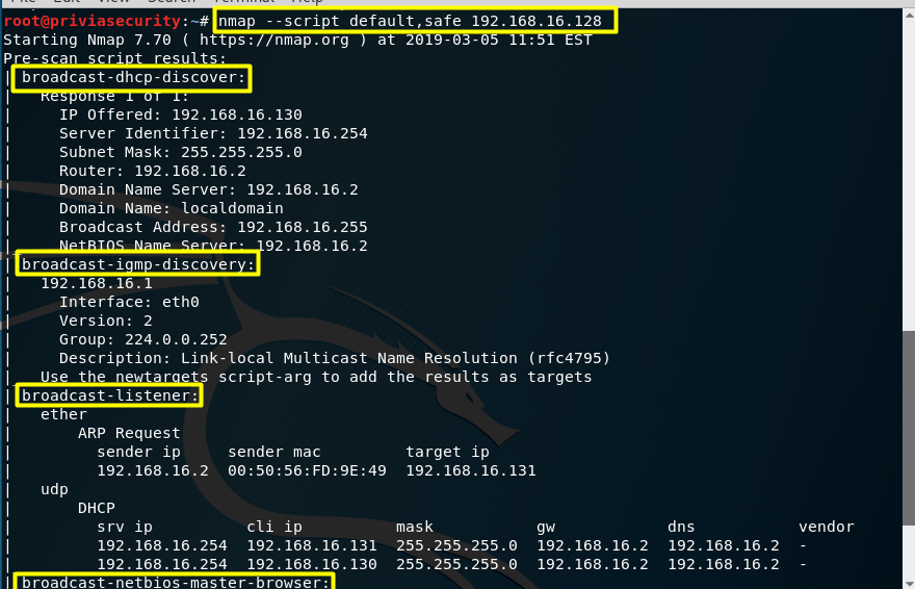
nmap --script default,safe: Runs the scripts in the default and safe categories. An example is shown in Figure 7.3.
nmap --script smb-os-discovery: Runs only the smb-os-discovery script. Adding the .nse file extension is optional.
nmap --script default,banner,/home/user/customscripts: Runs the scripts in the default category, the banner script, and the scripts in the /home/user/customscripts directory.
nmap --script "http-*": Runs every script whose name starts with http-, such as http-auth and http-open-proxy. The argument to --script must be in quotes to protect the wildcard from the shell. More complex script selection can be made with the and, or, and not operators to build Boolean expressions.
nmap --script "not intrusive": Runs every script except those in the intrusive category.
nmap --script "default or safe": Functionally equivalent to nmap --script "default,safe". Runs scripts that are in the default category, the safe category, or both.
nmap --script "default and safe": Runs only scripts that are in both the default and safe categories.
nmap --script "(default or safe or intrusive) and not http-*": Runs scripts in the default, safe, or intrusive categories, except those whose names start with http-.
NSE supports four types of script, distinguished by the kind of targets they take and the scan phase in which they run. An individual script may support more than one type of operation.
Prerule scripts: These run before any of Nmap’s scan phases, so Nmap has not yet collected any information about its targets. They are useful for tasks that do not depend on specific scan targets, such as sending network broadcast requests to query DHCP and DNS-SD servers. Some of these scripts can generate new targets for Nmap to scan. For example, dns-zone-transfer can obtain a list of IP addresses in a domain using a zone transfer request and automatically add them to Nmap’s list of scan targets.
Host scripts: Scripts in this phase run during Nmap’s normal scanning process, after Nmap has performed host discovery, port scanning, version detection, and OS detection against the target host. A script of this type is invoked once against each target host that matches its hostrule function. Examples are whois-ip, which looks up ownership information for a target IP address, and path-mtu, which tries to determine the maximum IP packet size that can reach the target without fragmentation.
Service scripts: These scripts run against specific services listening on a target host. For example, Nmap includes more than 15 HTTP service scripts to run against web servers. If a host has web servers running on several ports, these scripts may run more than once. They are the most common type of Nmap script and are distinguished by containing a portrule function that decides which detected services a script should run against.
Postrule scripts: These run after Nmap has scanned all of its targets. They can be useful for formatting and presenting Nmap output. For example, ssh-hostkey is best known as a service (portrule) script that connects to SSH servers, discovers their public keys, and prints them. However, it also includes a postrule that checks for duplicate keys across all the hosts scanned and then prints any it finds. Another use for a postrule script is printing a reverse index of Nmap output, showing which hosts run a particular service rather than just listing the services on each host. Postrule scripts are identified by containing a postrule function. Many scripts could run as either a prerule or a postrule script; in those cases, using a prerule is recommended for consistency.
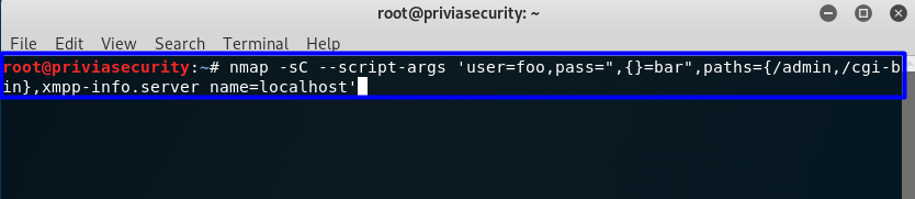
Arguments can be passed to NSE scripts with the --script-args option. The arguments describe a table of key-value pairs and possibly array values. They are made available to scripts as a table called nmap.registry.args in the registry.
Normally, however, they are accessed through the stdnse.get_script_args function. The syntax for command-line arguments is similar to the syntax of Lua’s table constructor.
Arguments are a comma-separated list of name=value pairs. Names and values may be strings that do not contain whitespace or the characters {, }, =, or ,. To include one of these characters in a string, enclose the string in single or double quotes. Within a quoted string, \ escapes a quotation mark.
A backslash is used to escape quotation marks only in this special case; in all other cases, a backslash is interpreted literally. Instead of passing the arguments on the command line with --script-args, you can store them in a file (separated by commas or newlines) and specify just the file name with --script-args-file. Options given on the command line with --script-args take precedence over those given in the file. The file name can be given as an absolute path or relative to Nmap’s usual search path (NMAPDIR and so on). Figure 7.5 shows an example of argument usage.
At the core of the Nmap Scripting Engine is an embeddable Lua interpreter. Lua is a lightweight language designed for extensibility, and it offers a powerful, well-documented API for interfacing with other software such as Nmap. The second part of the Nmap Scripting Engine is the NSE library, which connects Lua and Nmap. This layer handles issues such as initialising the Lua interpreter, scheduling parallel script execution, retrieving scripts, and more. It is also the heart of the NSE network I/O framework and exception-handling mechanism. In addition, it includes utility libraries that make scripts more powerful and convenient.
The Nmap scripting language is an embedded Lua interpreter extended with libraries for interfacing with Nmap. The Nmap API lives in the Lua namespace nmap, which means that calls to resources provided by Nmap carry an nmap prefix. For example, nmap.new_socket() returns a new socket wrapper object. The Nmap library layer also takes care of initialising the Lua context, scheduling parallel scripts, and collecting the output produced by completed scripts. During the planning stages, several programming languages were considered as the basis for Nmap scripting. Another option was to implement an entirely new programming language. NSE needed to be easy to use, small, compatible with the Nmap licence, scalable, fast, and parallelisable. Perl, Python, and Ruby have more comprehensive interpreters, but they are difficult to embed efficiently in Nmap. Lua, on the other hand, is not only embedded in Nmap but also in other popular open-source security tools, such as the Wireshark sniffer and the Snort IDS.
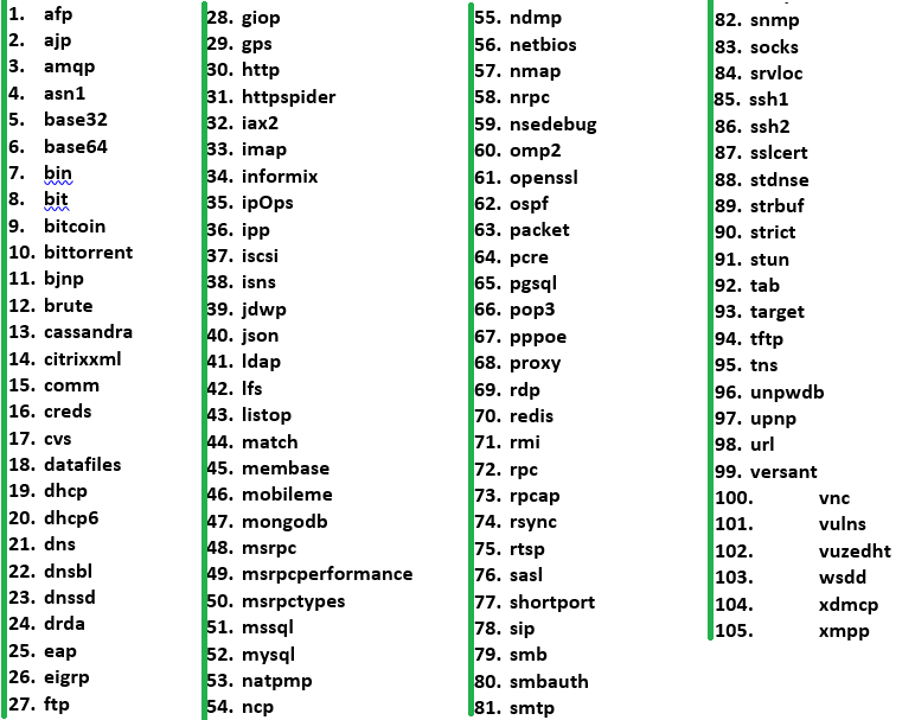
In addition to Lua’s significant built-in features, a number of extension libraries have been written and integrated to make script writing more powerful and convenient. These libraries (sometimes called modules) are compiled if necessary and installed along with Nmap. They have their own directory, nselib, which is installed in Nmap’s configured data directory. Figure 7.6 shows the NSE libraries.
Firewalls make network mapping during a scan more difficult. When reconnaissance scans are run against systems, firewalls and IDS systems can block them. Nmap offers many features to help you understand these complex networks and verify that filters are working as intended. All major IDS products ship with rules designed to detect Nmap scans, because scans are sometimes a precursor to attacks.
To bypass firewall rules, you first need to understand how they work. Nmap distinguishes between ports that are reachable but closed and those that are actively filtered. An effective approach is to start with a normal SYN port scan, then use techniques such as ACK scanning and IP ID sequencing to understand the network better.
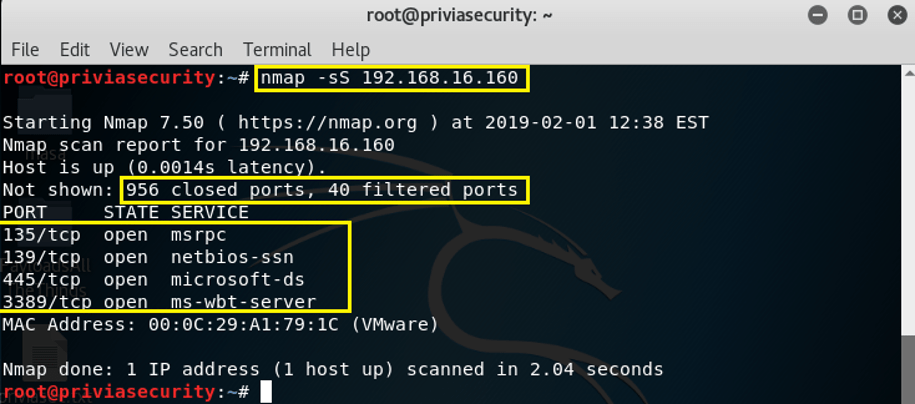
The TCP SYN (stealth) scan is the most popular scan type because it is the fastest way to scan TCP ports. It is stealthier than a connect scan and works against all functional TCP stacks. A SYN or stealth scan sends a SYN packet and examines the response. If a SYN/ACK comes back, the port is open and the remote end is trying to establish a TCP connection. The scanner sends an RST to tear the connection down before it is fully established, which usually keeps the connection attempt out of application logs. If the port is closed, an RST is sent back. If it is filtered, the SYN packet is dropped and no response is sent. In this way, Nmap determines whether a port is open, closed, or filtered. Figure 8.1.1a shows 956 closed ports and 40 filtered ports. Because this was a default scan of 1,000 ports, the remaining 4 ports were identified as open.
Sneaky firewalls that return RST: Although Nmap’s distinction between closed TCP ports (which return an RST packet) and filtered ports (which return nothing or an ICMP error) is usually accurate, many firewall devices can now forge RST packets as though they came from the target host and claim that the port is closed. One example of this capability is the Linux iptables system, which offers many ways to reject unwanted packets. The iptables manual documents the feature as --reject-with type. The type given can be icmp-net-unreachable, icmp-host-unreachable, icmp-port-unreachable, icmp-proto-unreachable, icmp-net-prohibited, or icmp-host-prohibited, which return the corresponding ICMP error message (port-unreachable is the default). The tcp-reset option can be used only with rules that match the TCP protocol; it causes a TCP RST packet to be sent back. This is mainly useful for blocking ident (113/tcp) probes, which frequently occur when sending mail to broken mail hosts (which otherwise will not accept your mail). Generating RST packets with firewalls and IDS/IPS is not common outside port 113, because it can confuse network operators and lets scanners move straight on to the next port without waiting for the timeout caused by dropped packets. Such forgery can be detected by carefully analysing the RST packet and comparing it with other packets sent by the machine.
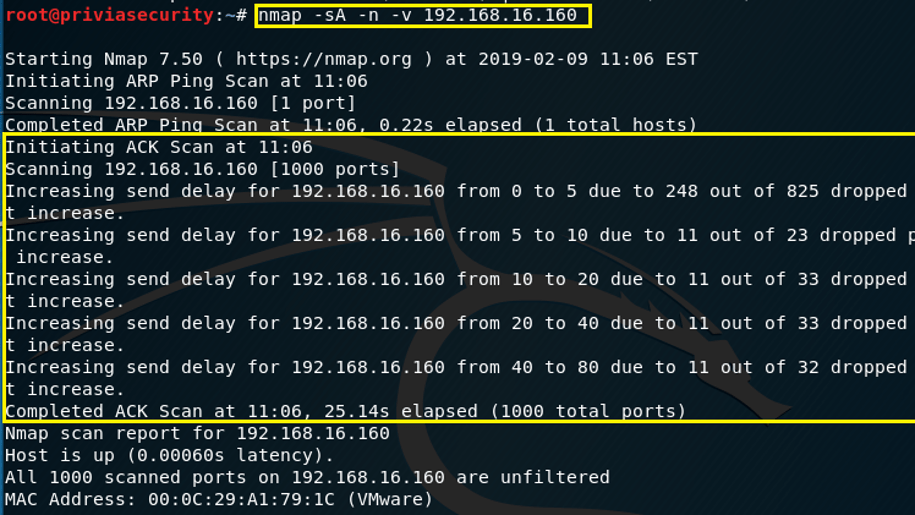
The TCP ACK scan is used to determine whether firewall rules are stateful and which ports are filtered. Its drawback is that it cannot distinguish open ports from closed ones. Unless you use the --scanflags option, this scan type sets only the ACK flag on its probes. When scanning unfiltered systems, open and closed ports both return an RST packet, and Nmap labels them unfiltered. This means they are reachable by ACK packets, but whether they are open or closed is undetermined. Ports that do not respond, or that send back certain ICMP error messages (type 3, codes 0, 1, 2, 3, 9, 10, or 13), are labelled filtered. To run this scan, simply use the -sA option, as shown in Figure 8.1.2.
The ID field in IP headers can reveal a surprising amount of information. As in the idle scan technique, it can be used to show a firewall that RST packets are not coming from an attacking system. Another angle is trusted source addresses that pass through a firewall’s control mechanisms without being checked. For example, machines on a company’s production network may trust IP addresses on the corporate network, or trust a system administrator’s personal machine. A concrete example of the trusted source address problem is a company’s private UDP service that skips user authentication when requests come from specific address blocks entered in a configuration file. These network blocks correspond to different corporate locations, and the feature makes administration and debugging easier. Nmap should not be relied on as the technique for determining these firewall rules, but the output of Nmap scans is still valuable. For example, this test can show whether decoys (-D) would be worth using.
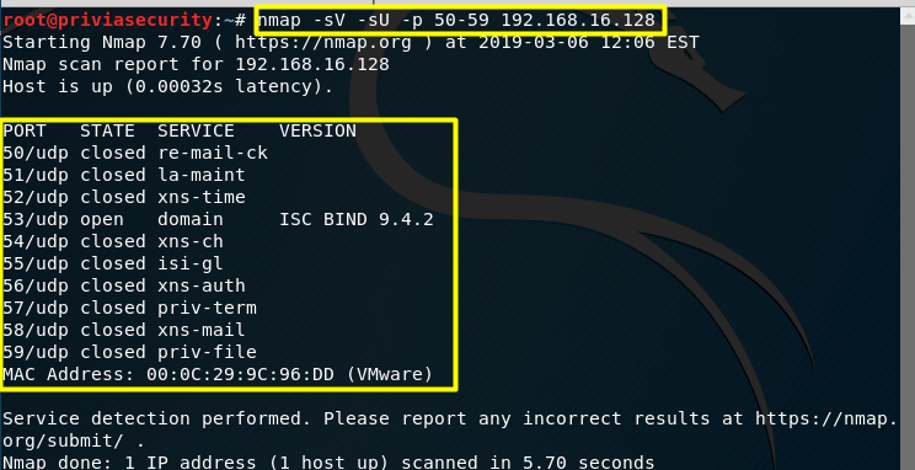
Working with UDP is usually harder, because the protocol does not acknowledge open ports the way TCP does. Many UDP applications simply ignore unexpected packets. To find out whether ports are open or filtered, Nmap sends a range of UDP probes for many different UDP services in the hope of getting a response from open ports. Figure 8.1.4 shows that port 53 is open and running a service. The other ports are still open|filtered, because none of the probes received a reply.
Determining firewall rules is valuable, but bypassing them is often the main goal. Nmap uses a range of techniques to get past poorly configured firewalls. An attacker only needs to find one misconfiguration to succeed, whereas network administrators must find and fix every one of them.
An ACK scan can be used to determine which network ports are filtered, but it does not tell you which of the reachable ports are open or closed. Nmap offers several scan methods that are good at slipping past firewalls while still providing the port state information you need. The FIN scan is one such technique and is run with the -sF option. In Figure 8.2.1, the scan is repeated, this time as a FIN scan. Because only the FIN flag is set, the packets slip past rules that block SYN packets. Whereas a SYN scan found only one open port below 100, the FIN scan finds both.
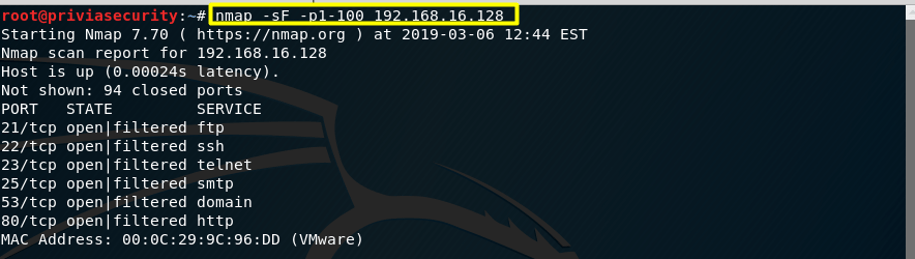
Many other scan types are worth trying, because the target’s firewall rules and the type of target host determine which techniques will work. Some particularly useful scan types are FIN, Maimon, Window, SYN/FIN, and NULL scans.
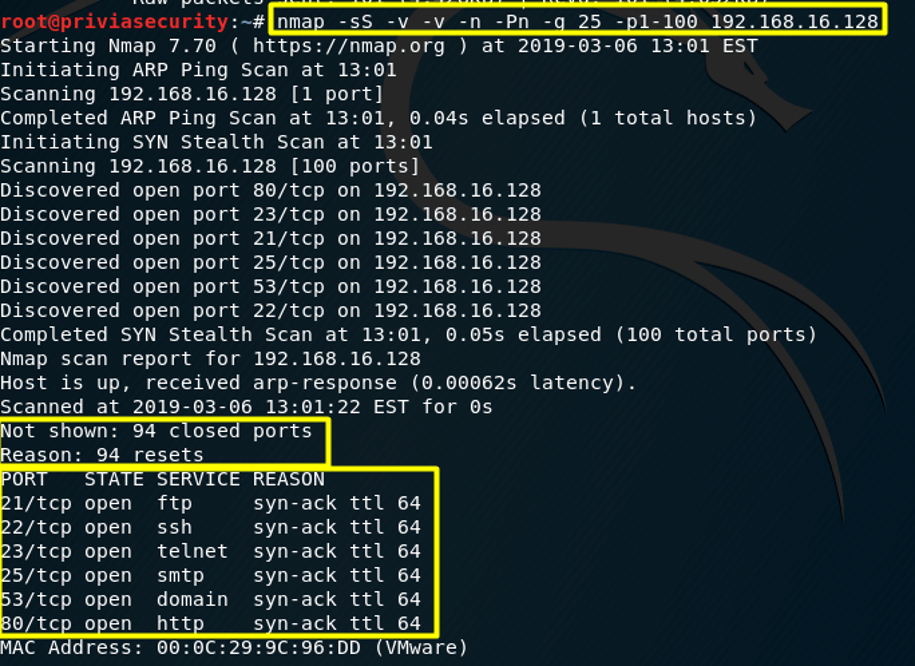
One common misconfiguration is trusting traffic based solely on its source port number. An administrator setting up a new firewall may be flooded with complaints from users whose applications have stopped working; DNS, for instance, may break because responses from external UDP DNS servers can no longer enter the network. FTP is another common case, where file transfers rely on connections that the firewall must let through. Some system and network administrators assume that no attack will arrive over FTP, and the same assumption is made for DNS on port 53. Nmap offers the -g and --source-port options to exploit these weaknesses: you supply a port number, and Nmap sends its packets from that port. Nmap must use different port numbers for certain OS detection tests to work properly. Most TCP scans, including the SYN scan, fully support the option, as does the UDP scan. Figure 8.2.2 shows source port manipulation using the -g option. The -sS option selects a SYN scan, the first -v enables verbose results, and the second -v increases the level of detail in the output further. The -n option disables DNS resolution, -Pn skips ping-based host discovery, and -p1-100 limits the scan to the first 100 ports.
Although IPv6 has not taken over the world, it is quite popular in Japan and some other regions. Filtering IPv6 can sometimes be more critical than filtering IPv4, because the expanded address space often allows globally addressable IPv6 addresses to be allocated to machines that would otherwise have to use the private IPv4 addresses specified by RFC 1918. Running an IPv6 scan instead of the default IPv4 scan is often as easy as adding -6 to the command line. Some features, such as OS detection and UDP scanning, are not yet supported for this protocol, but the most popular features work.
The IP ID idle scan is one of the stealthiest scan types, because no packets are sent to the target from your own address. Open ports are inferred from the IP ID sequences of a chosen zombie machine. A less well-known feature of the idle scan is that the results you obtain are the ones you would get if the zombie scanned the target host directly. Just as the -g option lets you exploit trusted source ports, the idle scan can sometimes exploit trusted source IP addresses.
When scanning firewalled networks, ping probes may receive no response from hosts. To reduce this problem, Nmap allows a wide variety of probes to be sent in parallel.
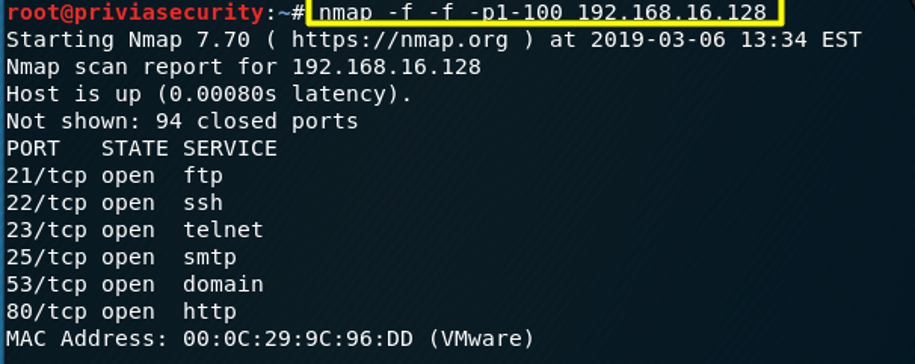
Fragmentation is one of the techniques used to evade firewalls. Some firewalls inspect packets based on their size. When packets are split into fragments, the firewall cannot inspect them as a single packet, so it can be bypassed more easily. The -f option fragments packets. Nmap splits packets into fragments of 8 bytes each, so a typical 20- or 24-byte TCP header is sent in three small fragments. Each -f adds 8 bytes to the fragment size, so -f -f allows up to 16 data bytes per fragment. Alternatively, you can specify the --mtu option. The --mtu argument must be a multiple of eight and must not be combined with -f.
The --send-eth option can be used to bypass the IP layer and send raw Ethernet frames. Nmap supports fragmentation only for its raw packet features, which include TCP and UDP port scans (except the connect scan and FTP bounce scan) and OS detection. Features such as version detection and the Nmap Scripting Engine generally do not support fragmentation, because they rely on the host’s TCP stack to communicate with target services. Nmap sends the fragments in order, without any overlap. If a fragmented port scan gets through, a tool such as fragroute can be used to fragment the other tools and exploits used to attack the host.
Application-level proxies for the web have become popular because of their perceived security and network efficiency (through caching) benefits. Like firewalls and IDS, misconfigured proxies can cause far more security problems than they solve. The most common problem is a failure to set appropriate access controls. There are hundreds of thousands of wide-open proxy servers on the internet, allowing anyone to use them as anonymous hopping points to other websites. Many organisations use automated scanners to find open proxies and publish their IP addresses. Open proxies are abused mostly by malicious people who want to break into sites, commit credit card fraud, or flood the internet with spam. Hosting an open proxy to internet resources can cause plenty of problems, but allowing open proxies to connect back into the protected network is far more serious. Administrators who decide that internal hosts must use a proxy to reach internet resources may unintentionally allow traffic in the reverse direction as well. The hacker Adrian Lamo became famous for breaking into Microsoft, Excite, Yahoo, WorldCom, the New York Times, and other large networks, largely by exploiting this reverse-proxy technique.
Ethernet devices are identified by a unique six-byte Media Access Control (MAC) address. The first three bytes form an organisationally unique identifier (OUI), a prefix assigned to a vendor by the IEEE. The vendor is then responsible for assigning the remaining three bytes uniquely to the adapters and devices it sells. Nmap includes a database that maps OUIs to the vendor names they are assigned to, which helps identify devices when scanning a network. The OUI database file is nmap-mac-prefixes. Although MAC addresses are pre-assigned to Ethernet devices, they can be changed through the driver on most current hardware. For example, most wireless access points offer a configuration option to restrict access to a specific group of MAC addresses. Similarly, some paid or private networks force you to authenticate or pay through a web form after you connect, and then grant you access to the rest of the network based on your MAC address. Given how easy it is to spoof a MAC address and gain unauthorised access to the network, this form of access control is rather weak. Note that the MAC address is replaced each time a packet passes through a router. Besides access control, MAC addresses are sometimes used for accountability. Network administrators record MAC addresses when machines obtain a DHCP lease or when a new machine communicates on the network. If complaints of network abuse or piracy are received, they find the MAC address based on the IP address and the time of the incident, then use the MAC address to track down the responsible machine and its owner. Nmap performs MAC address spoofing with the --spoof-mac option. The argument can take several forms. If it is simply 0, Nmap chooses a completely random MAC address for the session. If the string is an even number of hexadecimal digits, Nmap uses them as the MAC address. If fewer than 12 hex digits are provided, Nmap fills the rest of the six bytes with random values. If the argument is neither zero nor a hex string, Nmap looks through nmap-mac-prefixes for a vendor name containing the given string (case-insensitive). If a match is found, Nmap uses the vendor’s OUI and fills the remaining three bytes randomly. Valid --spoof-mac arguments include Apple, 0, 01:02:03:04:05:06, deadbeefcafe, 0020F2, and Cisco. This option implies --send-eth, to ensure that Nmap actually sends Ethernet-level packets. It affects only raw packet scans such as the SYN scan or OS detection, not connection-oriented features such as version detection or the Nmap Scripting Engine. Even when MAC address spoofing is not needed for network access, it can still be used for deception.
If a router between you and the target is causing problems, you can try to find a route around it. The effectiveness of this technique is limited, because packet filtering problems usually occur on or near the target network, and those machines are likely either to drop all source-routed packets or to be the only way into the network. Nmap supports both loose and strict source routing through the --ip-options option. For example, specifying --ip-options "L 192.168.0.7 192.168.30.9" requests that the packet be loose source routed through those two IP waypoints. For strict source routing, specify S instead of L. If you choose strict source routing, you have to specify every hop along the path. IPv4 source routing is very commonly blocked, whereas the IPv6 form of source routing is much more widespread. If Nmap discovers a source route to a target machine, exploitability is not limited to port scanning: Ncat can enable TCP and UDP communication over source-routed paths (using the -g option).
A feature of the FTP protocol (RFC 959) provides support for proxy FTP connections. It allows a user to connect to one FTP server and then ask for files to be sent to a third-party server. Such a feature has been abused by attackers on many levels, so most servers have stopped supporting it. Another drawback of the feature is that it allows the FTP server to scan other hosts: you ask the FTP server to send a file to each port of a target host in turn, and the error message reveals whether the port is open. This is a good way to bypass firewalls, because organisational FTP servers are often placed where they have more access to other internal hosts than any old internet host would. Nmap supports the FTP bounce scan with the -b option. It takes an argument of the form username:password@server:port, where server is the name or IP address of a vulnerable FTP server. As with a normal URL, the username:password part can be omitted, in which case anonymous login credentials (user: anonymous, password: -wwwuser@) are used. The port number can also be omitted, in which case the default FTP port (21) on the server is used. If your aim is to bypass a firewall, scan the target network for port 21 (or for any FTP service, if you scan all ports with version detection) and use the ftp-bounce NSE script; Nmap will tell you whether the host is vulnerable. If you are only trying to cover your tracks, you do not need to limit yourself to hosts on the target network. Before you go scanning random internet addresses for vulnerable FTP servers, however, bear in mind that system administrators will not thank you for abusing their servers in this way.
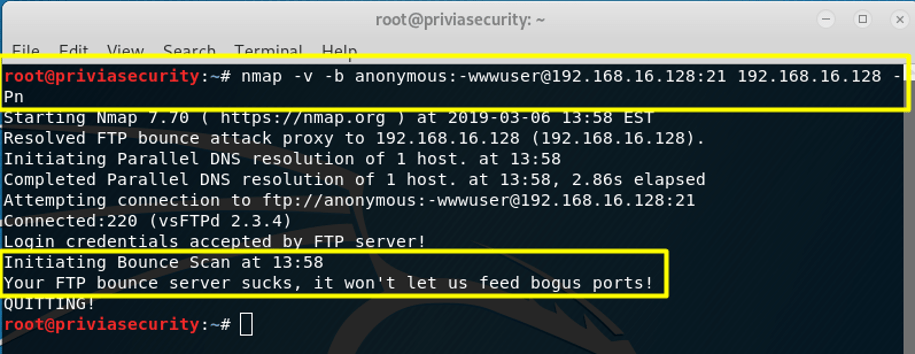
The scan was performed as shown in Figure 8.2.10. It can also be seen as an attack on the FTP server itself. In this attempt, the command specifies the username and password, the FTP server address, then the target address, along with the -Pn option to scan without pinging.
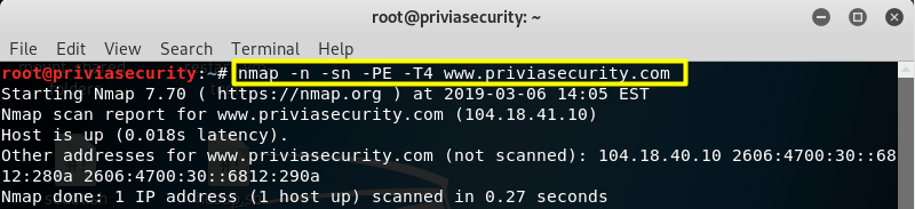
Figure 8.2.11a shows a network scan. The -n option disables DNS resolution, -sn disables port scanning, -PE performs an ICMP echo scan, and -T4 adjusts timing and performance, since the aim here is simply to discover which systems are present on the network. For the purposes of the example, the domain www.priviasecurity.co.uk is used. You could equally discover the systems on a network by giving a range such as 192.168.16.0/24, or by calculating the subnet of a machine such as 104.18.41.10 and using /24, /32, and similar options.
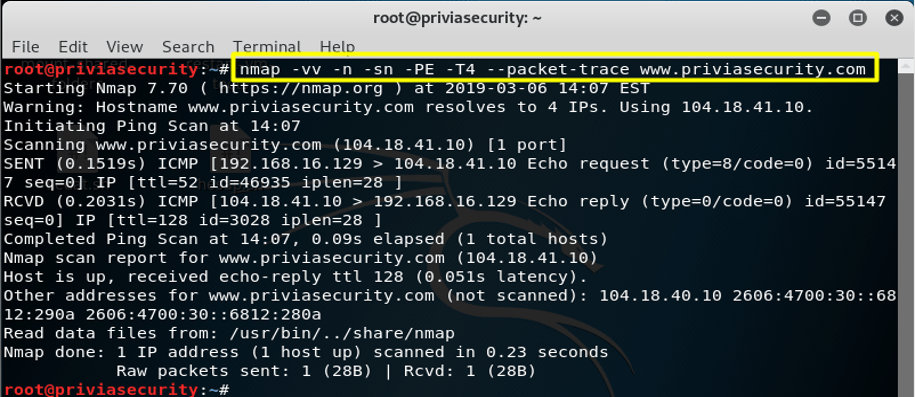
packet trace OptionFigure 8.2.11b shows a general scan that takes advantage of the --packet-trace option.
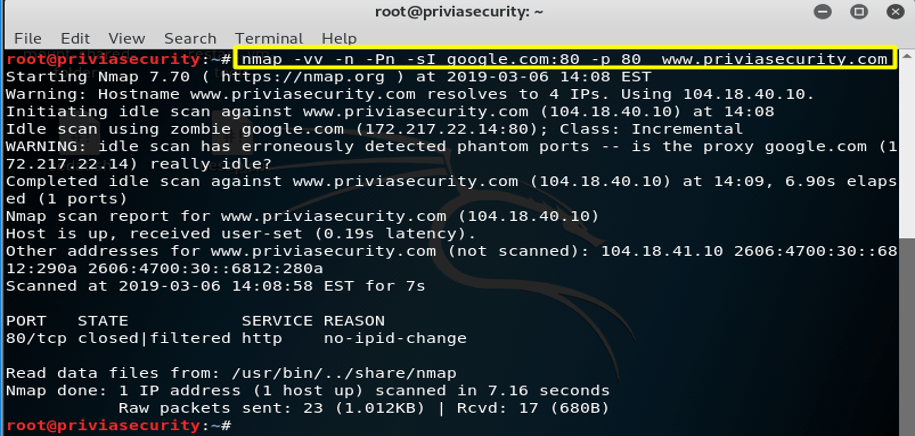
Figure 8.2.11c shows an idle scan against port 80 on the target. Here, the machine hosting google.com is designated as the zombie, and the scan is carried out by communicating through it.
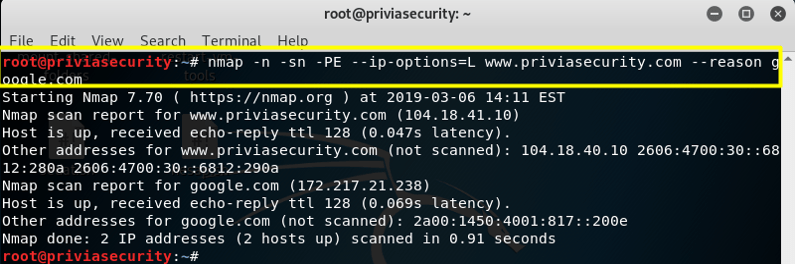
ip options OptionAs Figure 8.2.11d shows, the target machine is scanned using the advantages of the --ip-options option.
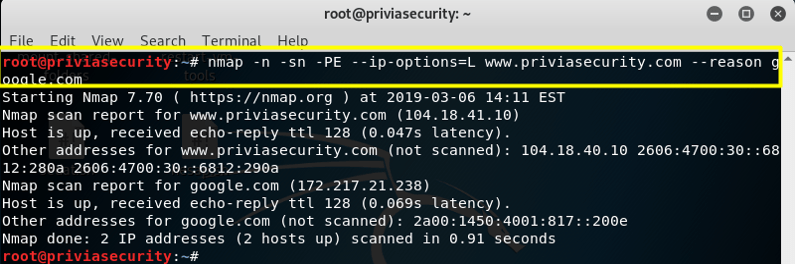
Pn OptionIn Figure 8.2.11e, a scan without pinging is performed in addition to the techniques used in Figure 8.2.11d.
You May Be Interested In These



We use a few cookies that are needed to make this website work, and they are always on. We would also like to set analytics cookies, to see which pages are useful; functional cookies, so that our live chat works; and advertising cookies, to measure our campaigns. We will not set any of those until you say yes, and you can change your mind at any time from the Cookie Settings link in the footer.
Choose the cookies you are happy for us to use. Strictly necessary cookies are always on; everything else is off until you turn it on.
These cookies keep the website working: they hold your security checks, your form submissions and the choice you make here. The site cannot run without them, so they are always on.
These let our live chat open and remember your conversation, and let the newsletter sign-up work. Switch them off and the chat window will not appear.
These tell us which pages are read and how people find us, so that we can improve the site. The reports are about groups of visitors, never about you personally.
These let us measure our advertising and show you our adverts on other websites, such as LinkedIn, Google and Meta. Switch them off and you will still see adverts, but they will be less relevant.


