

Explore our new Cybersecurity Terms Glossary, explained by our experts.

Explore our new Cybersecurity Terms Glossary, explained by our experts.
Cybersecurity Terms Glossary
Social engineering manipulates people rather than systems, using persuasion and deception to extract sensitive information. Learn the attack lifecycle, key techniques, and phishing types.

What Is Social Engineering?
Social engineering is one of the oldest and most effective forms of cyberattack in the history of the internet. It treats mistakes in human behaviour as a vulnerability and covers every attempt to obtain valuable information by exploiting those weaknesses through persuasion and deception.
Put another way, it is a cyberattack method that uses psychological manipulation to lead people into making the wrong decisions, making mistakes, and disclosing sensitive information.
By carrying out social engineering attacks, cybercriminals can change the way people make decisions. The lifecycle of a social engineering attack can be shown in four stages: research, hook, exploitation, and exit.
In the research stage, the attacker identifies the victim, gathers background information about them, and chooses an attack method based on what they find. In the hook stage, the victim is lured in: a story is invented to bring them under control, and they are drawn into the attack. In the exploitation stage, the attacker carries out the attack, can widen its scope, and may corrupt or destroy data. In the exit stage, traces of the attack are removed and everything is returned to its normal state.
Anyone can carry out a social engineering attack. A malicious hacker may use social engineering to harm an organisation or an individual, while a cybersecurity specialist may test whether an organisation or person can withstand social engineering attacks and report the findings. Intelligence agents carry out social engineering attacks in their country’s interests, and companies may use social engineering to gain an edge over their competitors. In short, anyone can use social engineering to achieve a particular goal.
The following factors are among the main reasons organisations are left exposed to social engineering attacks:
If an organisation is chosen as the target of a social engineering attack, information about it can easily be gathered from social media platforms. Its publicly accessible web pages and internet-facing servers can also be examined.
Every organisation’s website has a domain name, and freely available online tools can be used to collect information about the target through it.
The information-gathering tool known as Whois can retrieve details about a target organisation without interacting with its servers. These may include the first name, surname, phone number, email address, and home or work address of the person who registered the domain on the organisation’s behalf. It can also reveal when the domain was registered and when the registration expires.
Some social engineers keep track of when the domains of prominent organisations are due to expire. If an organisation’s domain lapses without being renewed, the social engineer registers it and puts it up for sale at a high price. To protect its reputation, the organisation is then forced to buy the domain back at that inflated price, and the social engineer makes a financial gain.
The image below shows a Whois lookup for the google.com domain.

Here, the Whois tool has been run against the “google.com” domain. The results show that the registration for “google.com” expires on 14 September 2028. Google’s registration period may be long, but some companies register their domains for less than six months at a time. To stop social engineers from taking over their domain names, it is important for companies to keep track of them.
Gathering information about a target organisation is not limited to Whois. Online services such as robtex.com, mxtoolbox.com, netcraft.com, ripe.net, and arin.net can provide more detailed information: the servers the organisation uses can be listed, and the official email addresses of its employees can be identified.
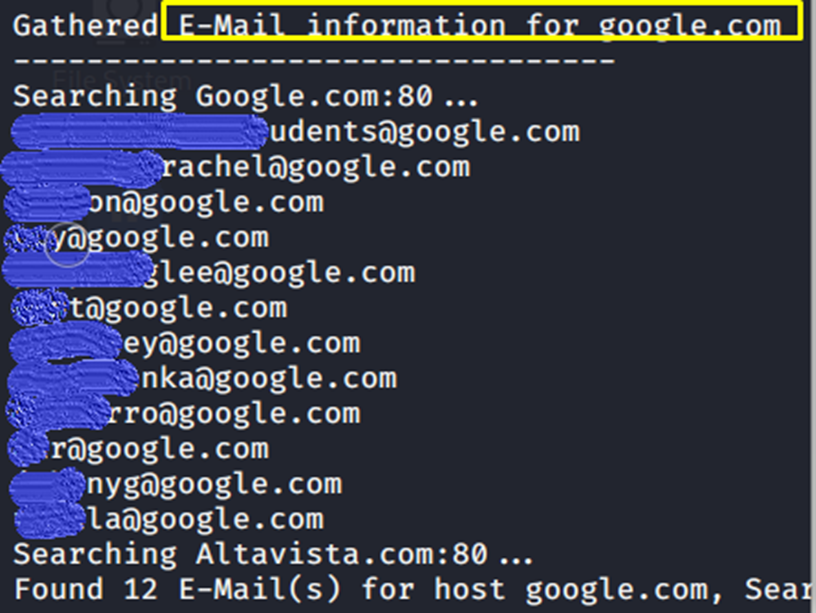
In the example above, email addresses using the “google.com” domain were obtained. By analysing them, an attacker could target the email address of a privileged user with a phishing attack—one of the best-known social engineering techniques.
DNS queries can be run against the target organisation’s domain to find out which servers sit behind it. For each server identified, details of the server itself, the services running on it, and their versions can be obtained. The dig tool can be used to perform these DNS queries.
Documents shared by the organisation, such as .docx, .xlsx, and .pdf files, can be examined for information about the people who edited them. To find these documents, Google dorks such as ext:docx,pdf,xlsx or filetype:docx,pdf,xlsx can be used. Google dorks can reveal critical information about a target organisation.
Shodan is a search engine for finding internet-connected devices. It can identify the servers, camera systems, and other internet-connected devices used by the target organisation. Beyond finding the devices, Shodan reports their open ports and the versions of the services listening on them. If a service may be vulnerable, it even provides the CVE identifier of the vulnerability.
Information can also be gathered from snapshots of the organisation’s websites, without interacting with the sites themselves. Archive.org can be described as a digital library.
Archive.org takes snapshots of publicly accessible websites at regular intervals and stores them in chronological order. As well as website snapshots, it keeps copies of some of the videos, images, music, and documents shared online. Social engineers who want to compromise an organisation can find critical historical information in this online digital library.
If the target is an individual rather than an organisation, their social media accounts are examined. Their past posts are reviewed, and everything they like and dislike is noted. A personality profile is then built from their social media accounts. Information from social media is therefore valuable for identifying the target’s weak points. Once these weak points are known, the social engineer can choose a technique that exploits them to bring the target under control.
Online services such as Knowem.com and checkusernames.com can reveal which social media platforms a target uses based on their username, widening the scope of the information that can be collected. Open-source tools can be used alongside these websites, and Google dorks can likewise be used to gather information about the individual.
Social engineers use different techniques to obtain the information they are after. They first research the victim and then choose the technique that will get them the information most easily and smoothly. Research points to ten main social engineering techniques:
Baiting is a social engineering technique that exploits people’s curiosity. What sets it apart from other techniques is that it approaches the victim with the promise of something good. Online, a user might be prompted to install a software update. In the physical world, the classic example is a USB stick, which almost everyone is curious about. A social engineer targeting an organisation might leave a USB stick in its grounds during the lunch break, hoping that an employee will pick it up and plug it into a company computer. If that happens, the baiting attack has succeeded.
Scareware is a social engineering technique that takes advantage of a user’s fear and anxiety. Fake warnings claim that the user’s computer is infected with malware, prompting them to download and run software—in reality, malware—to make the problem go away. While browsing, a user may see a warning such as “Your computer may be infected with malware”; the antivirus software it recommends contains malicious code, which is then installed on the computer. Malware can also be delivered to users through spam emails carrying fake warnings.
Pretexting is a social engineering technique in which the social engineer uses cleverly constructed lies to present themselves to the victim as someone in authority. The attacker tries to exploit the victim’s sense of trust: the better the social engineer is at building trust, the more likely the attack is to succeed. Social engineers commonly impersonate police officers, prosecutors, or bank staff to obtain victims’ personal information. When targeting an organisation, they may pose as IT staff to gain access to internal systems.
Tailgating is a social engineering technique in which a social engineer who wants to enter a restricted area—one that is unattended or protected by electronic access control—slips in behind someone with legitimate access. Entering without permission through a third door used only by staff, rather than the main or car park entrance, is one example of tailgating. In another, the attacker poses as a delivery driver and waits at a company’s outer door, tricking the security guard into opening the door and holding it. Access to the company is thus gained through an employee (the security guard). Tailgating may not work at every company, because larger companies require every employee to have an RFID card. Mid-sized companies often do not, however, so an attacker may gain access simply by chatting with an employee.
A watering hole attack is a social engineering technique that compromises the computers of users who visit public websites by installing a Trojan and creating a backdoor. Social engineers identify the sites their targets visit and look for vulnerabilities in them. Even if no vulnerability is found, they may use a zero-day exploit in their possession to plant malicious code on the site. They can then check the site’s logs to learn more about the victim. Zero-day exploits are therefore of great importance to watering hole attacks, which are mostly used in cyber-espionage operations and state-sponsored attacks.
Known as “something for something”, quid pro quo is a variant of baiting. Rather than simply promising the user a favour, it offers a service or benefit in exchange for carrying out a particular action. For example, a social engineer may pose as an IT employee, phone staff at a target company, and offer them a version upgrade or a software installation. They may then ask the user to temporarily disable their antivirus software so that the malware can be installed.
Shoulder surfing is a social engineering technique in which information is gathered by watching over someone’s shoulder. It is generally used in crowded places. Examples include:
Dumpster diving is a social engineering technique in which an attacker searches the bins near a target organisation or its employees for documents that have not been destroyed, collecting personal, corporate, or financial information about the person or organisation. Information about a person can also be gathered from the receipts they throw away when leaving cafés, restaurants, or shopping centres.
Eavesdropping is a social engineering technique in which personal information is obtained by listening in on private or confidential conversations. A typical example is sitting close to a group of friends and overhearing what they say. Planting covert listening devices in an organisation to obtain confidential information shows just how significant this technique can be.
Phishing is a social engineering technique carried out through email, social media, instant messaging, and SMS to trick victims into visiting malicious URLs, with the aim of obtaining their personal and financial information and compromising the systems they use. Messages sent to the user may arouse their curiosity and encourage them to visit a malicious website to find out more. Some phishing messages create a sense of urgency, tricking the victim into revealing sensitive data to resolve a situation that will supposedly get worse if they do nothing. Victims can also be deceived by clones of legitimate websites with genuine-looking URLs. In an email, the visible text of a hyperlink and the address it actually points to may not be the same.
Phishing, one of the most widely used social engineering techniques, has several sub-types of its own. The main types of phishing attack are:
Deceptive phishing is the most common type of phishing attack: fraudsters imitate a legitimate organisation’s email correspondence to lead victims into handing over their personal details and credentials. A sense of urgency is usually created so that victims act quickly without checking. Users can protect themselves against deceptive phishing by enabling two-factor authentication (2FA) and by watching for grammatical and spelling errors in the emails they receive.
Spear phishing involves a legitimate-looking email crafted specifically for the victim, using information from their social media profile and other publicly available details to get them to respond. These emails ask the victim for information while appearing to come from a trusted source, such as a friend or a business. Victims who reply may suffer identity theft, malware infection, credit card fraud, or even blackmail.
Whaling is an attempt to “go after the big fish”, and CEO fraud is a closely related form of the same attack. Social engineers first work out how to access, or impersonate, the email accounts of company executives or CEOs. When a CEO or senior manager asks an employee for critical documents, the employee sends them without question—and that is what makes this type of attack so dangerous. In poorly protected companies, an attacker with access to a senior account can also reach employees’ information and cause financial losses.
Vishing is a type of phishing attack carried out over Voice over IP (VoIP). Because a VoIP server can be made to look like almost anything and caller ID can be spoofed, vishing attacks can be very successful. A typical example is a call to someone in a company from what appears to be a bank or a tax authority such as HMRC or the US Internal Revenue Service (IRS).
SMiShing is a type of phishing attack carried out by text message and is similar to vishing. Because the social engineer can send the same text to many numbers at once, the attack can be very wide-reaching. Social engineers may try to convince victims that they have won a competition, while others pose as banks or credit companies. They then try to obtain the victim’s personal information through a link in the message or by asking them to call a number.
In W2 phishing, social engineers use an executive’s email account, or a lookalike address, to try to collect employees’ Social Security numbers and their W-2 and W-9 forms. It can be considered a type of whaling attack. The W-2 is a US Internal Revenue Service (IRS) tax form used to report the wages paid to employees and the taxes withheld from them. The W-9 is used by third parties to request a taxpayer’s identification number for the information returns they file with the IRS. W2 phishing attacks usually take place during tax season. Sometimes, instead of impersonating an executive, the attacker impersonates the tax authority itself.
Pharming uses DNS cache poisoning to replace the IP addresses of legitimate websites in the DNS cache with the IP address of a malicious site, redirecting users there. Attackers send victims to advertising and malicious sites for financial gain. To protect yourself, check that any web page where you enter personal information is a secure, HTTPS-protected site.
Many ransomware phishing emails encourage the victim to download a file from a link that contains ransomware. Rather than collecting personal information, ransomware phishing infects the user’s computer and demands payment. Victims pay the ransom to free computers that are being held hostage by the malware. To protect against these attacks, examine incoming emails carefully and scan any downloaded file with trusted antivirus software before running it.
The file-sharing platform Dropbox is one of the platforms social engineers exploit. They send the victim an email that appears to come from Dropbox, asking them to sign in. Using the credentials they capture, the social engineers sign in to Dropbox and gain access to the victim’s private files, photos, and videos, which are then used for blackmail and financial gain. The best protection against these attacks is to enable two-factor authentication.
The technique used against Google Docs is the same as the one used against Dropbox. A legitimate-looking fake sign-in page is used to obtain victims’ usernames and passwords. With these credentials, attackers gain access to the victim’s files, videos, photos, and other documents. To protect themselves against these attacks, users need to enable two-factor authentication.
The shift to remote working caused by the COVID-19 pandemic led to a rise in social engineering attacks. According to Cynet’s statistics, phishing attacks increased between 15 February 2020 and 15 March 2020. The image below shows statistics on the phishing attacks recorded over that period.
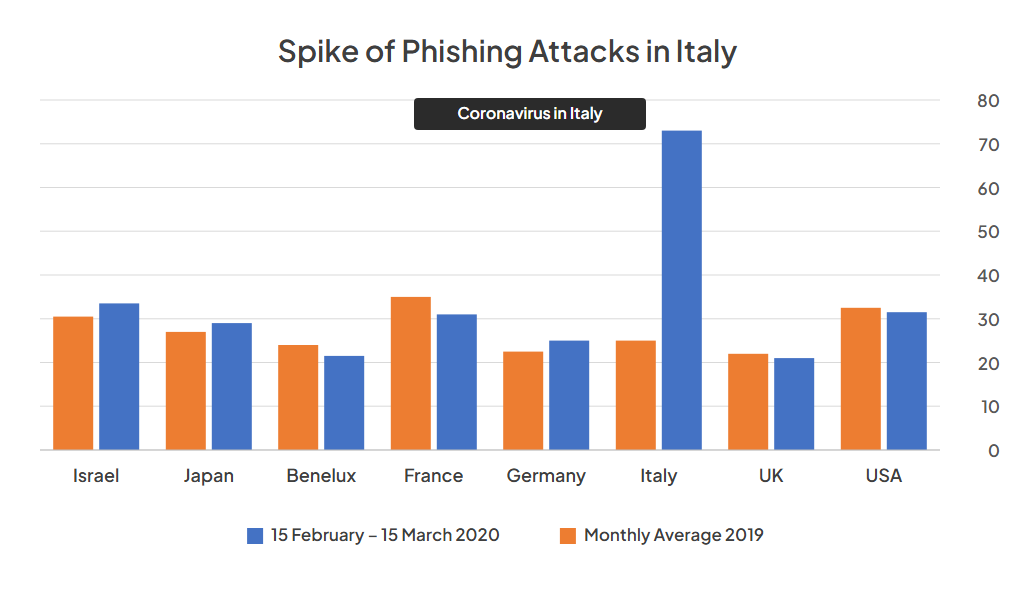
During the COVID-19 pandemic, phishing attacks on people in Italy rose more sharply than in other countries. According to Cynet, most of the phishing attacks against Italy were email-based, as shown below.

The chart shows that email-based phishing attacks against Italy rose sharply between 2 February and 15 March. According to Cynet, the attack vectors in phishing emails sent to users were distributed as follows:
During the pandemic, many email-based phishing attacks asked people for donations in the name of the CDC, the US public health agency. An example of one of these attacks is shown below.
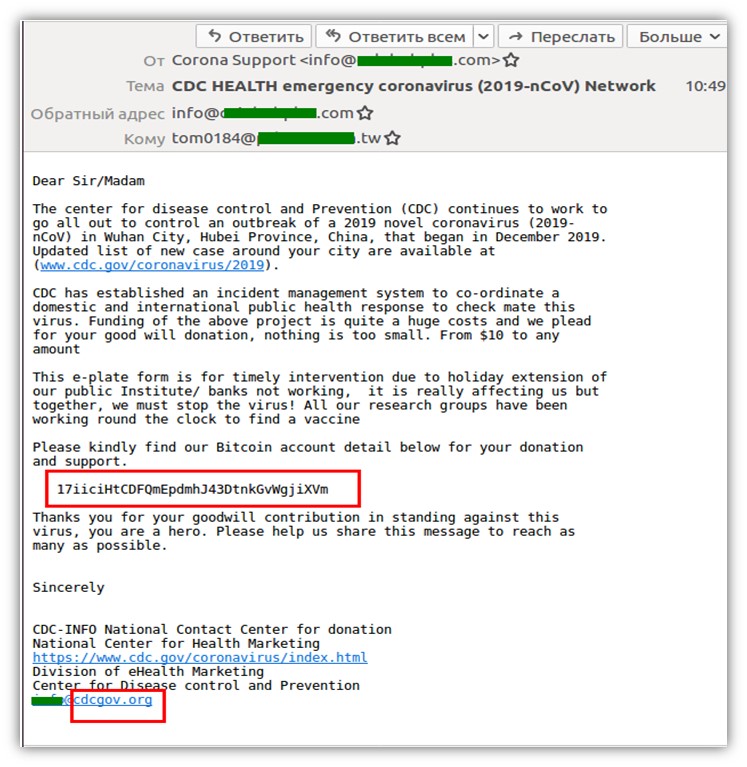
The email, which used the COVID-19 pandemic as a pretext to collect donations, gave a cryptocurrency wallet for sending them. Health organisations around the world do not ask the public for donations in this way—and even if they did, they would not do so by email with a cryptocurrency account number. The email address in the attacker’s signature also differs from the real health organisation’s address. To protect yourself against attacks like this, examine incoming emails closely.
Social engineers can send emails to victims using public or fake mail servers. The image below shows an example of a crafted email.
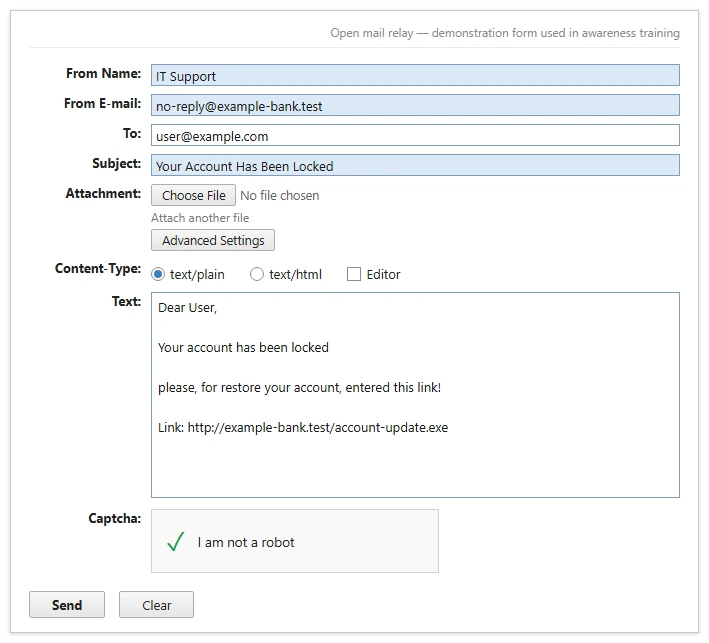
In this crafted email, the user is asked to click a link. When they do, a malicious file is downloaded to their computer. A more detailed email could also persuade them to run the downloaded file, allowing the victim’s machine to be compromised. Below, you can see that the email was delivered successfully.
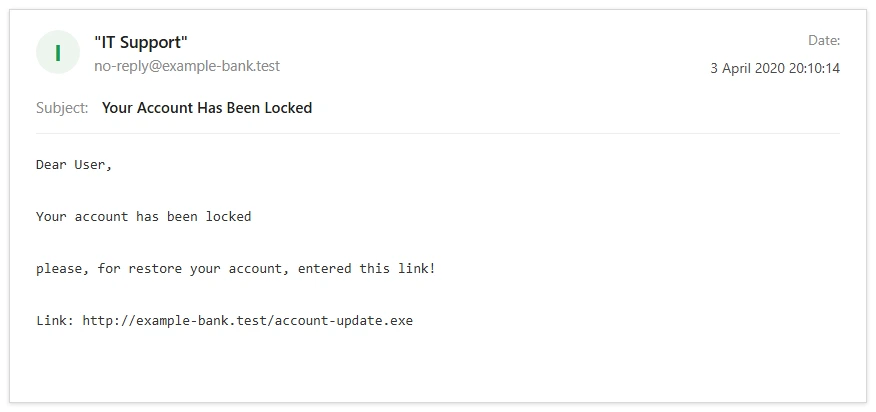
As shown above, the email appears to come from a bank the recipient uses. The visible part of an email can claim to be from anyone, but it does not reveal which server actually sent the message. That is why you should look out for grammatical and spelling errors in the content. If you want to click a link, scan it on VirusTotal first to check whether it is malicious. If the link downloads a file that you are asked to run, test the downloaded file on VirusTotal before running it.
Social engineers can design their own scenarios and fake websites for phishing attacks, or use ready-made open-source tools. The setoolkit tool (the Social-Engineer Toolkit) included in Kali Linux is one of the most important tools used in social engineering attacks.
HiddenEye, another open-source tool, is built for phishing. In the example scenario below, the tool first needs to be downloaded and installed. It is then launched, and on start-up it asks you to confirm that it will be used for educational purposes only. The image below shows the attack vectors available in HiddenEye.
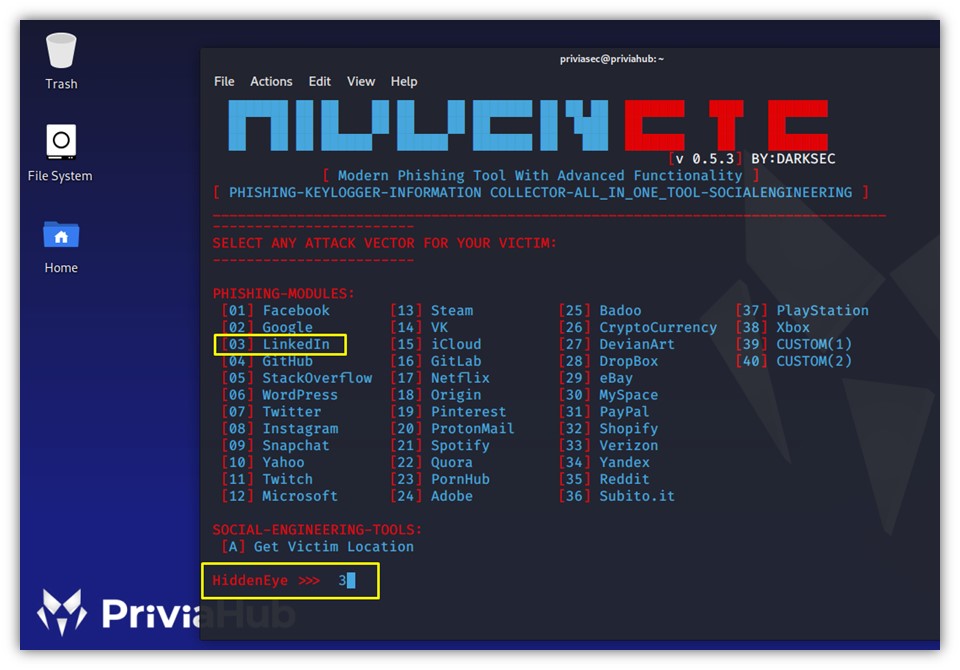
As shown above, there are 40 attack vectors in total. For this example, we select the LinkedIn attack vector. The tool then asks whether the keylogger feature should be enabled.

Once the keylogger option has been set, the tool asks whether Cloudflare protection should be added to the fake page, and the feature can be enabled at this point.

As you can see, the Cloudflare feature has been enabled, which can increase the victim’s trust in the page. The next image shows where the user should be redirected after entering their details.

Because the scenario uses LinkedIn, the victim will be redirected to linkedin.com after entering their credentials. The next step specifies which port the server hosting the fake page should use.

Here, the web server port is set to 8084. The server is selected next.
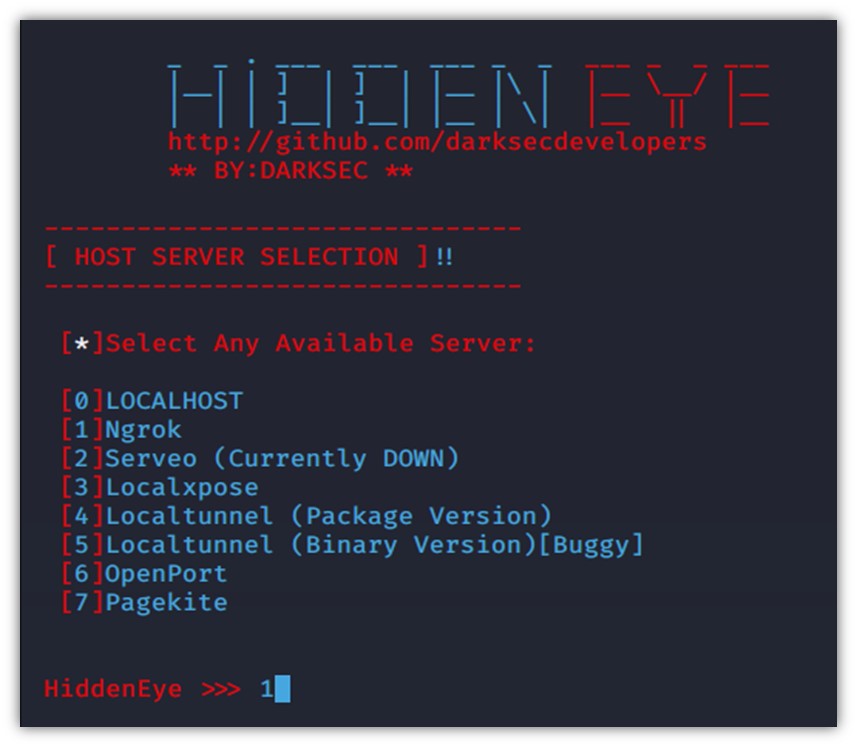
Ngrok is selected as the web server. Based on the choices made, the tool then displays the URL of the fake page and the URL of the server.
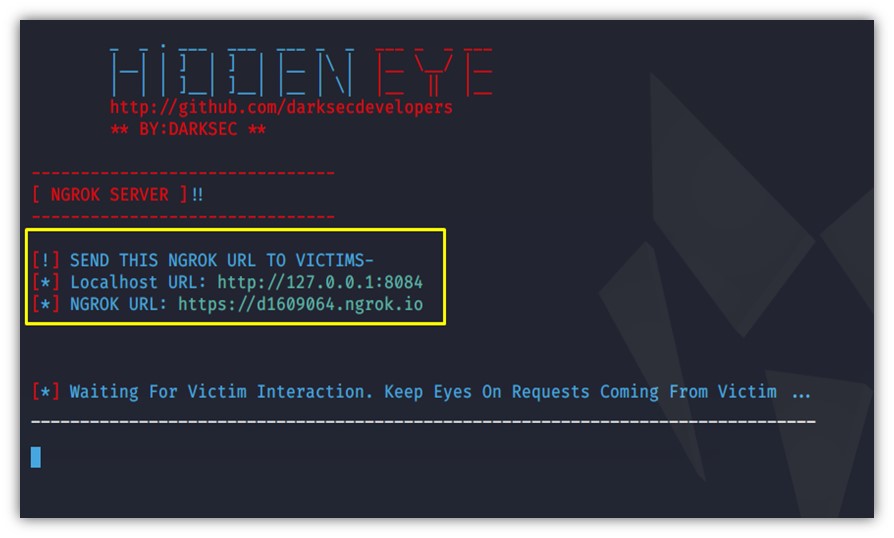
Once the fake page has been created with Ngrok, its opening screen is displayed.

With the Cloudflare feature enabled, a fake page like the one in the image is shown, helping to win the victim’s trust. The prepared fake LinkedIn page then appears.

This is an exact replica of the LinkedIn sign-in panel, where the victim will enter their credentials. When they sign in, every credential they enter is recorded by the server.
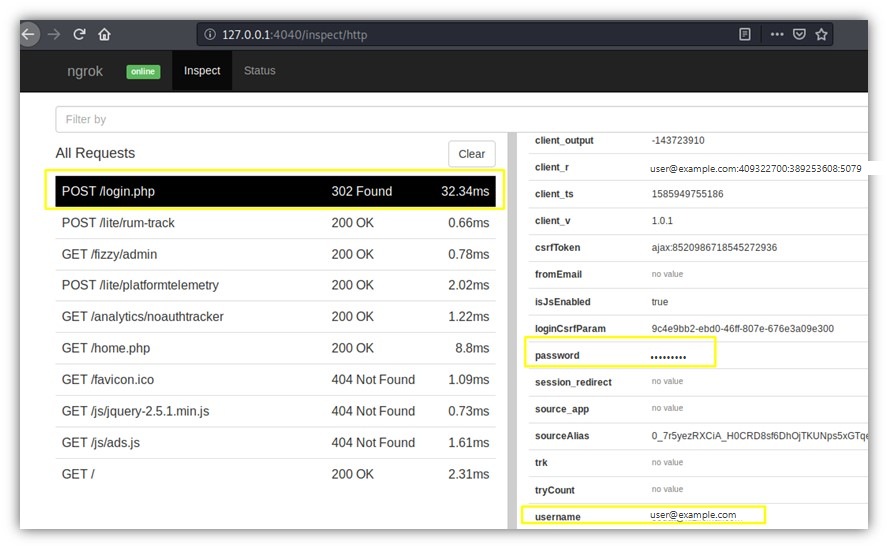
The victim’s credentials have now been captured. Once this happens, the victim is redirected to the genuine LinkedIn page.
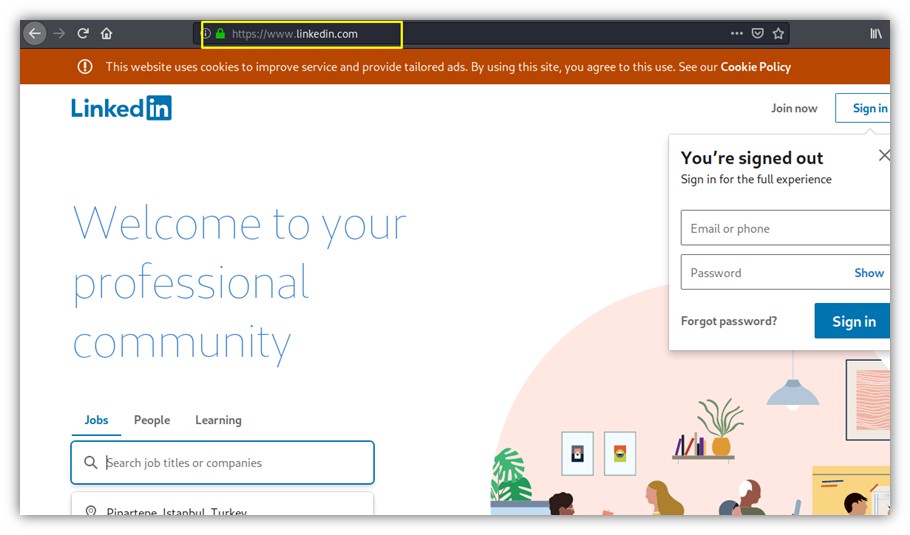
Finally, the linkedin.com homepage to which the victim has been redirected is displayed, and the phishing attack has been completed successfully.
Author: Sedat Kizilcinar
Edited by: Hamza Samlioglu
You May Be Interested In These



We use a few cookies that are needed to make this website work, and they are always on. We would also like to set analytics cookies, to see which pages are useful; functional cookies, so that our live chat works; and advertising cookies, to measure our campaigns. We will not set any of those until you say yes, and you can change your mind at any time from the Cookie Settings link in the footer.
Choose the cookies you are happy for us to use. Strictly necessary cookies are always on; everything else is off until you turn it on.
These cookies keep the website working: they hold your security checks, your form submissions and the choice you make here. The site cannot run without them, so they are always on.
These let our live chat open and remember your conversation, and let the newsletter sign-up work. Switch them off and the chat window will not appear.
These tell us which pages are read and how people find us, so that we can improve the site. The reports are about groups of visitors, never about you personally.
These let us measure our advertising and show you our adverts on other websites, such as LinkedIn, Google and Meta. Switch them off and you will still see adverts, but they will be less relevant.


