Privia Security was chosen as one of Türkiye's fastest growing companies!

Privia Security was chosen as one of Türkiye's fastest growing companies!

Nmap is one of the most advanced network scanning tools available today. Nmap is used to detect the IP addresses of devices on a network, device information, open ports, operating systems, services running on open ports, and vulnerabilities on devices.
In security tests conducted against any organisation or institution, the information gathering, scanning, and enumeration phases of the penetration testing lifecycle can be carried out using Nmap. First, the target network is scanned to carry out the information gathering phase, and information about the devices running on the target network is obtained. The IP addresses and hostname information of running devices are among the information collected.
As an example, the information gathering, scanning, and enumeration phases of the penetration testing lifecycle can be carried out with Nmap on a network with the CIDR notation 192.168.30.0/24.
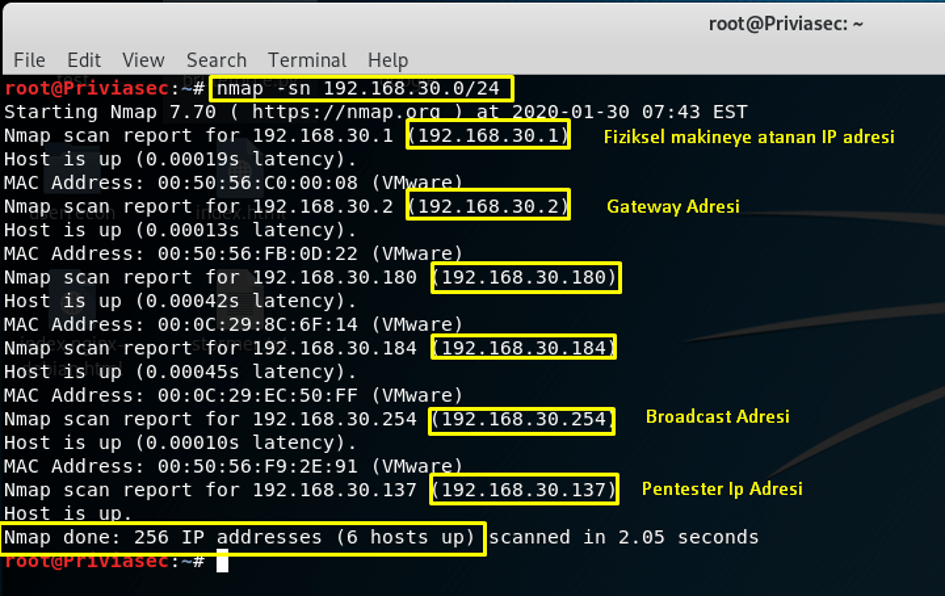
In Image 1, it was determined which machines are online within the IP range 192.168.30.0/24. The –sn parameter is used to check whether machines are online without performing any port scanning on the target machines. In the scan, 5 systems with IP addresses were found to be online in addition to the physical machine with IP address 192.168.30.1. 192.168.30.2 is the Gateway IP address, 192.168.30.254 is the Broadcast IP address, and 192.168.30.137 is the IP address performing the scan. The IP addresses 192.168.30.180 and 192.168.30.184 are the target machines detected as online. The machines were detected as a result of an ARP Ping Scan. Some firewalls block Ping scans. The –Pn parameter can be used to bypass firewalls that block Ping scans.
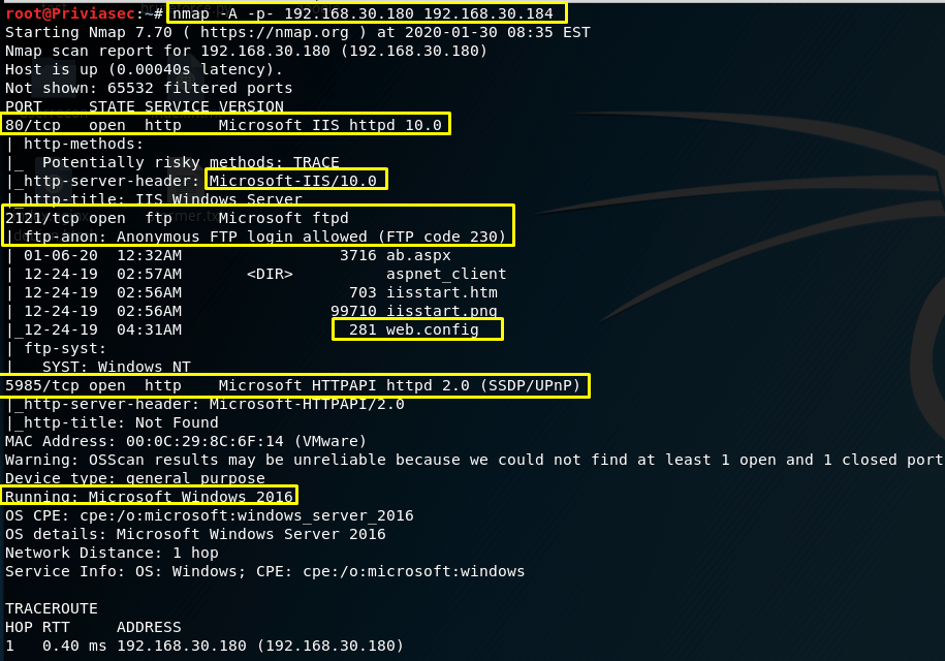
In Image 2, an aggressive mode (-A) and full port scan (-p-) was performed against the IP addresses 192.168.30.180 and 192.168.30.184. On the machine with IP address 192.168.30.180, ports 80, 2121, and 5985 and the services running on them were detected. Using the ftp-anon NSE script against the FTP service running on port 2121, the Anonymous user was found to be active on the system. The machine’s operating system was identified as Microsoft Windows Server 2016. The machine with IP address 192.168.30.184 is shown in Image 3.
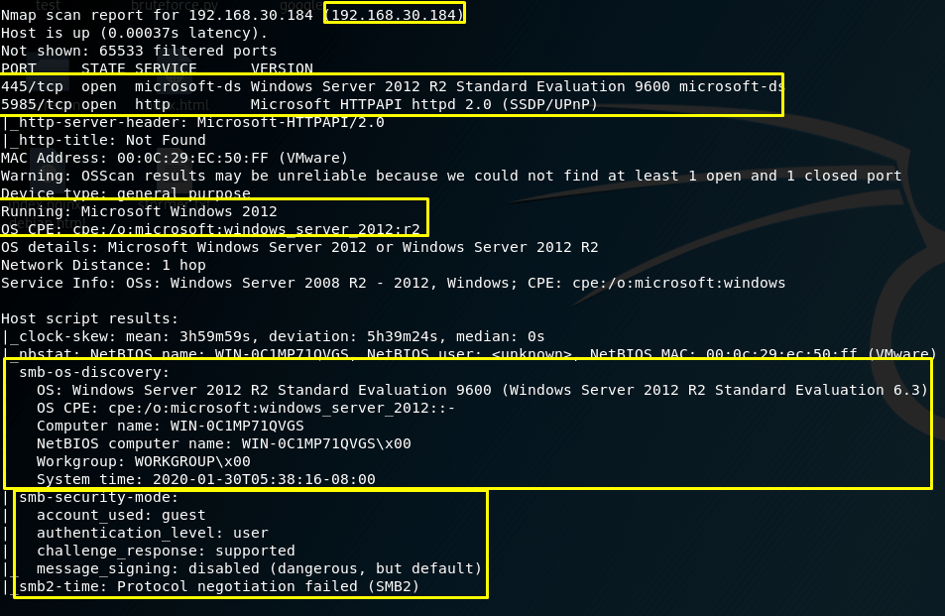
In Image 3, scanning the IP address 192.168.30.184 revealed that ports 445 and 5985 are open. The version information for the microsoft-ds service running on port 445 identified the operating system as “Microsoft Server 2012 R2 Evaluation 9600”. In addition, since the scan was run in aggressive mode, some NSE scripts were used against the SMB service running on port 445. The output of the smb-os-discovery script identified the operating system information, computer name, and system time. Using the smb-security-mode NSE script, the guest user was found to be active on the target system. As a result, scanning and information gathering operations against the system were completed using Nmap.
After information gathering and scanning, scripts built into Nmap can be used to check whether open ports contain vulnerabilities. These scripts, which check for vulnerabilities on the target system, are located in the vuln category. In Image 4, vulnerability detection was performed against the target systems.
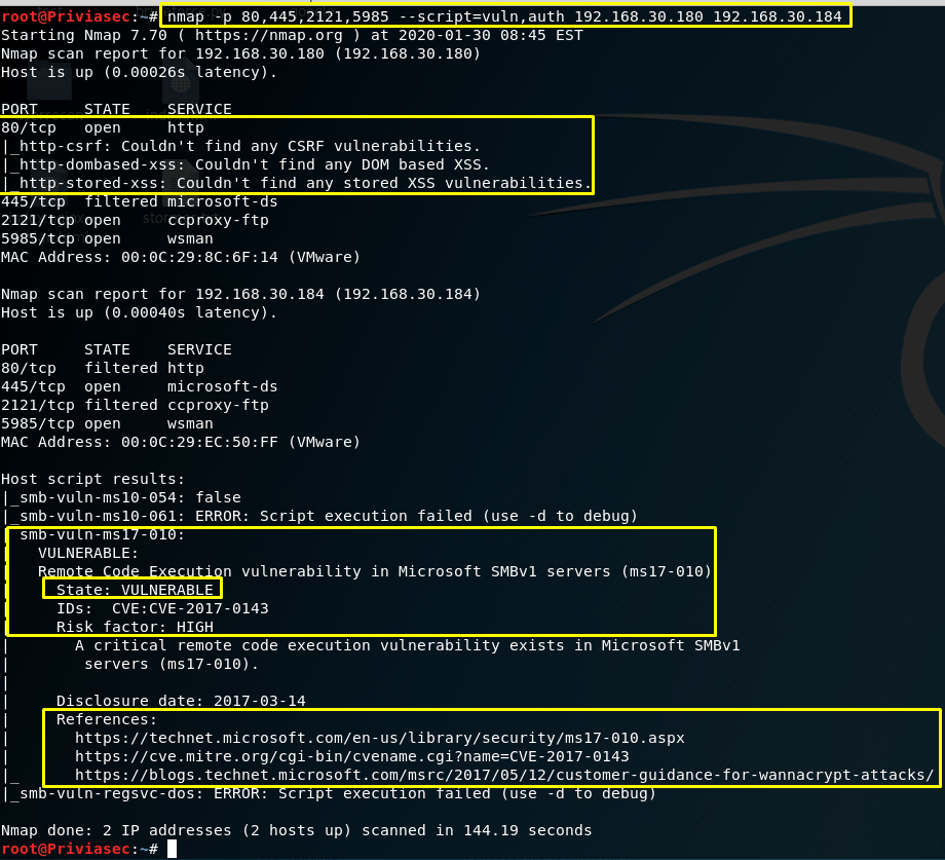
In Image 4, a scan was performed against ports 80, 445, 2121, and 5985 on machines with IP addresses 192.168.30.180 and 192.168.30.184. The scripts in the vuln and auth categories were used. Vuln scripts were used for vulnerability detection, and auth scripts were used for authentication operations.
In Image 4, since an HTTP service is running on port 80 of IP address 192.168.30.180, the http-csrf, http-dombased-xss, and http-stored-xss scripts were used. Against port 445 of the machine with IP address 192.168.30.184, the scripts smb-vuln-ms10-054, smb-vuln-ms10-061, smb-vuln-ms17-010, and smb-vuln-regsvc-dos were used. The smb-vuln-ms17-010 script, which belongs to the vuln script category, detects the remote code execution vulnerability known as MS17-010 on the target system. The presence of the word VULNERABLE in the resulting script output indicates that the machine is vulnerable.
For vulnerability detection, the –script parameter can be assigned not only script categories, but also script names and extensions. In Image 5, vulnerability detection was performed against port 445 of the machine with IP address 192.168.30.184.
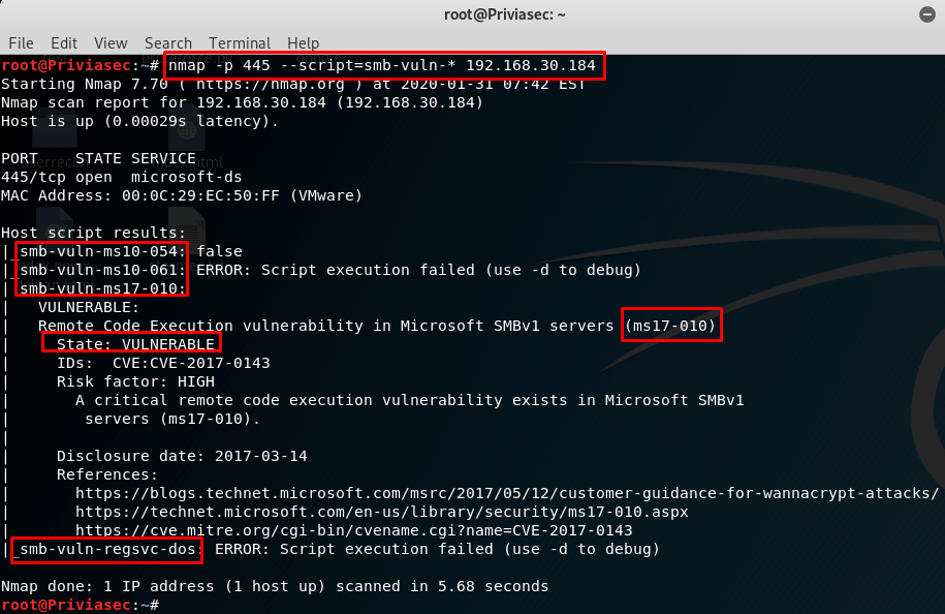
In Image 5, the asterisk (*) in the value smb-vuln-* causes all scripts beginning with smb-vuln- and ending with different words to be used. In the same way, the use of scripts can be customised for scans targeting different ports. For example, the command “nmap -p80 –script=http-* 192.168.30.180” can be used.
In addition, it is important to know what output Nmap produces when the Windows firewall is active or inactive on a target system. Image 6 shows the Nmap output in a scan performed with the firewall both active and inactive.
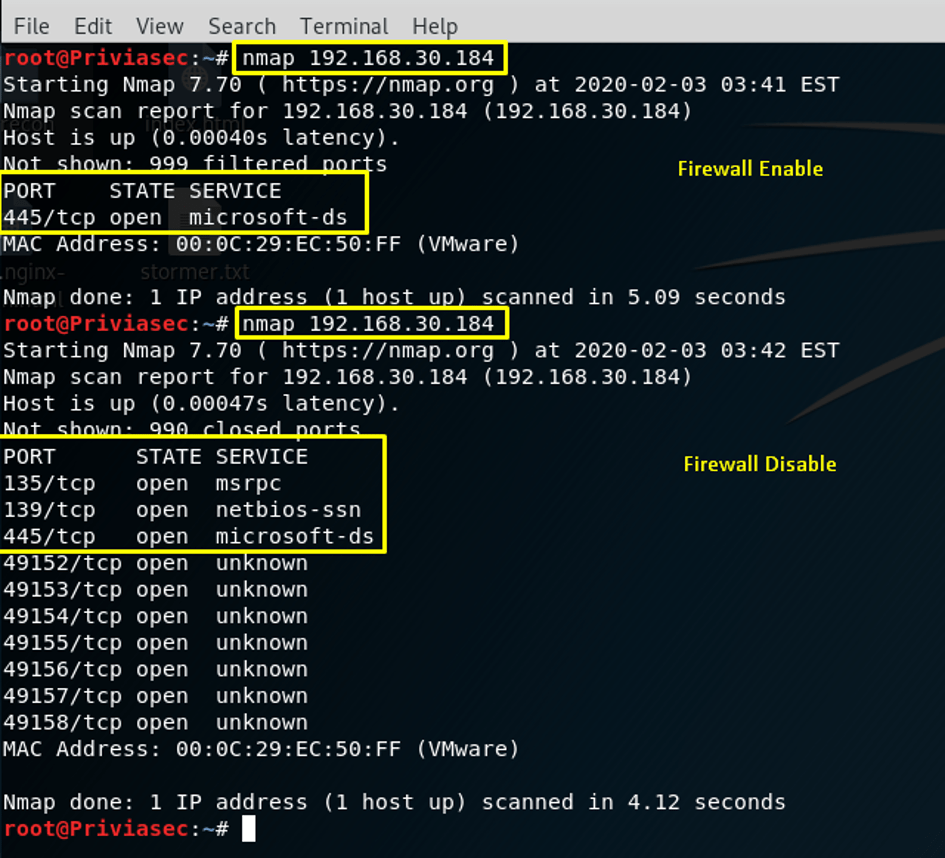
In Image 6, in a default scan performed using the command “nmap 192.168.30.184” with the Windows firewall active, port 445 was detected as open. The reason port 445 was detected as open is that an Inbound rule allowing traffic on port 445 is enabled in the firewall. In the second Nmap scan, ports 445, 139, and 135 were detected as open. These two examples show the differences between Nmap output when the Windows firewall is active and when it is inactive. In Image 7, a TCP ACK Scan was performed — one of the techniques used to bypass firewalls.
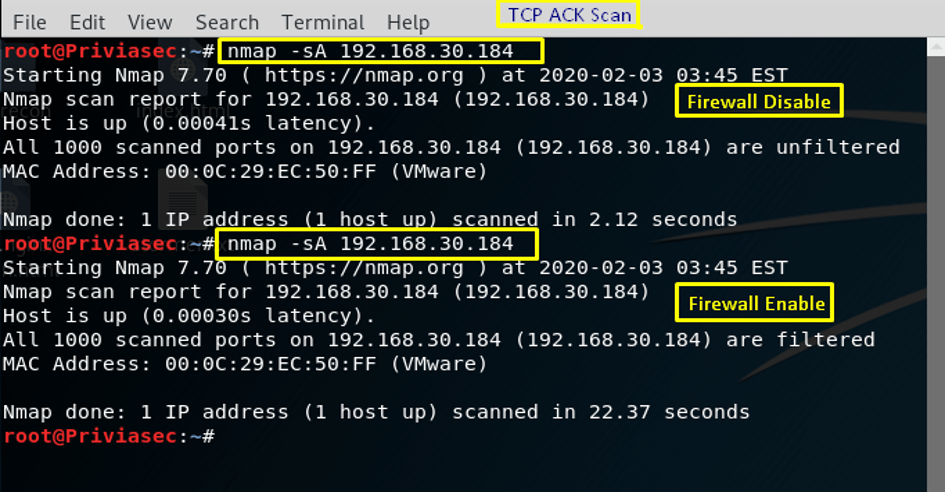
In Image 7, a TCP ACK Scan was performed using the –sA parameter. When the firewall is inactive, the default 1000 ports are marked as unfiltered. When the firewall is active, the specified 1000 ports are marked as filtered.
Another technique used to bypass firewalls, in addition to TCP ACK Scan, is TCP Window Scan. Image 8 shows a TCP Window Scan.
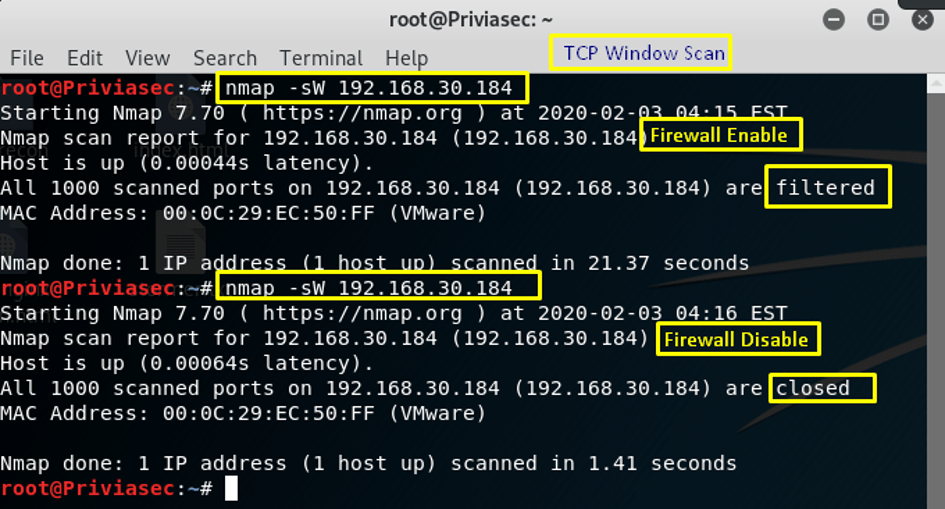
In Image 8, a TCP Window Scan was performed using the command “nmap –sW 192.168.30.184”. When the Windows firewall is active, 1000 ports were marked as filtered. When the Windows firewall is inactive, 1000 ports were marked as closed.
When the Windows firewall is inactive, the TCP ACK Scan output marks 1000 ports as unfiltered, while in the TCP Window Scan 1000 ports are marked as closed. In this way, the two scanning techniques can be compared. Finally, in Image 9, scanning was performed using the fragmentation technique with the Windows firewall both active and inactive.
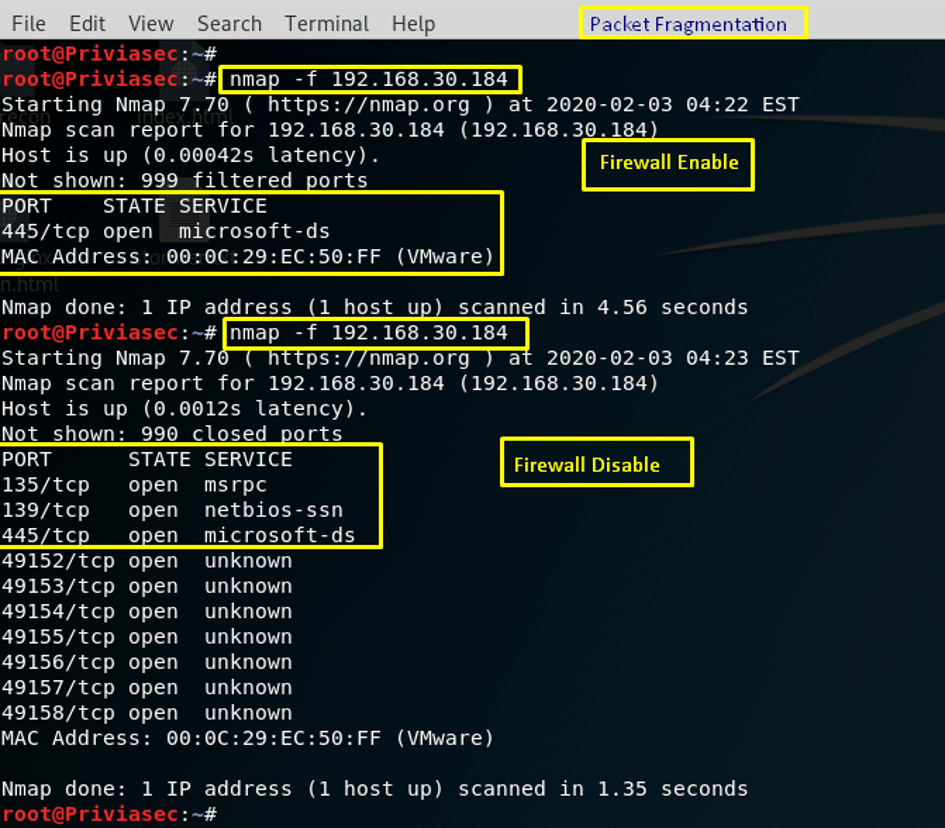
The fragmentation technique causes the packets being sent to be fragmented, making it harder for the firewall to detect packet content. In Image 9, a scan performed using the fragmentation technique with the Windows firewall active detected port 445 as open. As in the example above, the reason port 445 is detected as open here is also because an Inbound rule allowing traffic on port 445 is enabled in the firewall.
When the Windows firewall is disabled, ports 445, 139, and 135 were detected as open. In this way, the differences in Nmap output between situations where the Windows firewall is active and inactive can be observed.
You May Be Interested In These