Privia Security was chosen as one of Türkiye's fastest growing companies!

Privia Security was chosen as one of Türkiye's fastest growing companies!

Cookies are small pieces of data, that is, web identifier information, that help many websites to offer a better service to their visitors. However, when you bring these small pieces together, the traces we have left behind can turn into a frightening nightmare!
Cookies created in users’ browsers have spread to a far broader and different range of uses with developing technology. We are evolving towards a world in which we witness that these cookies can be used at many points, from advertising companies to intelligence agencies.
While we produce data through our browsers, IoT technologies have also begun to communicate over the internet, to produce data and to leave footprints. So, alongside the data we produce, what information can be reached through these small data fragments called cookies, which we see as harmless?
It has now become a matter of time before the physical world is exposed through the footprints users leave in cyberspace. We want to show internet users that a new era has begun, that we have stepped into an era in which we will see debates about privacy much more frequently.
From their earliest days, cookies have been a subject of debate for people. Monitoring people’s surfing habits, profiling them; this has also brought with it events that we sometimes blow out of proportion and around which we sometimes construct paranoid scenarios.
The main purpose of cookies, from the early days of the internet, has been based on being identifier information. That is to say, it began with recognising you, keeping your session open, and offering correct recommendations based on your habits. Then it attracted the attention of advertisers and the marketing world, and brought with it the marketing methods used for increasing product sales with more targeted advertising.
In the use of cookies, we consumers always had one advantage. The fact that we can delete cookies whenever we want. On the other hand, for a marketing expert the target audience is one of the most important elements. Advertising the right product or service to the right target audience always produces successful results.
As marketing tools and tracking systems developed, browsers foresaw that this situation created a security risk and allowed cookies to be automatically deleted within certain periods.
For the marketing world, this situation was one of the biggest difficulties. Then we encountered profiling. Now, alongside deletable cookies, we began to be targeted with non-deletable profiles. This is where your fingerprint also comes into play. Your habits, your interests, your movements, together with your system – that is, the hardware and software characteristics of the computer you are connecting with – have made it possible to single us out.
At this point, when you create a profile, even if the user’s cookies are deleted, profiles that serve as a fingerprint remain at your disposal. In this way, you can recognise the visitor and target them again.
The big players in the marketing world began to test this new theory. Mobile operators such as Verizon Wireless succeeded by trying out persistent identifier information on their users’ mobile devices.
It is very natural behaviour for websites to add identifier information to our computers in order to identify visitors. Otherwise, having to log in constantly, or having to enter a password dozens of times again and again rather than just once while moving around a page, would tire people out and the experience would cease to be usable.
Websites prevent such negative situations by recording some data packets in our browser in order to clearly establish the concept of usability and to provide a good user experience. We define these data packets as cookies.
Alongside these data packets, we are now also using technologies that perform certain functions on our browsers and transmit the responses to these functions to the servers on the other side. Of course, at this point HTML5 comes into play.
Now, websites have come to a state where they can also use, alongside cookies, fingerprints – that is, unique codes – in order to identify us. Generally, the <canvas> feature of HTML5 is used. With JavaScript too, this information can be transmitted to the servers on the other side. Since this is a different way of identifying the user, even if cookies are deleted, by performing some sort of matching they can reveal the visitor from their profile.
This situation was announced in 2012 with an article published by Keaton Mowery and Hovav Shacham. Then we began to see that services such as AddThis, which reach millions of users, were carrying out these experiments without their users’ knowledge.
Plenty of Fish, Ligatus, AddThis, WhiteHouse.gov, CBS.com…
Of course, it was thanks to the researchers who revealed that we were being profiled that we learned about this situation. Most of these pages were forced to make a public announcement. They stated that these experiments were a test, and that the information was subsequently deleted.
When you visit a web page, by analysing how media and data such as text, images and audio files are processed, some information is collected about your computer, such as the following.
If you notice, none of the above contains personal data! However, this data has branched out so much that, when brought together – from the software you have installed to the system you are using – identifying you has become much easier.
The EU also confirmed that the consent rules in its Privacy and Electronic Communications Directive are applicable to device fingerprinting and other alternative technologies to cookies. It has thus been proven that EU laws on internet privacy, such as the protection of our personal data, are essentially ineffective at protecting against these aggressive tracking technologies.
Fingerprints can constitute personal data; therefore the processing of this information is subject to data protection laws. Website administrators are required to provide clear and comprehensive information about how the collected data is used, and to obtain users’ consent in order to use the information for targeted advertising. However, do you really believe that the “opt out” buttons that website administrators put before you really opt you out? That is at their discretion…
Of course, fingerprint data can be used without obtaining consent. It is used only to adapt the user interface to the device, to provide a service explicitly requested by the user, or as a security check to prevent unauthorised access to services. However, in order to provide access to services and to authenticate the identity used, they can use fingerprinting as part of a broader mechanism. It is at this point that they need to obtain our, the user’s, consent.
We can explain what we mean by unauthorised access as follows. You are an education platform, you provide online education and you administer exams. In the exam, by using a fingerprint, you can prevent cheating and similar situations. Or, let us assume that you are a platform such as XFlix.com; just as security requires it, you can also use it to prevent misuse. This is a perfectly natural behaviour.
You have turned off cookies, you are browsing in a private tab? Are you one of those who think that no one can track your every move and that you are safe? You were wrong! Websites built with modern and new technologies, when combined with the world of marketing, use innovative techniques. Even though most platforms such as Xflix may not have rolled this out, you can assume that they are seriously considering it.
I would also like to remind you that there is an unpleasant side to the matter. The same work can also be used for different operations. Think of them as essentially non-deletable cookies! By performing cookie synchronisation, cookies can be regenerated in the browsers of identified people and can be maintained, by being regenerated after every deletion. Let us also note that they are generally created with JavaScript called Evercookie.
These cookies are prepared to be regenerated when the user deletes them. They have a backup, and when Evercookie detects that the cookies have been deleted, it restores them from the backup. In the literature, this situation is called zombie cookies.
A website placing a cookie in your browser does not mean that you have given all of your information. The cookies placed are generally used to identify the visitor. On the other hand, the cookies used by advertising companies can be used for purposes such as learning your habits and using targeted advertising.
Of course, you can block cookies or delete the cookies stored in your browser. Some browsers can even block these cookies by default.
You can open your browser settings and also ask it to disable all cookies. Of course, I would like to remind you that some websites, when you have disabled cookies, do not display pages correctly and may show you an error. On the other hand, some pages will ask you to log in again and again, every time, that is each time you perform an operation. Naturally, after a while, you may give up and have to reactivate them.
Let us take the matter one step further. With these little data fragments we produce, can we be tracked, can our profiles be extracted? These questions, in the age we are in and with the technologies currently in use, can be answered with “certainly yes”.
These small pieces of code, which until recently were produced by software experts in order to identify visitors or to advertise, today both create big data on servers and have become indispensable to sectors such as marketing and sales.
Let us ask the question in the following way and query the answer. What can be done with these data fragments, which appear harmless, that go to the server on the other side?
Among these small pieces of code…
It contains a great deal of information such as this. It matched your MAC address and reactivated your profile based on all the information it has previously collected about you! Moreover, even if you use a VPN, this information can easily be transmitted to the servers on the other side.
You know how every now and then on the internet they post things like… “I set up my phone from scratch, I format the computer, and two minutes later, bam, an advert appears in front of me… They’re listening to our phones! They’re turning on our cameras!”
They are neither listening to your phone nor turning on your camera. They simply compared the cookies you have deleted, the operating systems you have reset, with what you have connected from, and matched them up.
Let us continue with another question; how does xFlix know which browser and which location you have logged in from?
Can they profile me? Unfortunately, the answer to this question is also yes! Thanks to this information, it has now become possible to expose your identity. They have a great deal of information, from the operating and hardware system you use to the software you have installed. The more specific this information is, the easier it becomes to identify you.
It is difficult to get to the whole from a few crumbs of information. However, when you bring together many crumbs of information, especially if your MAC address is going to the other side, we can comfortably say that you go beyond merely being identified, and that you are being profiled.
These identifying crumbs of information obtained through your browser have now come to contain a great deal of very specific information. There are very many screen resolutions, there are very many kinds of hardware, there are very many behaviour patterns and there are very many versions. When you bring this information together, the identifying data of individuals can be narrowed down to a few possibilities among millions of people.
That is to say, even if we clear what we call the cookies inside the browser, the browser version, the operating system and its version, the Java version, hardware information, screen resolution, the fonts you use and much more information can be stored on the servers on the other side and compared.
In the end, you give yourself away nicely! There are so many alternatives that there is no second person using the same system as you under the same behavioural conditions! Naturally, even if you connect to a web server from a completely clean browser, your identity can be revealed by way of comparison. That is to say, you have deleted the cookies, but because the software and hardware you use is the same, you are detected.
It is necessary to underline that users need to be careful when it comes to Browser FingerPrint!
To test the information you send to servers on the other side via the browser you use, you can have a look at panopticlick.eff.org or amiunique.org. Going into one of these addresses and having a small look at what information can be retrieved would be useful.
On my own test system, by starting a study through the address amiunique.org, I reached the following information.
“Yes! You are unique among the 2,994,597 fingerprints in our entire dataset.”
Yes, thanks to the system and applications I used, the information obtained through my cookies was turned into a fingerprint.
As a result, it emerged that, among the 2,994,597 browser fingerprints scanned through this site, I was in a unique state!
Each time you connect to a website, your device sends a request containing various HTTP headers. These headers contain information such as your device’s language and security settings, cookies and the referring URL. The header measurements are transmitted by your browser by default. This technology is called header measurements.
The technology that includes unique features or changes you have made in your browser, on the other hand, comes before us under the name of browser measurements.
The end product of a tracker that runs a fingerprinting script and compares how your device renders graphics in comparison to other users’ devices comes before us as the Fingerprint.
Hardware measurements, on the other hand, are your device’s persistent hardware characteristics – that is, they are constant as long as you do not change the hardware!
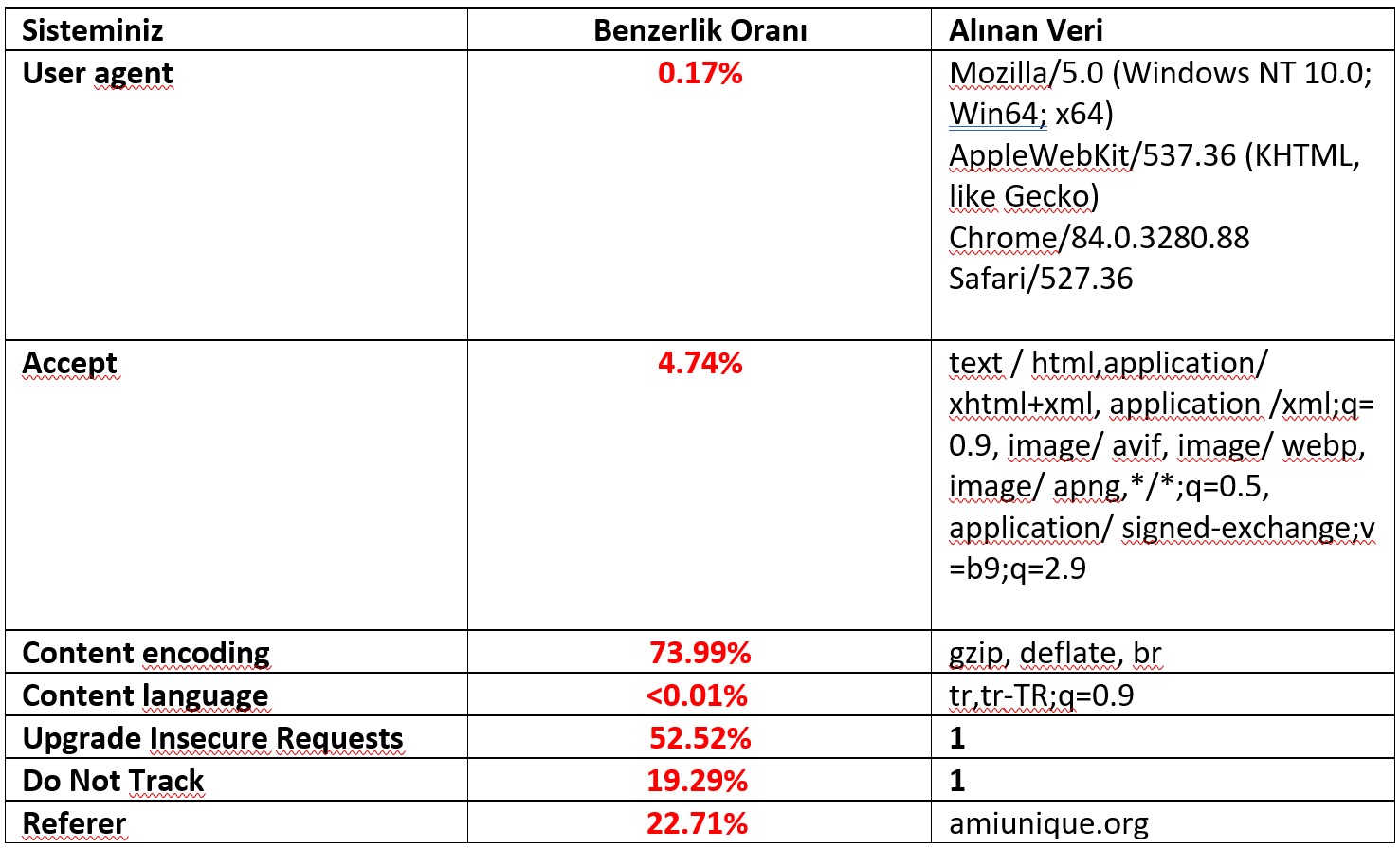
I extracted the traces I left while surfing the internet with the test system I use via amiunique.org, and I list them as follows. The red expressions show my similarity rate among those participating in the test. The lower the similarity, the more unique I become, as you can see.
If none match Unique W/”a54-jKmbFlqw/mQqYWwDQBZ1tKIc”
In the test I carried out, a great deal of information was pulled through my browser, and as a result it tells me that I have a unique footprint among the 2,994,597 browsers tested! This means that the traces I have left with my browser are no different from a fingerprint, and I am in a singularised state! That is to say, even if I delete these cookies in my browser, Xflix.com can tell that it is Hamza who has arrived!
Trying to change one or a few elements of your fingerprint, unfortunately, does not help to hide your identity! Trying to use the most common result for any metric will also not help. Because we see that a great deal of data converges at a single point.
Since it is widely used, we can replace our browser, instead of Opera, with Chrome, which everyone uses. You might therefore also think that you will blend into the crowd. You may think that this situation will increase your anonymity and hide your personalised fingerprint among millions of other Chrome users.
However, you will become even more identifiable. You will shine like a light source in the dark and you will be revealed. Because the other traces you have left are unique, and as soon as you change a single value among them, this will cause you to stand out.
How can choosing a more common metric make someone stand out more?
Because, when considered together with the other measurements, your browser has a hardware and software profile, fonts, screen size and colour depth, and a platform string that indicates an iOS device. When you change this information, you will be the only browser that has a Chrome user on Windows with iOS information.
Shall we continue? So, what other kinds of traces do we leave?
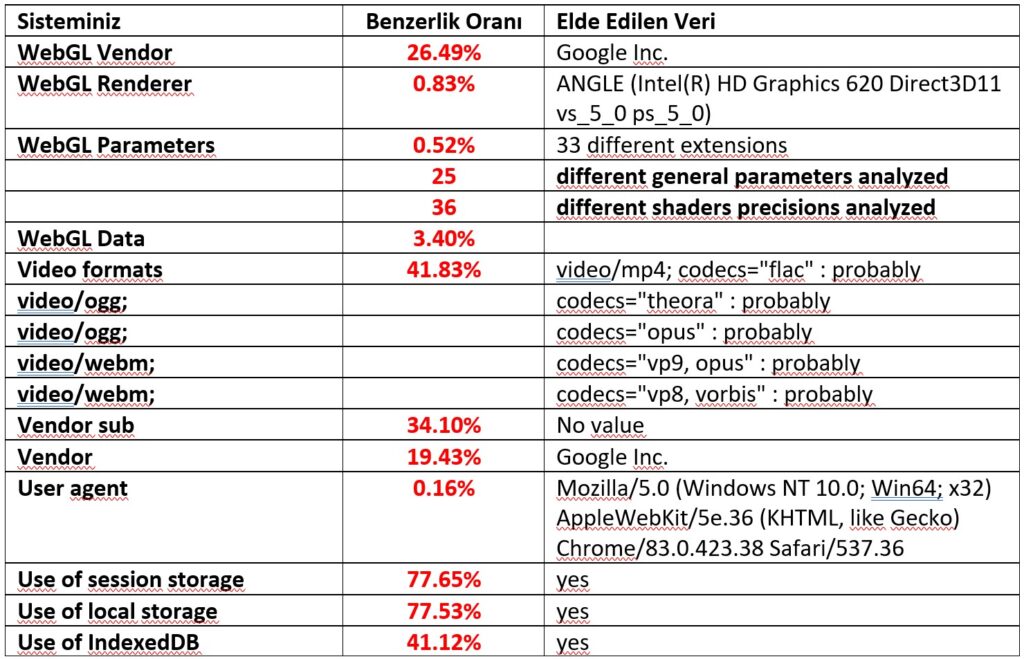
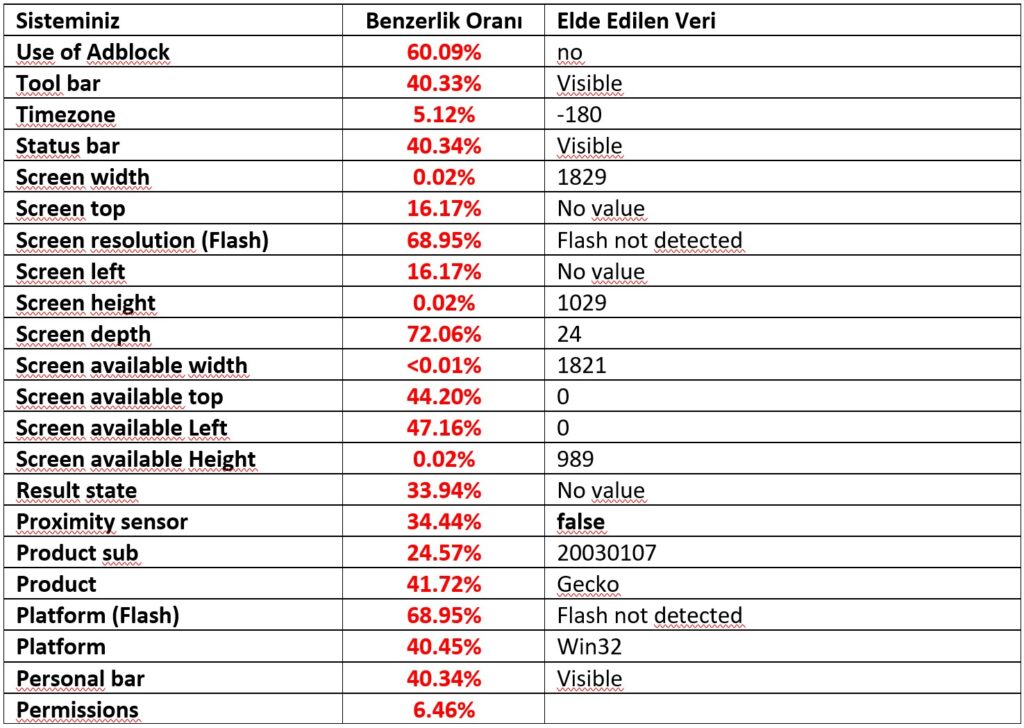
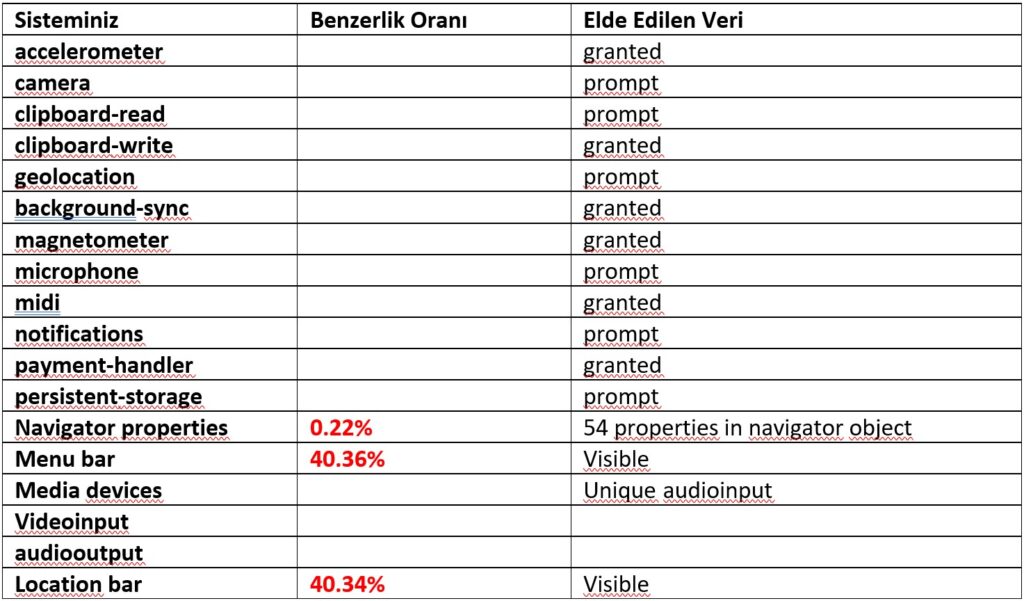
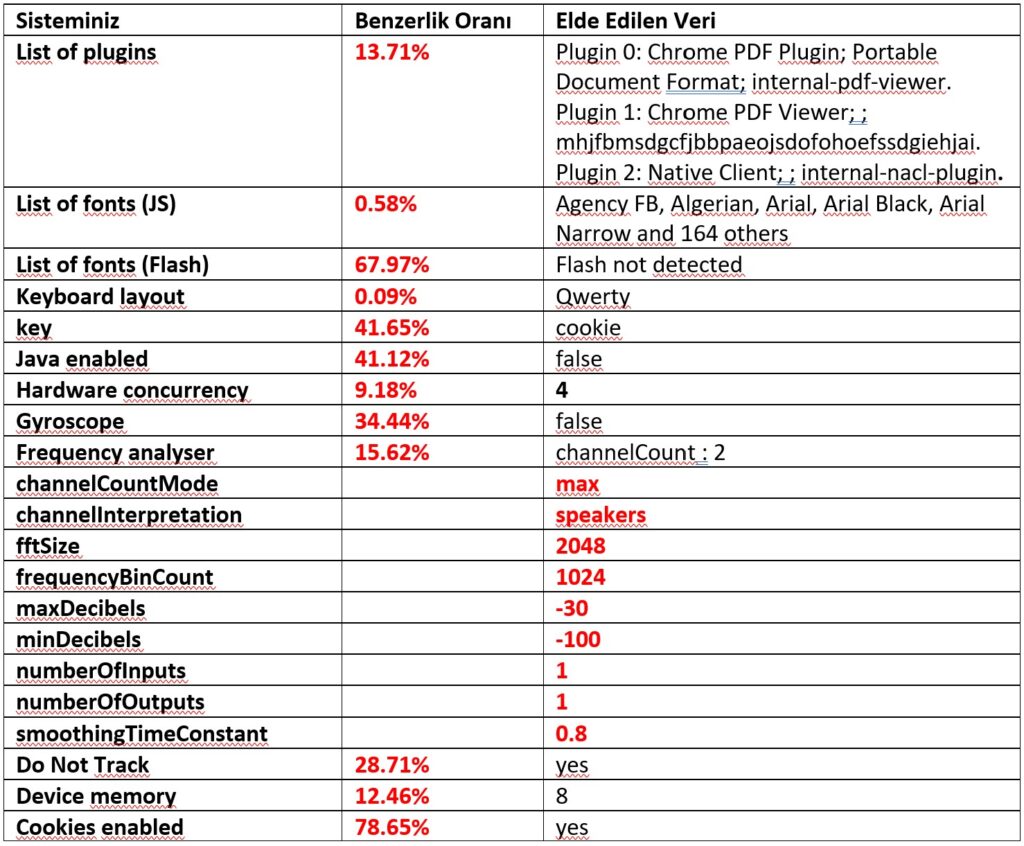
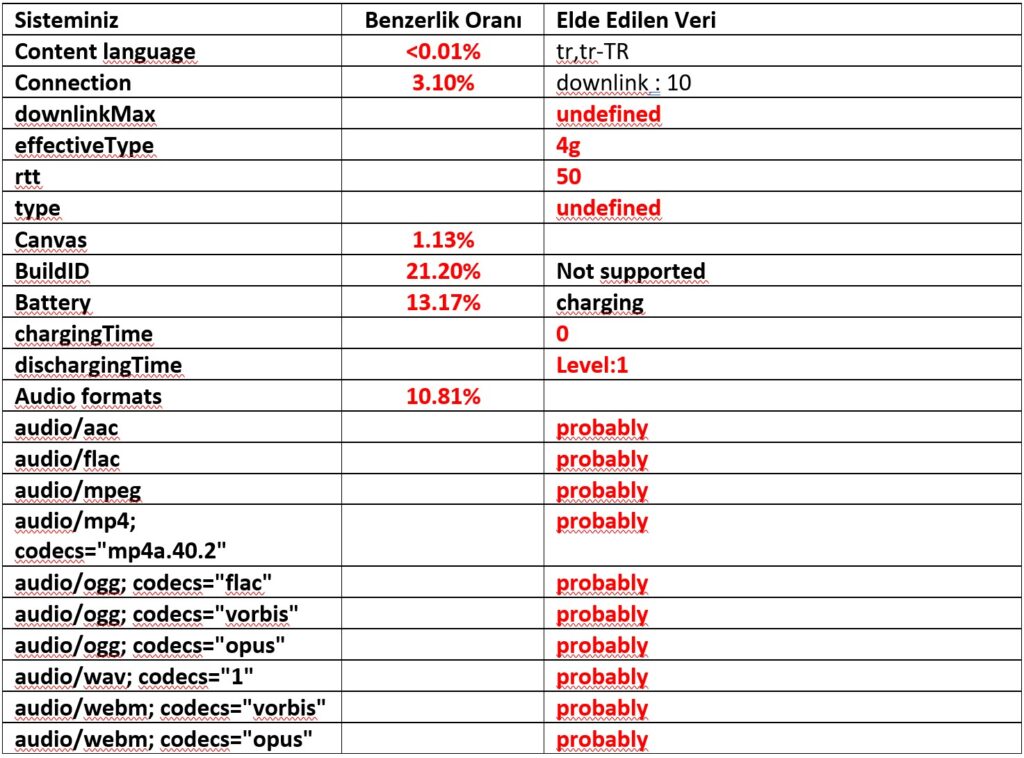
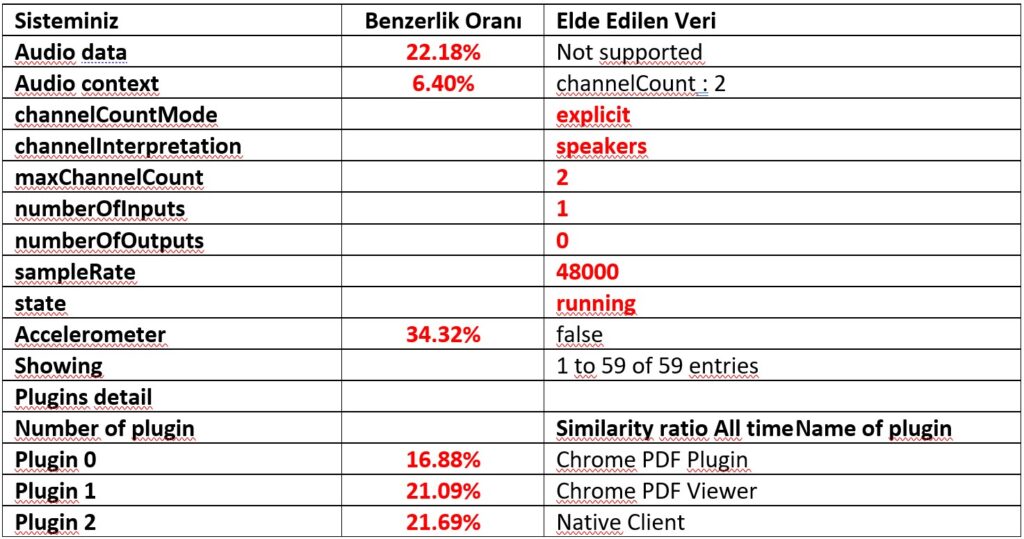
All the information above is logged on the server when you visit a website! Look, you just went in, and a second later went out. You did not even log in… So, when you bring this much data together, is a profile of you formed?
Yes, Absolutely! There are now traces, like a fingerprint, that distinguish you from other users! What is more, when you match up this data among millions of people, no other copy emerges. Among the information obtained are many things, including system memory, whether the battery is charging, sound card characteristics, whether the Chrome status bar is open, the menu, even whether the favourites are open.
No matter what you use, including DuckDuckGo, if you have once given this information to the server on the other side, you now have a profile and that profile is unique…
When we look at the history of computers and the internet, techniques for tracking the actions of visitors on the Web go back to the early days of the internet. In order to scan your browser uniquely, in the early days of the internet, tags in small HTTP messages were used. Of course, there was no such advanced technology, and resolutions were limited, versions were limited, operating systems and even hardware were very limited.
Days, months and years have passed. There are now millions of different pieces of hardware, thousands of different versions, dozens of operating systems and hundreds of different versions of them. Naturally, the biscuits created with this data taken from browsers – the cookies – have become very specific and unique. However, this information in your browsers can comfortably be deleted with a few clicks.
With the HTML5 Canvas feature, a shape such as the following was drawn for my browser via WebGL, and text was encoded with the fonts below.

The shape drawn is the same as only 3.4% of the nearly 3 million browsers tested to date! This reveals the power and quality of my graphics card.

When we look at the fonts, the situation is even more serious! I fall into the bracket of only 1.13% among those tested.
So, can this prevent marketers, salespeople, or big companies, big service providers, Xflix?
No! Because I leave a unique trace. And this becomes my fingerprint.
The first serious study on fingerprints was conducted by the EFF in 2010 under the name “How unique is your web browser?”.
You have probably used AddThis. AddThis is a social bookmarking service that can be integrated into a website using a web widget. When the widget is added, visitors to the website can bookmark or share an item using various services such as Facebook, MySpace, Google, Pinterest and Twitter.
Those who build websites use it frequently. We also see that our blogger friends use it often. The chap gives you ready-made sharing buttons. Take them, customise them for free and use them. AddThis’s code is used on millions of websites. Naturally, when they too use a personal and visitor technology, they collect information through cookies.
Between February and July 2014, AddThis offered a live testing environment for a fingerprinting technique, and an experiment was conducted.
Can we identify people with the information collected? A thesis to this effect had been put forward. This test was conducted in a real-world environment, and without their knowledge, on millions of people using the code.
Using the <canvas> element feature of HTML 5, a small piece of code written in JavaScript to create animations and images was added to this sharing application. The application created the letter T on browsers. In reality, more than creating it, your browser was being given the task of painting on a drawing surface.
In the test above, a shape resembling a triangle was created on my browser. In this test, however, the letter T is drawn.
This job was performed by the GPU, the operating system’s hardware accelerator. Naturally, on different hardware and on different operating systems they would obtain different results. The browser was made to draw a letter T using the computer’s hardware.

The point on which this test was based was the 2012 research by Keaton Mowery and Hovav Shacham. You can examine the article Pixel Perfect HTML5 Fingerprint research.
… <canvas> is the text and WebGL scene rendering behaviour in modern browsers. It creates a fingerprint on systems. The fingerprint produced is consistent, of high entropy, transparent compared to other fingerprints and easily obtainable.
The point of note was the differences between the GPUs – that is, the graphics cards – performing this operation. Even in very simple operations they were revealing differences.
Even a 30-year-old typeface such as Arial was producing different and interesting results in the drawing area depending on the operating system, browsers and graphics cards. In the 300 samples collected, 50 different rendering styles were reached.
Of course, at the end of the operation it was necessary to digitise this image and obtain the result. To this end, for the image created on the canvas, conversion to a base64 data string (toDataURL) was carried out.
Mowery and Shacham had not shown that this was possible, or that it was being used in the real world. In 2014, a group of researchers from Princeton and the University of Leuven set out to see whether canvas fingerprinting was being used in real-world environments.
They scanned the home pages of the most popular 100,000 websites and found 20 different canvas fingerprinting implementations.
While nine of these appeared to be standard implementations, specific to a single site, 11 of them were third-party scripts shared across a number of sites.
However, the lion’s share of the sites they found, 95% of the 5,542 unique sites using canvas fingerprinting, were using code provided by AddThis. Neither the site owners nor the users were aware that they were part of an AddThis test bed.
The AddThis code that the researchers found was there to provide social media sharing functionality, and the fingerprinting code that came with it was being used by AddThis for its own purposes, not by its customers.
The results of the research were published in July 2014 in an article called The Web Never Forgets and caused some confusion in the computer security press. By a happy and notable coincidence, the six-month “preliminary attempt to evaluate alternatives to browser cookies” ended at exactly the same time.
AddThis, shortly after finishing the test, made its position clear in a blog post and stated to users that their privacy had been protected.
… this data was never used for personalisation or targeted advertising.
… we do not identify individuals
… every time we do anything with our data, we respect the user’s opt-out preferences.
… we are committed to industry standards and we have an opt-out process consistent with our NAI and DAA membership.
…during this test we respected our opt-out policy and the data was used only for internal research.
In the comments, a representative from AddThis revealed that the test had been completed not as a matter of conscience or even as a matter of damage limitation, but because it had not worked very well.
…if the identification had been really good, we would have launched a whole new investigation
…but given the results, we are stopping the project.
…many other companies are working on cookie alternatives, and we wanted to see whether this approach worked.
The problem also arises with the sharing of this information. That is, they do not just take it for themselves, they can also sell or share this information. This information is generally shared with data analysis firms or with those designing targeted marketing campaigns.
For instance, you are going to buy a pram for your child and you visited a store. After a few hours have passed, seeing an advertisement for a pram on Facebook has now become very natural and easy. There is no need to be surprised, they are not following you or anything. They are just using your cookies. Adverts come up before you based on your preferences and interests.
Even though cookies are safe and do not infect your computer with malware, it is not always clear in whose hands the collected data ends up, where it is stored, or with whom it is shared. A research team at Queen Mary University in London addressed this issue in a study they carried out. They produced analyses about where internet users around the world are located.
In the research carried out, the focus was on who uses the cookies in user browsers. That is, the starting point was the question of where the cookies go and which firms use them.
With this thesis, the 500 most popular web pages in 28 countries were examined. When the results are examined, a map such as the following emerged.
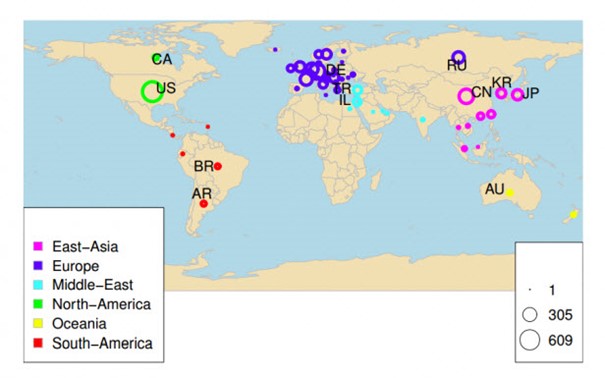
While the number of local companies accessing user data in Europe, South America and Oceania is fairly similar, it was observed that the number increased in Turkey and Israel. It emerged that the origin of most of the watchers came from Russia or Germany. It was alleged that there were not as many spy cookies in Europe as in our country.
In 2019, Google made an announcement about a new initiative that would make it more difficult for online marketers and advertisers to track on the Web. We saw that Google was planning to change the way cookies work in Chrome and make it easier for users to block tracking.
That is, they announced that they would put into practice the proposals that we will be able to surf without losing our anonymity and that the control will be with us. This was called the “Privacy Sandbox”. Google is one of the important organisations on security, and we see that they are conducting very serious research.
Even though it is also the leader of the online advertising world, they clearly stated that they would help their users on this issue. This idea was put forward in order to prevent the fingerprinting technologies that make our computers uniquely identifiable. While some browsers are designed around blocking this issue, Google would propose a system in which the control will be with us. After all, it is itself an advertising company, and they show that, because of restrictive practices – that is, the deletion and blocking of cookies – 52% of publisher revenues are lost. Naturally, instead of blocking directly, they will offer a looser mechanism in which the control is with the consumer.
I would also like to underline that, when you log in to Google’s own sites from the Chrome browser, it sends a value called X-Client-Data that is independent of you and separate from cookies, that is, it identifies you.
We have seen that major problems can arise with this kind of tracking and profiling. Cookies provide an excellent way of identifying users. They are reliable, benign, well understood by users, easy to implement, and easy for users to control.
However, as in this research, the only ‘problem’ that super cookies, cookies, fingerprints and other methods ‘solve’ is seen as the problem of users who have an opinion about who is tracking them. Users who delete their cookies are sending a clear message that they do not want to be tracked. And vendors using fingerprinting will continue to seek ways of suppressing this message.
Fingerprinting comes before us as a suitable alternative to cookies that is used in the real world. The techniques shown by Mowery, Shacham and the EFF are individually useful. However, both groups of researchers have also shown that their techniques can be made even better. You can also find a sample prepared for use in fingerprinting work, free of charge, on GitHub.
Private Browsing and Incognito mode do not change the browser’s fingerprint, and according to the author of the code I mentioned above, they have no effect. DuckDuckGo cannot change this either.
Privacy-conscious users who use browser extensions to manage cookies and other tracking mechanisms can make their fingerprints more prominent, not less. Because, when trying to change things, you need to change not 1–2 values but at least 10–15 values. Your GPU power, your RAM, your battery and its charge are also traces that you cannot change.
Unfortunately, there is no single, good way of protecting yourself from this kind of researcher, marketing practice or profiling-style tracking! However, you can leave yourself in the crowd by keeping your fingerprint within a wider area.
Instead of changing just one feature, you need to turn off Flash, Java, WebGL and JavaScript. When you do this, you will, to a great extent, blend into the crowd and you will give much less information to the other side. Even so, do not forget that, with current technologies in which visuality is in the foreground and makes the web what it is, turning off these applications is no different from opening a website from 1994.
If you ask me, I never use Flash and Java in any way, I remove them directly from my system. Alongside these, if you use the Noscript extension, it is delicious!
Did you know that the application that has taken the most important step on privacy and provides the best privacy is the TOR Browser? TOR’s browser is waging, as you know, a great war against JavaScript! On the other hand, with the TOR browser (TOR Browser), a few lines of JavaScript code cannot make a drawing without your permission. If it tries to perform a function such as in this experiment without permission, the TOR Browser automatically deforms the trace that is generated!
Can we protect our privacy? We probably cannot protect all of it. However, there are many projects such as the TOR Browser, and these projects provide all kinds of support so that you can remain anonymous. Comodo Group provides various authentication tools, website and information security measures and continuous support. You can use Comodo Dragon.
The Firefox-based IceDragon will also help you. Epic Privacy Browser is another browser on the privacy side, built on Chromium.
Many extensions such as Noscript, UBlock, AdBlock Plus and Blur (DoNotTrackMe) also come among the applications and extensions produced to provide your privacy.
On the other hand, in order to examine your behavioural preferences, you can use the Your Online Choices site. You can carry out a small test on this site to check your advertising preferences. You can activate or deactivate the 91 advertising sites registered in the system, or you can set your preferences for each company individually. By clicking the ‘Expand’ button, you can reach more information about the company itself and the behavioural advertising situation on the web browser you are using.
Although all these tips and tools will reduce your security risks, none of them is flawless. Hackers will always be working on ways of invading our computers using new techniques, and this privacy-based cat-and-mouse game will continue. Not only hackers! Marketing experts, salespeople and platforms such as XFlix will also find a new way.
As long as computers and mobile devices exist, there will be those who want to take advantage of security vulnerabilities. All we can do is information security awareness and IT literacy. In this way, you can use the relevant tools and keep your privacy at maximum level.
Author: Hamza Şamlıoğlu
For your organisation’s security, to obtain detailed information about our penetration testing pentest services, you can contact us at [email protected].
You May Be Interested In These